第13章ハイブリッドマルチクラウドのデジタルソリューション開発
13.2 Big Cloud IaaS Mainstream Capabilities13.2 大手クラウドのIaaSで使える主な機能
Learning Objectives学習目標
By the end of this section, you will be able to:
この節を終えると、次のことができるようになる。
• Learn how to use IaaS storage services
・IaaSのストレージサービスの使い方を学ぶ。
• Learn how to use IaaS compute services
・IaaSの計算サービスの使い方を学ぶ。
• Understand IaaS support services for web and mobile applications
・Webアプリケーションとモバイルアプリケーションを支えるIaaSのサービスを理解する。
• Relate to IaaS container management services
・IaaSのコンテナー管理サービスを理解する。
• Understand IaaS support services for database management
・データベース管理を支えるIaaSのサービスを理解する。
From a business model perspective, start-ups and companies with fluctuating workloads depend on finding a way to effectively deploy and manage their applications. This includes considerations such as cheap, reliable performances that can adapt to unpredictable seasonal demands. This calls for a service model that allows businesses to access cloud resources and adopt agile infrastructures without having to worry about IT management.
英語のヒント
ビジネスモデルの観点から、新興企業やワークロードが変動する企業にとっては、アプリケーションを効果的に配置・管理する方法を見つけることが重要になる。予測しにくい季節的な需要に対応できる、安価で信頼できる性能などを検討しなければならない。そのため、IT管理を気にせず、クラウド資源を使い、機敏に対応できるインフラを採用できるサービスモデルが求められる。
One solution to such demand is infrastructure as a service (IaaS). IaaS offers on-demand access to cloud computing services, provides a pay-as-you-go pricing model, and allows the user to take advantage of cloud servers by virtually managing data and servers for their application. IaaS allows the engineering team to optimize the platform from the infrastructure and does not get locked into any cloud provider’s settings.
英語のヒント
その要求への答えの一つが、IaaS(サービスとしてのインフラ)である。IaaSはクラウドの計算サービスを必要なときに使えるようにし、従量課金を採用する。利用者は、アプリケーション用のデータとサーバーを仮想的に管理し、クラウドサーバーを活用できる。IaaSでは、技術チームはインフラからプラットフォームを最適化でき、特定のクラウド事業者の設定に固定されずに済む。
In this section, we will delve deeper into the different layers of operations that IaaS provides. As the infrastructure is provided without any special setup, IaaS, as a framework, requires additional skills and time from the engineering team to set up and maintain their platform. Throughout these sections, we will go through different common infrastructures that mainstream IaaS providers usually accommodate so that we can determine the best approach to maintain our cloud applications.
英語のヒント
この節では、IaaSが提供するさまざまな運用の層を詳しく見ていく。特別な設定を施さない状態でインフラが提供されるため、IaaSという枠組みでは、技術チームが自分たちのプラットフォームを設定・維持するための技能と時間が別途必要になる。これからの各節では、主要なIaaS事業者が通常提供する共通のインフラを順に調べ、クラウドアプリケーションを維持するのに最適な方法を考える。
Storage Serviceストレージサービス
A storage service is one of the base infrastructure components that a cloud provider would provide that allow the user and the application to read, write, and access storage. These services are elastic storage services, and the word elastic is used throughout the chapter to indicate an unlimited number of resources that the user can access from the cloud provider. Some common components in the application that may require storage access are analytical data, logging information, application data, images, and videos. The storage required for these components may grow over time as the application operates, so the users must understand the type of storage service that they choose for their application. It is also common that the user may choose more than one service to use in their application. There are several types of storage services that the user can choose from, depending on the cloud provider. For example, Microsoft Azure allows users to create a storage account that makes it possible for them to use blob storage as explained in the following paragraph, mount Azure-based remote file systems to their local machine, create column-oriented database tables, or create a queue to receive streaming data from a sensor. However, there are three common types of services that all cloud providers provide:
英語のヒント
ストレージサービスは、クラウド事業者が提供する基本インフラの一つで、利用者やアプリケーションが記憶領域を読み書きし、アクセスできるようにする。これは伸縮自在なストレージサービスである。本章では「伸縮自在(elastic)」という語で、利用者がクラウド事業者から利用できる資源の数に制限がないことを表す。アプリケーションの中でストレージへのアクセスが必要になるものには、分析用データ、ログ情報、アプリケーションのデータ、画像、動画などがある。運用を続けると必要な容量が増えることがあるため、利用者は選ぶサービスの種類を理解しなければならない。一つのアプリケーションで複数のサービスを選ぶことも一般的である。事業者によって、選べるストレージサービスは異なる。例えばMicrosoft Azureでは、ストレージアカウントを作ることで、後述するBlobストレージ、Azure上のリモートファイルシステムのローカル端末へのマウント、列指向データベースのテーブルの作成、センサーからのストリーミングデータを受け取るキューの作成などが可能になる。ただし、どのクラウド事業者も提供する共通の種類は、次の3つである。
• The first, file storage, manages data as files. This is the most common storage service among first-time users as it is the easiest concept to understand. Most users who use computers daily are familiar with File and the way it stores in their local environment. However, as File has a tendency to grow in size and its format can get complicated, the File storage becomes more difficult to manage as the application operates and grows in the Cloud Environment. The structure of the file system can also be carried into each File being stored in this service. Some common file metadata that are managed and tracked by the Cloud Provider are file name, file size, timestamp, and permissions.
英語のヒント
・第1は、データをファイルとして管理するファイルストレージである。最も理解しやすいため、初めて使う利用者にとって最も一般的なストレージサービスとなる。日常的にコンピューターを使う人の多くは、ファイルと、手元の環境での保存方法に慣れている。しかし、ファイルは大きくなりやすく、形式も複雑になり得る。クラウド上でアプリケーションが動き、拡大するにつれ、ファイルストレージの管理は難しくなる。このサービスに保存する各ファイルには、ファイルシステムの構造も引き継がれる。クラウド事業者が管理・追跡する一般的なメタデータには、ファイル名、サイズ、タイムスタンプ、アクセス権限がある。
• The second, object storage (or blob storage), manages data as blobs, with each blob representing any data format, such as a file in a local filesystem. A blob can contain any type of data, such as a small value, a document, an image, a video, or a collection of such. Cloud providers allow access to the information stored and its associated metadata via an API/SDK or via direct web links in the case of pictures for example. Common metadata includes name, size, timestamp, and custom-tag. In some cases, this approach helps manage the storage of items and also makes them available to anyone who is given access to them in the cloud, which is not possible when storing data items in a local file system. This service is commonly used by consumer applications and allows them to access and retrieve data items as objects using their names and tags.
英語のヒント
・第2はオブジェクトストレージ(Blobストレージ)で、データをBlobとして管理する。各Blobは、ローカルファイルシステム内のファイルのように、任意の形式のデータを表す。小さな値、文書、画像、動画、それらを集めたものなど、どの種類のデータでも格納できる。クラウド事業者は、保存した情報とそれに付随するメタデータへ、API/SDK経由でアクセスできるようにする。画像などでは直接のWebリンクも使える。一般的なメタデータには、名前、サイズ、タイムスタンプ、独自タグがある。この方式は項目の保存を管理しやすくし、クラウド内でアクセスを許された誰にでも項目を利用可能にする場合がある。これはローカルファイルシステムに保存する場合にはできない。このサービスは消費者向けアプリケーションでよく使われ、名前やタグを使ってデータ項目をオブジェクトとしてアクセス・取得できる。
• The third, block storage, manages the data as blocks or physical range of storage in the physical device (such as a hard disk drive [HDD] or Non-Volatile Memory Express [NVMe]). Each block address can range from a few kilobytes or several megabytes in size. Because this service can provide a way for the user to directly access the data using a physical address, it does not need to manage the entire set of data objects. The most common usage for this service would be a system application such as an operating system or database where they need access to files much quicker, and they can keep track of and manage how the data are changed.
英語のヒント
・第3はブロックストレージである。ハードディスクドライブ(HDD)やNon-Volatile Memory Express(NVMe)などの物理装置上で、データをブロック、つまり物理的な記憶範囲として管理する。各ブロックのアドレスが指す範囲は、数キロバイトから数メガバイトまでとなり得る。物理アドレスでデータへ直接アクセスする手段を提供できるので、データオブジェクト全体を管理する必要がない。最も一般的な用途は、OSやデータベースなどのシステムアプリケーションである。これらでは、ファイルへはるかに速くアクセスする必要があり、データの変更を追跡して管理できる。
To access the storage services from the application, the developer would have more than one way to access the data. Figure 13.2 shows a simple view of different access patterns on how the user and application can get access to the storage service.
開発者には、アプリケーションからストレージサービスのデータへアクセスする方法が複数ある。図13.2は、利用者とアプリケーションがサービスへアクセスする、異なるパターンの簡単な概観である。
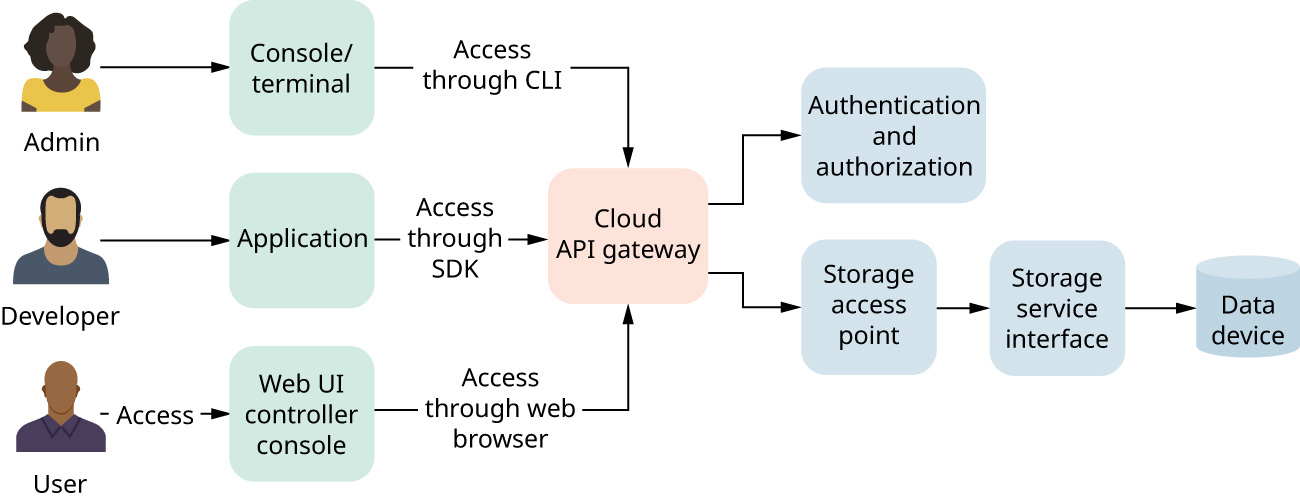
attribution: Copyright Rice University, OpenStax, under CC BY 4.0 license · CC BY 4.0 · Source出典
Figure 13.2 As the diagram shows, users and applications can access storage service through different patterns, including CLI or command line interface. (attribution: Copyright Rice University, OpenStax, under CC BY 4.0 license)
図13.2 利用者とアプリケーションは、CLI(コマンドラインインターフェース)など、図に示す異なる方法でストレージサービスへアクセスできる。(帰属表示:著作権 Rice University、OpenStax、CC BY 4.0)
Most cloud providers will provide different tools to support different environments that the user may use to access their infrastructure and services. The storage service will usually be provided as a location in the cloud for the user to access. If the user is a developer, they can access the storage directly through their code using a software development kit (SDK), which is used to access the storage needed to read, write, and store data. This kit is usually provided by the cloud provider and works with different programming languages. Some applications running on the cloud environment also use this SDK to write operational data, such as logs, or consume different configurations that were stored in the cloud environment. If a user is a cloud administrator, they can also access the storage service through a computer terminal using command line interface (CLI). This is also a tool provided by the cloud provider, and this tool will allow users to access the storage service and manage their data. Finally, the user can also access the storage service through the web interface console through their browser. By doing it this way, the user can access their data interactively through their browser. Generally, cloud resources are available either via a cloud portal interface, an SDK that is accessed programmatically, or a CLI that enables users to invoke SDK constructs on the command line. Figure 13.3 shows the web interface for an Azure storage account container (aka, blob) accessible via the Azure object storage service’s web console. On the Amazon AWS cloud, blobs can be created as buckets within the Simple Storage Solution (S3).
英語のヒント
大半のクラウド事業者は、利用者がインフラやサービスへアクセスする際のさまざまな環境に対応するため、異なるツールを提供する。ストレージサービスは通常、利用者がアクセスするクラウド上の場所として提供される。利用者が開発者なら、ソフトウェア開発キット(SDK)を使い、コードから直接ストレージへアクセスできる。SDKは、データの読み取り、書き込み、保存に必要なストレージへのアクセスに使う。通常はクラウド事業者が提供し、さまざまなプログラミング言語に対応する。クラウド上のアプリケーションも、SDKでログなどの運用データを書き込んだり、クラウド環境に保存された各種の設定を読み込んだりする。クラウド管理者なら、端末からコマンドラインインターフェース(CLI)を使ってアクセスすることもできる。これも事業者が提供するツールで、ストレージへのアクセスやデータ管理が可能だ。最後に、ブラウザーのWeb管理画面からもアクセスできる。この方法では、ブラウザー上で対話的にデータを扱える。一般にクラウド資源は、クラウドポータルの画面、プログラムから使うSDK、またはSDKの機能をコマンドラインから呼び出すCLIのいずれかを通じて利用できる。図13.3は、AzureのオブジェクトストレージサービスのWeb管理画面から利用する、ストレージアカウントのコンテナー(別名Blob)の画面である。Amazon AWSでは、Simple Storage Solution(S3)内のバケットとしてBlobを作れる。
Image omitted because its reuse rights could not be verified.権利の確認ができないため画像を割愛。
Figure 13.3 This image from Azure object storage service’s web console provides an additional example of the web interface used to store data containers (i.e., blobs) in Azure within a storage account. (Used with permission from Microsoft)
図13.3 AzureのオブジェクトストレージサービスのWeb管理画面。ストレージアカウント内にデータコンテナー(Blob)を保存するための画面の例を示す。(Microsoftの許可を得て使用)
Another important component in the cloud storage service is the storage access point. The access point is one of the critical components in cloud architecture that will minimize the latency that the user can consume the data. Based on the user’s location, the cloud provider can provide the available access point closest to the user’s location to eliminate long I/O latency. However, this is also one of the key problems of leveraging storage service when the application is scaled out. Depending on the cloud provider, there are a fixed number of access points in an area for each account to consume. Usually, it would not be an issue for a small- or medium-performance application. However, for real-time and high-performance applications, this restriction may become a bottleneck for the application to operate correctly. This issue can be resolved when the user moves to a hybrid cloud solution where they can spend a bit more up front to pay for backing up data devices and hardware that can be located in their local area.
英語のヒント
クラウドストレージのもう一つの重要な構成要素は、ストレージのアクセスポイントである。これは、利用者がデータを利用する際の遅延を最小にする、クラウドアーキテクチャーの重要な要素の一つだ。事業者は利用者の場所に応じ、利用可能な最寄りのアクセスポイントを提供して、長い入出力遅延をなくせる。しかし、アプリケーションを水平に拡張する際には、これがストレージサービス利用上の主要な問題にもなる。事業者によって、各アカウントがある地域で利用できるアクセスポイントの数は固定されている。低・中程度の性能を求めるアプリケーションでは通常問題にならないが、リアルタイム処理や高性能を求める場合、正しく動かすためのボトルネックになり得る。利用者がハイブリッドクラウドへ移り、先に少し多めの費用を払い、地元に置けるデータのバックアップ用装置やハードウェアを用意すれば、この問題は解消できる。