第13章ハイブリッドマルチクラウドのデジタルソリューション開発
Container Management Servicesコンテナー管理サービス
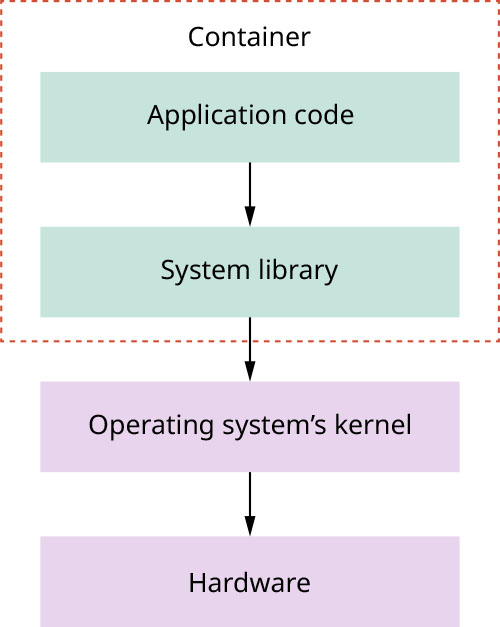
In recent years, container management services, which encapsulate an application with the necessary operating system libraries for it to operate, have become one of the key innovations that have transformed the use of cloud infrastructures. In a nutshell, the container is a way to encapsulate an application with any operating system’s library that is required for the application to operate. By using a container, the developer is not worried about the environmental mismatch between the environment where the application was developed and the environment where the application is run. This container can be run on top of any Linux kernel that provides support to the container runtime. Figure 13.7 shows how a container runs in a regular compute environment. It is also important to point out that the container technology is different from the virtualization technology used in virtual machines.
英語のヒント
近年、アプリケーションとその動作に必要なOSライブラリーをまとめて包み込むコンテナー管理サービスが、クラウドインフラの使い方を変えた重要な革新の一つになっている。要するにコンテナーは、動作に必要なOSのライブラリーとアプリケーションを一緒に包む方法である。コンテナーを使うと、開発者は開発時の環境と実行時の環境の食い違いを気にせずに済む。コンテナーのランタイムを支えるLinuxカーネルであれば、その上で動かせる。図13.7は、通常の計算環境での動き方を示す。コンテナー技術は、仮想マシンで使う仮想化技術とは異なることも押さえておこう。
attribution: Copyright Rice University, OpenStax, under CC BY 4.0 license · CC BY 4.0 · Source出典
Figure 13.7 This diagram shows the high-level view of how a container runs in a regular compute environment. (attribution: Copyright Rice University, OpenStax, under CC BY 4.0 license)
図13.7 通常の計算環境でコンテナーがどう動くかを示す概念図。(帰属表示:著作権 Rice University、OpenStax、CC BY 4.0)
On the cloud environment, the container management service allows the user to deploy, operate, and scale any containerized application. It also includes several necessary components that help the user manage their containerized application better, such as the following:
クラウド環境のコンテナー管理サービスでは、コンテナー化したアプリケーションを配置・運用・拡張できる。さらに管理を改善するため、次のような必要な構成要素も含まれる。
• The container registry (CR), or the registry where the user can version control each container image that they deployed into the cloud environment. The user can usually manage the container using image metadata such as namespace, image name, or image tags.
英語のヒント
・コンテナーレジストリー(CR)。クラウドへ配置した各コンテナーイメージのバージョンを管理する登録場所である。通常は、名前空間、イメージ名、イメージタグなどのメタデータを使ってコンテナーを管理できる。
• The base container image, which is the foundational layer of a container provided by the cloud provider to build an application. The image is mostly up-to-date with secure patches and packages that allow the user to update their application with the latest security update.
英語のヒント
・ベースコンテナーイメージ。アプリケーションを作るために事業者が提供する、コンテナーの基礎となる層である。多くの場合、安全上のパッチやパッケージが最新になっており、利用者は最新のセキュリティー更新をアプリケーションへ適用できる。
• The Kubernetes environment, or Kubernetes (K8S) service, which is the most popular container orchestration system. This is a managed service that is usually provided by the cloud provider to allow the user to scale their containerized application in a Kubernetes environment. The K8S environment is one of the key systems to run a hybrid cloud environment where the user can run applications from both their local and cloud environment.
英語のヒント
・Kubernetes環境、またはKubernetes(K8S)サービス。Kubernetesは最も普及しているコンテナーのオーケストレーションシステムである。事業者が通常提供する管理済みサービスで、利用者はKubernetes環境でコンテナー化したアプリケーションを拡張できる。K8S環境は、ローカルとクラウドの両方でアプリケーションを動かすハイブリッドクラウド環境にとって、重要なシステムの一つである。
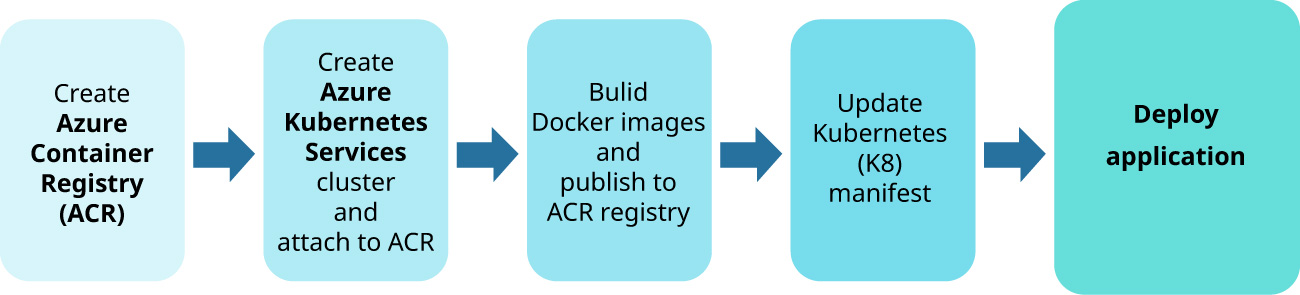
Figure 13.8 shows a simple workflow to deploy a containerized application into Azure Cloud Environment. Architecting a hybrid cloud solution requires strong technical expertise in application development and containerized application, and it also requires deep knowledge of cloud solutions. The details on how to do it correctly will not be covered in this section. However, the hybrid solution should be the target for any user on their journey of migrating their application into the cloud.
英語のヒント
図13.8は、コンテナー化したアプリケーションをAzureのクラウド環境へ配置する簡単な作業の流れを示す。ハイブリッドクラウドのソリューションの設計には、アプリケーション開発とコンテナー化について高い専門技能が必要であり、クラウドソリューションの深い知識も要る。正しく行うための詳細は、この節では扱わない。しかし、クラウドへアプリケーションを移していく利用者にとって、ハイブリッド構成は目指すべき目標となる。
attribution: Copyright Rice University, OpenStax, under CC BY 4.0 license · CC BY 4.0 · Source出典
Figure 13.8 On Azure, K8S can be part of a simple containerized application deployment workflow. (attribution: Copyright Rice University, OpenStax, under CC BY 4.0 license)
図13.8 Azureでは、コンテナー化したアプリケーションの簡単な配置手順に、K8Sを組み込める。(帰属表示:著作権 Rice University、OpenStax、CC BY 4.0)
CONCEPTS IN PRACTICE概念を実践に
Containers and Virtual Machinesコンテナーと仮想マシン
For deployment, organizations can use containers or virtual machines. How do you decide which technology is more appropriate? Containers have more scalability and are practical if you’re working with multiple environments and you want to package and run your applications in a manner that is predictable with repetition from one environment to the next. Virtual machines (VM) provide more environmental control and are practical if you need to use the same physical machine to install more than one operating system, as well as create more than one environment. Another consideration is the speed of software development. It is faster and easier to build and test new features on containers compared to VMs. However, VMs provide better security. While there’s a lot to consider when deciding on containers versus VMs, both technologies offer important benefits, providing organizations with critical resources for deployment.
英語のヒント
組織は、配置にコンテナーか仮想マシンを使える。どちらが適切かをどう判断するだろうか。コンテナーは拡張性に優れ、複数の環境を扱い、ある環境から次の環境へ移っても、繰り返し同じ動作を予測できる形でアプリケーションをまとめて実行したい場合に役立つ。仮想マシン(VM)は環境をより細かく制御でき、同じ物理マシンに複数のOSをインストールしたり、複数の環境を作ったりする必要がある場合に役立つ。もう一つの検討事項は、ソフトウェア開発の速さである。コンテナーではVMより、新機能の構築とテストが速く容易になる。一方、安全性ではVMが優れる。どちらにするかを決める際には多くの検討事項があるが、両方の技術が重要な利点を持ち、配置に欠かせない資源を組織へ提供する。
Database Management Servicesデータベース管理サービス
Today, database or any data management system is the heart of any application. However, managing a database is usually a difficult task as the data can be growing oversized both in size and in complexity. For this reason, most cloud providers provide several managed database services for any application that runs inside and outside of the cloud environment. There are two popular database management services:
英語のヒント
現在、データベースをはじめとするデータ管理システムは、どのアプリケーションでも中心的な役割を果たす。しかし、データは量も複雑さも膨大になり得るため、データベースの管理は通常難しい。そこで大半のクラウド事業者は、クラウドの内外で動くアプリケーション向けに、管理済みのデータベースサービスをいくつか提供する。よく使われる種類は次の2つである。
• A relational database service (RDS), in which the relationship between data is strictly managed. The data can be managed under a predefined data schema. This is the most common type of database that most developers are familiar with. Some popular examples of this type of database are Oracle DB, MySQL, or PostgreSQL.
英語のヒント
・リレーショナルデータベースサービス(RDS)。データ間の関係を厳密に管理する。データはあらかじめ定義されたスキーマに従って管理できる。多くの開発者になじみのある、最も一般的なデータベースの種類である。代表例はOracle DB、MySQL、PostgreSQL。
• A NoSQL database, in which the relationship between data is not strictly managed. The data can be managed under key/value pair. This type of database has become popular in recent years with monitoring applications where the data needs to be written and captured quickly. Some popular examples of this type of database are MongoDB Atlas and Cassandra DB.
英語のヒント
・NoSQLデータベース。データ間の関係を厳密には管理せず、キーと値の組としてデータを管理できる。近年、データを素早く書き込み記録する必要がある監視アプリケーションで普及した。代表例はMongoDB AtlasとCassandra DBである。
The access pattern for these services is similar to how any application access to any managed database. Different secure authentication and authorization methods can be configured through the CLI or web console by the user and the application can access the database from inside or outside of the cloud environment.
英語のヒント
これらのサービスへのアクセス方法は、アプリケーションが管理済みデータベースにアクセスする一般的な方法と似ている。利用者はCLIやWeb管理画面で、安全な認証・認可の方法をさまざまに設定でき、アプリケーションはクラウド環境の内外からデータベースへアクセスできる。