第13章ハイブリッドマルチクラウドのデジタルソリューション開発
Web and Mobile App ServicesWeb・モバイルアプリケーションのサービス
Among all applications and workloads in the cloud, two common workloads have emerged in recent years. Those are web and mobile workloads where the user wants to provide real-time access to all users across the globe. This is one of the most critical reasons why the user wants to move into the cloud environment because the cost to scale the global infrastructure is extremely high.
英語のヒント
近年、クラウド上のアプリケーションとワークロードの中から、一般的な2種類のワークロードが現れた。世界中の利用者にリアルタイムのアクセスを提供する、Webとモバイルのワークロードである。世界規模のインフラを拡張する費用は非常に高いため、これがクラウド環境へ移りたいと考える最も重要な理由の一つになる。
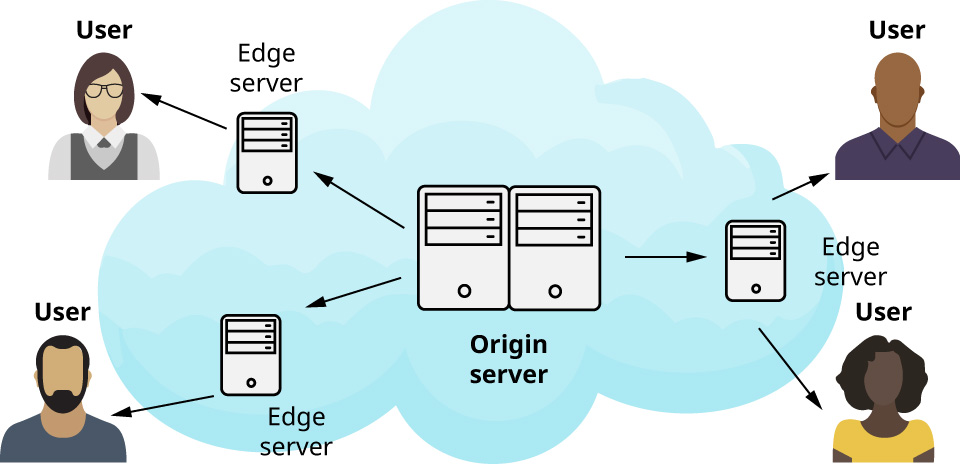
A content delivery network (CDN) is an important cloud capability that accelerates web and mobile workloads access globally. A CDN is a network of servers and associated networking infrastructure that is spread across the globe and allows access to web and mobile workloads from anywhere. It is configured to prioritize and cache common data and content (e.g., videos) in different geographical areas so it can increase access and processing speeds of mobile and web applications in the global network, which results in improved user experience and reduced energy costs. On-demand streaming services (e.g., Netflix, Hulu, Tubi) use CDNs to direct users to the closest server (i.e., a network edge server located at the edge of the network closer to their location) from which they can stream their movies. The web clients/apps provided by these vendors allow dynamic adaptive streaming over the Web (via the HTTP web protocol) to ensure high-quality streaming of media content over the Internet delivered from CDN servers. Figure 13.5 shows a high-level architecture of how CDN is set up on Azure Cloud Service.
英語のヒント
コンテンツ配信ネットワーク(CDN)は、世界中からのWeb・モバイルのワークロードへのアクセスを速める、重要なクラウド機能である。世界各地に広がるサーバーと関連ネットワークインフラからなり、どこからでもアクセスできるようにする。各地域で、よく使うデータや動画などのコンテンツを優先してキャッシュするよう設定される。その結果、世界規模のネットワークでモバイル・Webアプリケーションのアクセスと処理を速め、利用者の体験を改善し、エネルギー費用を減らせる。Netflix、Hulu、Tubiなどのオンデマンド配信サービスは、CDNを使い、映画を受信できる最寄りのサーバーへ利用者を導く。このサーバーは、利用者に近いネットワークの端にあるエッジサーバーである。これらの事業者のWebクライアントやアプリは、HTTPを通じたWeb上の動的な適応型ストリーミングを可能にし、CDNサーバーからインターネット経由で高品質のメディアを配信する。図13.5は、Azure Cloud Service上にCDNを構成するアーキテクチャーの概観を示す。
attribution: Copyright Rice University, OpenStax, under CC BY 4.0 license · CC BY 4.0 · Source出典
Figure 13.5 Microsoft Learn’s content delivery network on Azure Cloud Service is set up using a high-level architecture. (attribution: Copyright Rice University, OpenStax, under CC BY 4.0 license)
図13.5 Azure Cloud Service上のMicrosoft Learnのコンテンツ配信ネットワークを、高い抽象度のアーキテクチャーで示す。(帰属表示:著作権 Rice University、OpenStax、CC BY 4.0)
Outside of the infrastructure, the cloud provider is also providing other common patterns and services that most web and mobile applications need to use to provide an optimal experience to the end consumer. These patterns and services are pre-implemented and optimized by the cloud provider and have an easy integration with the compute and storage services where the application runs. The following are two common web and mobile cloud components:
英語のヒント
クラウド事業者はインフラ以外にも、多くのWeb・モバイルアプリケーションが最終利用者に最適な体験を提供するために必要とする、共通のパターンやサービスを提供する。これらは事業者があらかじめ実装・最適化しており、アプリケーションが動く計算サービスやストレージサービスと容易に統合できる。一般的なWeb・モバイル向けの構成要素は、次の2つである。
• The component that stores and manages sensitive information securely while allowing the application to be scaled and deployed in different environments on the cloud is secret and configuration management. Different environments will require different configurations and secret details, such as database access or language settings. The best practice to handle complex environmental configurations and secrets is using a global cloud service to inject those details during runtime so the application code can be free of custom implementation and the application deployment and version control would be much simpler. Most cloud providers will allow the user to manage their custom configuration and secrets and update them during application runtime.
英語のヒント
・機密情報を安全に保存・管理しながら、アプリケーションをクラウド上の異なる環境へ配置・拡張できるようにするのが、シークレットと設定の管理である。環境ごとに、データベースへのアクセスや言語設定など、異なる設定や秘密情報が必要になる。複雑な環境設定と秘密情報を扱う最良の方法は、全体で使えるクラウドサービスによって、それらを実行時に注入することである。そうすれば、アプリケーションのコードに個別の実装を加えずに済み、配置とバージョン管理もはるかに簡単になる。大半の事業者では、利用者が独自の設定や秘密情報を管理し、アプリケーションの実行中に更新できる。
• The component that allows developers to centralize all logging data and provide a comprehensive view of all events happening with an application at any moment is logging and monitoring management. As the application grows and scales in different environments, the ability for the developer to know and understand how their application runs becomes more and more important. The administrator’s ability of the administrator to identify and mitigate the issue during the runtime is an essential requirement for any cloud-based application. For this reason, most cloud providers provide logging and monitoring services together with the compute service so that they can centralize all logging data and provide a comprehensive view of all events that are happening with the application at any moment. The user can leverage this service to obtain some monitoring capabilities out of the box when they deploy their application to the cloud environment. However, based on different applications and requirements, the user may expand these capabilities by adding custom logging logic or notification configurations to match their needs. Figure 13.6 shows a simple monitoring dashboard on Azure Cloud Service.
英語のヒント
・すべてのログデータを一か所にまとめ、アプリケーションでその時々に起きるあらゆるイベントを総合的に見渡せるようにするのが、ログと監視の管理である。アプリケーションが異なる環境で成長・拡張すると、開発者が動作を把握し理解する能力の重要性が増す。実行中の問題を特定し軽減する管理者の能力は、どのクラウドアプリケーションにも不可欠な要件だ。そこで大半の事業者は、計算サービスと併せてログ・監視サービスを提供し、すべてのログを集中させ、その時々のイベントを総合的に確認できるようにする。利用者はクラウドへ配置するとき、このサービスによって監視機能の一部を最初から利用できる。ただし、アプリケーションや要件に応じ、独自のログ処理や通知設定を追加して、必要に合うよう機能を広げることもある。図13.6はAzure Cloud Serviceの簡単な監視ダッシュボードである。
Image omitted because its reuse rights could not be verified.権利の確認ができないため画像を割愛。
Figure 13.6 This picture provides an example of a simple monitoring dashboard on Azure Cloud Service. (Used with permission from Microsoft)
図13.6 Azure Cloud Serviceの簡単な監視ダッシュボードの例。(Microsoftの許可を得て使用)