第6章インフラストラクチャーの抽象化層:オペレーティングシステム
Longevity寿命
How long does an OS last? Did companies stop developing new OSs? How can the current OS survive? To answer these questions, we need to discuss concepts such as paging, TLBs, disks, storage latency, and multicores as well as virtual machines (VM).
英語のヒント
OSは、どのくらい長く使えるのだろうか。企業は、新しいOSの開発をやめたのだろうか。現在のOSは、どうすれば生き残れるのだろうか。これらに答えるため、ページング、TLB、ディスク、記憶装置の遅延、マルチコア、仮想マシン(VM)などの概念を検討する必要がある。
Technology and OSs技術とOS
Many of the basic ideas in OSs were developed 30–50 years ago, when technology was very different. The question is not only whether these ideas will still be relevant in the future, but whether they are relevant even today. After all, technology has changed considerably over the last thirty or so years. For example, CPU speeds went from 15 MHz in 1980 to 2.5+ GHz in 2024, a 167-fold increase. Memory size went from 8 MB to 16+ GB, a 2,000-fold increase. Disk capacity went from 30 MB to 2+ TB, a 6,667-fold increase. Disk transfer rate went from 2 MB/sec to 200+ MB/sec, a 100-fold increase. Network speeds went from 10 Mb/sec to 10+ Gb/sec, a 1,000-fold increase. As you can see, there were huge increases in size, speed, and other capabilities.
英語のヒント
OSの基本的な考えの多くは、技術が今とは大きく違っていた、30~50年前に生まれた。問題は、それらの考えが将来も有効かどうかだけでなく、今日でも有効なのかということだ。何しろ、ここ30年ほどで技術は大きく変わった。たとえば、CPUの速度は、1980年の15 MHzから2024年の2.5 GHz以上へ、167倍になった。メモリ容量は8 MBから16 GB以上へ、2,000倍になった。ディスク容量は30 MBから2 TB以上へ、6,667倍になった。ディスク転送速度は2 MB/秒から200 MB/秒以上へ、100倍になった。ネットワーク速度は10 Mb/秒から10 Gb/秒以上へ、1,000倍になった。このように、容量、速度、その他の能力は大幅に増大している。
As you may recall, paging is a storage mechanism that allows processes to be retrieved from secondary memory and moved to main memory using pages. In the 1960s, paging originally touted disk speed latency of 80 ms, a data transfer rate of 250 KBs/sec, memory size of 256 Kbytes. Thus, for 64 pages, it took 6.4 sec to replace all of the memory to address individual page faults and 1 sec to address sequential page faults. Today, we have disk speed latency of 10 ms, a data transfer rate of 150+ MB/sec, and memory size of 64+ GB. For 16,000,000+ pages, it takes 44+ hours to replace all of memory to address individual page faults, and 320+ sec to address sequential page faults. Therefore, we cannot afford to page something out unless the system is going to be idle for a long time. But the real question is: does paging make sense anymore as a mechanism for the incremental loading of processes? The answer is yes, but by reading the entire binary at once because 15 MB of binary takes 0.1 sec to read.
英語のヒント
思い出してほしいが、ページングは、ページを使って二次記憶からプロセスを取り出し、主記憶へ移せるようにする記憶の仕組みである。1960年代のページングでは、当初、ディスクの遅延80 ms、データ転送速度250 KB/秒、メモリ容量256 Kバイトがうたわれていた。そのため64ページについて、個々のページフォールトに対処してメモリ全体を置き換えるには6.4秒、連続したページフォールトに対処するには1秒かかった。今日では、ディスクの遅延は10 ms、データ転送速度は150 MB/秒以上、メモリ容量は64 GB以上である。16,000,000ページ以上について、個々のページフォールトに対処してメモリ全体を置き換えるには44時間以上、連続したページフォールトに対処するには320秒以上かかる。したがって、システムが長い間アイドル状態になるのでなければ、何かをページアウトする余裕はない。しかし本当の問いは、プロセスを少しずつ読み込む仕組みとして、今なおページングに意味があるかどうかである。答えは、ある。ただし、バイナリー全体を一度に読み込む。15 MBのバイナリーは、0.1秒で読めるからである。
TLBs have not kept up with memory sizes; 64 entries provide 256 KB coverage. In the mid-1980s, this was a substantial fraction of memory (i.e., 8 Mbytes). Today, TLBs can only cover a tiny fraction of memory. Some TLBs support larger page sizes of 1 Mbyte or 1 GB, but this complicates kernel memory management.
英語のヒント
TLBは、メモリ容量の増大に追いついていない。64項目でカバーできるのは256 KBである。1980年代半ばには、これはメモリ全体、つまり8 Mバイトのかなりの割合を占めていた。今日では、TLBがカバーできるのは、メモリのごくわずかな部分だけである。1 Mバイトや1 GBという、より大きいページに対応するTLBもあるが、これはカーネルのメモリ管理を複雑にする。
Disk capacity has increased faster than access time; storage access latency for disks is around 10 ms, and it is around 100 µs for flash memory. There are new nonvolatile memories, such as Intel’s 3D XPoint, that improve the latency to 100ns–300ns.
英語のヒント
ディスク容量は、アクセス時間の改善より速く増大してきた。記憶領域へのアクセス遅延は、ディスクで約10 ms、フラッシュメモリで約100 µsである。Intelの3D XPointなど、新しい不揮発性メモリには、遅延を100 ns~300 nsに改善するものがある。
Chip technology improvements allowed processor clock rates to improve rapidly. Unfortunately, however, faster clock rates mean more power dissipation, and now power limitations limit improvements in clock rate. Chip designers are now using technology to put more processors (cores) on a chip. In general, all OSs must now be multiprocessor OSs. However, it is not clear how to utilize these cores, and application developers must write parallel programs, which is very hard.
英語のヒント
チップ技術の改善によって、プロセッサのクロック周波数は急速に上昇した。しかし残念ながら、クロック周波数が高いほど電力の散逸が増え、今では電力上の制約が、クロック周波数の向上を制限している。チップの設計者は今、一つのチップにより多くのプロセッサ、つまりコアを載せる技術を使っている。一般に、今やどのOSもマルチプロセッサOSでなければならない。しかし、これらのコアをどう利用すべきかは明らかではなく、アプリケーションの開発者は、非常に難しい並列プログラムを書かなければならない。
Lastly, the current/hot trend for OS development is the data center, which coordinates thousands of machines working together trying to achieve very low-latency communication.
英語のヒント
最後に、OS開発の現在の注目分野は、データセンターである。数千台のマシンを協調させ、非常に低い遅延の通信を実現しようとしている。
LINK TO LEARNING学習リンク
As nearly every person and business on the planet uses computers today, their reliability and security are increasingly essential. At the same time, there is growing concern about whether the underlying technologies we are relying on to power OSs will become obsolete soon. And there are also questions about what will replace OSs. Check out the debate on what will replace OS (https://openstax.org/r/76replaceOS) and see whether you share any of the concerns.
英語のヒント
今日、地球上のほぼすべての人や企業がコンピューターを使うため、その信頼性とセキュリティーは、ますます不可欠になっている。同時に、OSを動かすために頼っている基盤技術が、近いうちに時代遅れになるのではないかという懸念が強まっている。OSに何が取って代わるのかという疑問もある。OSに取って代わるものについての議論(https://openstax.org/r/76replaceOS)を読み、共感する懸念があるか考えよう。
Virtual Machines仮想マシン
As you learned earlier in this chapter, a virtual machine is a software emulation of a physical computer that creates an environment that can execute programs and manage operations as if it were a separate physical entity. This emulation allows multiple operating systems that are isolated from each other to run concurrently on a single physical machine. In essence, a VM provides the functionality of a physical computer, including a virtual CPU, memory, hard disk, network interface, and other devices.
英語のヒント
この章ですでに学んだように、仮想マシンは、物理コンピューターをソフトウェアで模倣するものであり、独立した物理的な実体のように、プログラムを実行し、操作を管理できる環境を作る。この模倣によって、互いに分離された複数のOSを、一台の物理マシン上で並行して動かせる。要するにVMは、仮想CPU、メモリ、ハードディスク、ネットワークインターフェース、その他のデバイスを含む、物理コンピューターの機能を提供する。
Recall that the underlying technology enabling VMs is called a hypervisor or virtual machine monitor (VMM). This technology resides either directly on the hardware (Type 1 or bare-metal hypervisor) or on top of an operating system (Type 2 or hosted hypervisor). The hypervisor is responsible for allocating physical resources to each VM and ensuring that they remain isolated from each other. This isolation ensures that processes running in one VM do not interfere with those running in another and thereby enhances security and stability. VMs are widely used for a variety of purposes, including server virtualization, software testing and development, and desktop virtualization. Virtual machines have become a fundamental component of cloud computing, as they allow cloud providers to offer scalable and flexible computing resources to users on a pay-as-you-go basis.
英語のヒント
VMを可能にする基盤技術を、ハイパーバイザーまたは仮想マシンモニター(VMM)ということを思い出そう。この技術は、ハードウェア上に直接置くタイプ1、つまりベアメタルハイパーバイザーか、OS上に置くタイプ2、つまりホスト型ハイパーバイザーのいずれかである。ハイパーバイザーは、物理リソースを各VMへ割り当て、VM同士の分離を確保する。分離により、あるVMで動くプロセスが、別のVMのプロセスを妨げないことを保証し、セキュリティーと安定性を高める。VMは、サーバー仮想化、ソフトウェアのテストと開発、デスクトップ仮想化など、多様な目的で広く使われる。仮想マシンは、クラウド事業者が、規模を調整できる柔軟な計算資源を、使用量に応じた料金で利用者へ提供できるようにする。そのため、クラウドコンピューティングの基本的な構成要素となっている。
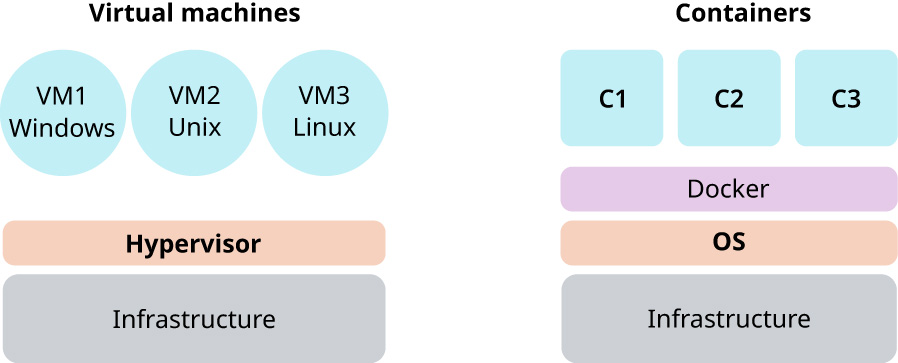
Figure 6.38 illustrates the difference between a Type 1 virtual machine monitor and container environment such as via Docker. A container is a standardized unit of software that logically isolates an application, enabling it to run independently of physical resources.
英語のヒント
図6.38は、タイプ1の仮想マシンモニターと、Dockerなどによるコンテナー環境の違いを示す。コンテナーは、アプリケーションを論理的に分離し、物理リソースから独立して動かせるようにする、標準化されたソフトウェアの単位である。
attribution: Copyright Rice University, OpenStax, under CC BY 4.0 license · CC BY 4.0 · Source出典
Figure 6.38 One notable difference between the virtual machine and containers is that VMs allow for the use of multiple operating systems, whereas containers share a single OS. (attribution: Copyright Rice University, OpenStax, under CC BY 4.0 license)
図6.38 仮想マシンとコンテナーの目立った違いの一つは、VMでは複数のOSを使えるのに対し、コンテナーは一つのOSを共有することである。(出典:著作権 Rice University、OpenStax。CC BY 4.0ライセンス)
When the complete OS is running within a VM, then the system will be called a guest operating system. VMs are heavily used in cloud computing such as Microsoft Azure, Amazon Web Services, Google Cloud Platform, and IBM Cloud.
英語のヒント
OS全体がVM内で動くとき、そのOSをゲストOSという。VMは、Microsoft Azure、Amazon Web Services、Google Cloud Platform、IBM Cloudなどのクラウドコンピューティングで、盛んに使われている。