第6章インフラストラクチャーの抽象化層:オペレーティングシステム
Efficiency Management効率の管理
By managing system resources (e.g., CPU, memory, disk, and network) efficiently, the OS ensures that no resource is underutilized or overburdened. We start with this question: What level of ease or complexity is involved in developing applications with optimal efficiency on a computer? A well-performing operating system facilitates the development of efficient applications that enhance the user experience by providing faster response times. The OS also impacts user experience positively by managing resource allocation and multitasking efficiently.
英語のヒント
OSは、CPU、メモリ、ディスク、ネットワークなどのシステム資源を効率よく管理することで、使われなさすぎる資源や、過大な負荷がかかる資源が生じないようにする。まず、コンピューター上で最適な効率のアプリケーションを開発するのは、どの程度容易で、どの程度複雑なのか、という問いから始めよう。性能のよいOSは、応答時間を短くして利用体験を向上させる、効率のよいアプリケーションの開発を容易にする。また、資源の割り当てとマルチタスクを効率よく管理することでも、利用体験を向上させる。
At some point, you might work for an organization that is engaged in developing a new app, and the company may ask itself this question: If we were to take the time to develop all the additional software required for our application to boot and run on raw hardware, how much faster would it be? This is the same as asking what the penalty or cost is of developing what the OS provides (i.e., sharing of the hardware among apps, and limited damage when programs have defects). The answer to this question relates to runtime efficiency. With respect to coding time efficiency, the OS includes various abstractions, interface and libraries that application programmers can use to ease the burden of software development. Having to write these from scratch without the support of an operating system would greatly increase the required coding effort and extend the development time associated with application development.
英語のヒント
いつか、新しいアプリを開発する組織で働くことがあるかもしれない。その会社は、「アプリケーションがハードウェア上で直接起動・実行するのに必要な追加ソフトウェアを、すべて時間をかけて開発したら、どれだけ速くなるだろうか」と自問するかもしれない。これは、OSが提供するもの、すなわちアプリ間でのハードウェア共有や、プログラムに欠陥があった場合の被害の制限を開発することに、どれだけの負担や費用がかかるかを問うのと同じである。この問いの答えは、実行時の効率に関係する。コーディング時間の効率については、OSはアプリケーションのプログラマーが開発負担を軽くするために使える、さまざまな抽象化、インターフェース、ライブラリを備えている。OSの支援なしに、これらを一から書かなければならないなら、必要なコーディングの労力は大幅に増え、アプリケーションの開発期間も延びるだろう。
Mechanisms Implementationメカニズムの実装
In operating systems, a policy is a way to choose which activities to perform (i.e., what needs to be done) and a mechanism is an activity that enforces policies (i.e., how to do it), which often depend on the hardware on which the operating system runs. If a process is granted resources using the first come, first served policy, then that policy may be implemented using a queue of requests. To understand how policies and mechanisms relate, consider this analogy. A car is a mechanism because it enables operations such as going, stopping, and turning that enable a driver to get from point A to point B. Notice that the mechanism (in this case, the car) does not say anything about how to use the mechanism to get anywhere in particular. The driver provides a policy by deciding on a route. Now compare a car with a public bus. In this case, the bus driver determines the policy. The same goes for the self-driving cars that are being developed these days. They serve as the mechanism as there are no decisions about routes being built into cars. Instead, a self-driving car uses machine learning to determine a policy, which includes deciding on a route, selecting the procedure on how to drive, and allowing the driver to override automated driving at any time.
英語のヒント
OSにおいて、ポリシーは、どの活動を行うか、つまり何をする必要があるかを選ぶ方法であり、メカニズムは、ポリシーを実施する活動、つまりどう行うかである。これらは、OSが動作するハードウェアに依存することが多い。先着順のポリシーでプロセスに資源を与えるなら、要求のキューを使って実装できる。ポリシーとメカニズムの関係を理解するため、自動車にたとえて考えよう。自動車は、進む、止まる、曲がるという操作で、運転者が地点Aから地点Bへ移動できるようにするため、メカニズムである。しかし、メカニズム、ここでは自動車は、特定の場所へ行くためにそれをどう使うかまでは決めない。運転者が経路を決め、ポリシーを与える。次に、自動車と路線バスを比べよう。この場合は、バスの運転者がポリシーを決める。現在開発されている自動運転車も同じである。経路についての決定が車に組み込まれていないため、車はメカニズムとして働く。代わりに、自動運転車は機械学習でポリシーを決める。ポリシーには、経路の決定、運転方法の手順の選択、いつでも運転者が自動運転に優先して操作できるようにすることが含まれる。
OS-Level and Server VirtualizationOSレベルの仮想化とサーバー仮想化
The ability of a system or server to run different types of applications used by multiple users at a time on the same computer is called virtualization. Server virtualization places a software layer called a hypervisor (i.e., virtual machine monitor, or VMM) between a machine’s (i.e., server’s) hardware and the operating systems that run on it. The hypervisor creates and manages virtual machines. A virtual machine (VM) is software that is created to run like a physical computer and that operates its operating system and applications like separate physical servers. OS-level virtualization is a basic form of server virtualization. When using OS-level virtualization, there is no need for a hypervisor as the server’s OS handles all resources.
英語のヒント
同じコンピューターで、複数の利用者が使う異なる種類のアプリケーションを同時に動かせる、システムやサーバーの能力を仮想化という。サーバー仮想化では、機械、つまりサーバーのハードウェアと、その上で動くOSの間に、ハイパーバイザーというソフトウェア層を置く。これは仮想マシンモニター(VMM)とも呼ばれる。ハイパーバイザーは、仮想マシンを作成・管理する。仮想マシン(VM)は、物理コンピューターのように動作し、独立した物理サーバーのようにOSとアプリケーションを動かすために作られたソフトウェアである。OSレベルの仮想化は、サーバー仮想化の基本的な形だ。この方式では、サーバーのOSがすべての資源を扱うため、ハイパーバイザーは不要になる。
Cloud computing leverages server virtualization and makes it possible for users to commission virtual machines. In this case, the servers reside in distributed data centers provided by cloud vendors. Commissioning a virtual machine is equivalent to gaining access to a virtual computer that runs a chosen operating system while leasing the underlying hardware and only paying per use (i.e., cost of CPU, storage, and network usage).
英語のヒント
クラウドコンピューティングは、サーバー仮想化を活用して、利用者が仮想マシンを用意できるようにする。この場合、サーバーはクラウド事業者が提供する、分散したデータセンター内にある。仮想マシンを用意することは、基盤となるハードウェアを借り、CPU、ストレージ、ネットワークの使用量に応じた料金だけを払いながら、選んだOSを動かす仮想コンピューターへアクセスできるようになることに相当する。
OS Architecture and Support LayersOSのアーキテクチャーと支援層
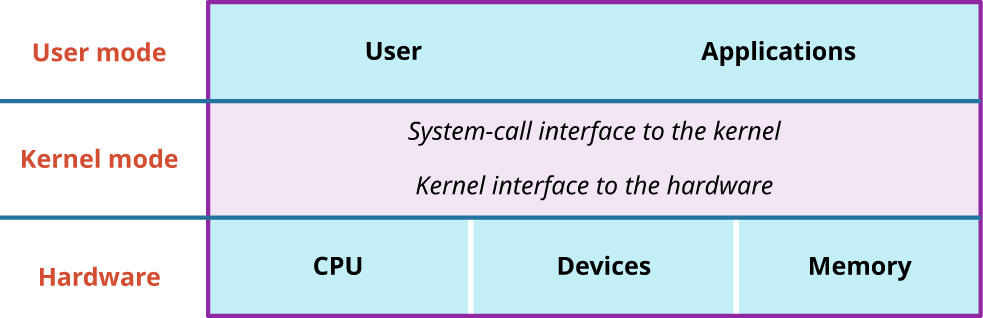
As you’ve now learned, the OS is a system software program whose job it is to manage all the programs running on a computer. OSs enable users to run multiple applications at the same time and keep them from interfering with or crashing each other. OSs provide convenient abstractions to handle diverse hardware. They coordinate resources and protect users from each other using a few critical hardware mechanisms. OSs make it easier for developers to create applications by offering built-in features that help with managing errors. These features include fault containment, which prevents errors in one part of an application from affecting the whole system; fault tolerance, which allows the application to keep running even when errors occur; and fault recovery, which helps the system to fix itself or revert to a previous state after an error. The fact that these standard services are provided by the OS means that developers do not have to build these error management features from scratch, which simplifies the development process. Figure 6.3 shows the support layers within the UNIX/Linux system structure. The OS navigates between three layers: the user mode, where the application resides; the kernel mode, which is in effect sandwiched between the user and hardware; and the hardware, which refers to resources such as the CPU and memory. In the next sections, we will describe these modes and the features they support in detail.
英語のヒント
学んだように、OSはコンピューター上で動くすべてのプログラムを管理するシステムソフトウェアである。複数のアプリケーションを同時に動かし、互いに干渉したり、相手を停止させたりするのを防ぐ。多様なハードウェアを扱う便利な抽象化を提供し、いくつかの重要なハードウェアの仕組みを使って資源を調整し、利用者どうしを保護する。OSは、エラー管理を助ける機能を組み込みで提供して、開発者がアプリケーションを作りやすくする。これには、アプリケーションの一部のエラーがシステム全体へ波及するのを防ぐ障害封じ込め、エラーが起きても動作を続けられる耐障害性、エラー後にシステムの修復や以前の状態への復帰を助ける障害回復がある。これらの標準サービスをOSが提供するので、開発者はエラー管理機能を一から作る必要がなく、開発手順が単純になる。図6.3は、UNIX/Linuxのシステム構造を支える層を示す。OSは三つの層の間で働く。アプリケーションがあるユーザーモード、事実上ユーザーとハードウェアの間に挟まるカーネルモード、そしてCPUやメモリなどの資源を指すハードウェアである。以下の節では、これらのモードと、それぞれが支える機能を詳しく説明する。
attribution: Copyright Rice University, OpenStax, under CC BY 4.0 license · CC BY 4.0 · Source出典
Figure 6.3 The UNIX/Linux system structure is made up of three main parts: (1) the user mode, (2) the kernel mode, and (3) the hardware. (attribution: Copyright Rice University, OpenStax, under CC BY 4.0 license)
図6.3 UNIX/Linuxのシステム構造は、(1)ユーザーモード、(2)カーネルモード、(3)ハードウェアという三つの主要部分から成る。(出典:著作権 Rice University、OpenStax。CC BY 4.0ライセンス)