第6章インフラストラクチャーの抽象化層:オペレーティングシステム
File System Interfaceファイルシステムインターフェース
In general, the file system interface defines standard operations such as file (or directory) creation and deletion, manipulation of files and directories, copy, and lock. Remember the various file attributes are name, type, size, and protection. The file system uses these attributes to provide system calls for the following operations:
英語のヒント
一般に、ファイルシステムインターフェースは、ファイルやディレクトリーの作成・削除・操作、コピー、ロックなどの標準操作を定める。ファイルの属性には、名前、種類、大きさ、保護があることを思い出そう。ファイルシステムは、それらの属性を使って、次の操作のシステムコールを提供する。
• Create: Find a space for the file in the disk and enter the new file information in the directory.
• 作成:ディスク内にファイル用の領域を見つけ、新しいファイルの情報をディレクトリーへ登録する。
• Write: Search the directory for a specific file and start writing from where the writing pointer is pointing to.
英語のヒント
• 書き込み:ディレクトリーで特定のファイルを探し、書き込みポインターが指す位置から書き込みを始める。
• Read: Specify the name of the file and start reading from where the reading pointer is pointing to.
• 読み取り:ファイル名を指定し、読み取りポインターが指す位置から読み取りを始める。
• Seek: Search for the specific byte position in the file.
• シーク:ファイル内の特定のバイト位置を探す。
• Delete: Search for the file in the directory and erase the file from the directory.
英語のヒント
• 削除:ディレクトリー内でファイルを探し、ディレクトリーからそのファイルを消す。
• Truncate: Reset the file length to zero and release the allocated space for the file.
英語のヒント
• 切り詰め:ファイルの長さを0に戻し、ファイルへ割り当てた領域を解放する。
• Append: Add new information to the end of the file.
英語のヒント
• 追記:ファイルの末尾へ新しい情報を加える。
• Copy: Create a new file and read the data from an old file, then write it to the new one.
• コピー:新しいファイルを作り、元のファイルからデータを読んで、新しいファイルへ書き込む。
If multiple processes are trying to open a file at the same time, then there is a role for file management that should be applied—namely, lock.
英語のヒント
複数のプロセスが同時にファイルを開こうとしているなら、適用すべきファイル管理の働きがある。それがロックである。
LINK TO LEARNING学習リンク
As people and businesses use various types of computers today, the ability to interchange files between various file systems is critical. In fact, insurance companies often ask their clients to sign insurance contracts over the Internet and rely on their digital signature in online documents. Teachers use Google Classroom to enable their students to collaborate on assignments or class presentations. Read this overview of common file systems (https://openstax.org/r/76comfile) to see how file systems enable us to seamlessly share documents and files.
英語のヒント
今日、人や企業は多様なコンピューターを使うため、さまざまなファイルシステムの間でファイルを交換できることは重要である。実際、保険会社は、顧客にインターネット上で保険契約へ署名するよう求め、オンライン文書の電子署名を利用することが多い。教師はGoogle Classroomを使い、生徒が課題や授業の発表に共同で取り組めるようにする。ファイルシステムによって、文書やファイルをどのように円滑に共有できるかを知るために、一般的なファイルシステムの概要(https://openstax.org/r/76comfile)を読もう。
Inodesinode
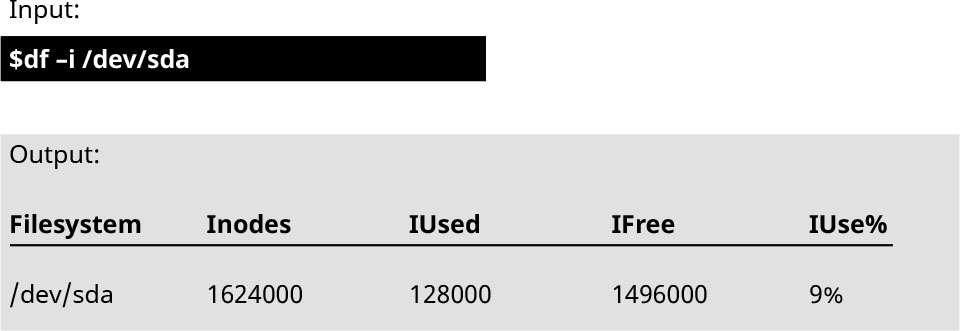
As mentioned earlier, inodes are OS data structures used to represent information about files and folders stored on disk along with file data and kept in memory when the file is open. An inode contains information including file size, sectors occupied by file, access times (e.g., last read and last write), and access information (e.g., owner id and group id). In Linux, whenever the system creates a new file, it gives it an inode unique number called i-number. Internally, the OS uses the i-number as an identifier for the file—in effect, as its name. When a file is open, its inode is kept in main memory. When the file is closed, the inode is stored back to disk. If you are using Linux, you can check the total number of inodes on disk using the df command and –i option, as shown in Figure 6.34.
英語のヒント
前に述べたように、inodeは、ファイルやフォルダーに関する情報を表すOSのデータ構造である。ファイルデータとともにディスクへ保存し、ファイルを開いている間はメモリに置く。inodeには、ファイルの大きさ、使用しているセクター、アクセス時刻(最後の読み取りや書き込みなど)、アクセス情報(所有者ID、グループIDなど)が入る。Linuxでは、システムが新しいファイルを作るたびに、i-numberという一意のinode番号を与える。内部では、OSはi-numberをファイルの識別子、実質的には名前として使う。ファイルを開くと、そのinodeを主記憶に保持する。ファイルを閉じると、inodeをディスクへ戻して保存する。Linuxを使っているなら、図6.34のように、dfコマンドに–iオプションを付け、ディスク上のinode総数を確認できる。
attribution: Copyright Rice University, OpenStax, under CC BY 4.0 license · CC BY 4.0 · Source出典
Figure 6.34 In the Linux OS, the total number of inodes on the directory /dev/sda can be viewed using the command df and the option –i. (attribution: Copyright Rice University, OpenStax, under CC BY 4.0 license)
図6.34 Linux OSでは、dfコマンドと–iオプションを使って、/dev/sdaディレクトリーのinode総数を確認できる。(出典:著作権 Rice University、OpenStax。CC BY 4.0ライセンス)
File systems are responsible for managing parts of the disk that are used (inodes) and parts of the disk that are not used (free blocks). Each file system has different strategies and approaches for managing this information, with different trade-offs. Additional features of file systems include file system–level encryption, compression, and data integrity assurances.
英語のヒント
ファイルシステムは、ディスク内の使用中の部分(inode)と、使っていない部分(空きブロック)を管理する。ファイルシステムごとに、その情報を管理する戦略や方法が異なり、それぞれ異なるトレードオフがある。追加の機能には、ファイルシステム水準の暗号化、圧縮、データの完全性の保証がある。
Distributed File Systems分散ファイルシステム
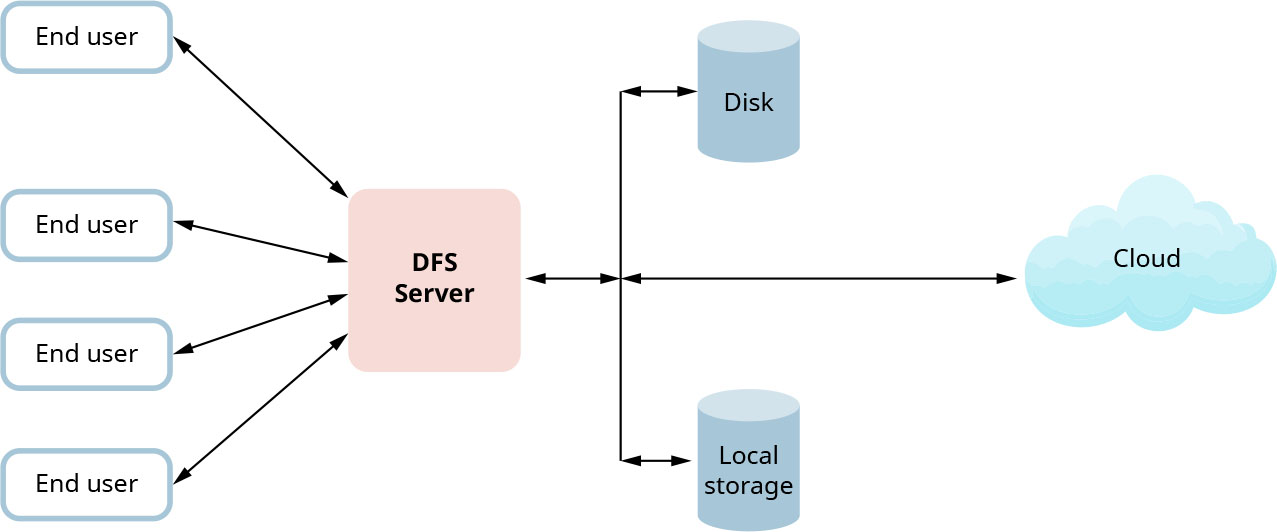
A distributed file system (DFS) is a file system that is distributed on multiple file servers or multiple locations that support network-wide sharing of files and devices. The presentation of a DFS is similar to the traditional view (i.e., client is using a file system). The main idea of a DFS is that it uses a namespace, which means all clients see a single namespace where files and directories are shared across the network. In a DFS, clients can read and write files on a remote machine as if they were accessing their local disks. A DFS provides an abstraction over physical disks that is akin to the abstraction virtual memory provides over physical memory (Figure 6.35).
英語のヒント
分散ファイルシステム(DFS)は、ネットワーク全体でファイルやデバイスを共有できるよう、複数のファイルサーバーや場所に分散したファイルシステムである。DFSの見え方は、クライアントがファイルシステムを使うという従来の見え方に似ている。中心となる考えは、名前空間を使うことである。つまり、すべてのクライアントには、ネットワークをまたいで共有されたファイルやディレクトリーを持つ、一つの名前空間が見える。DFSでは、クライアントは、ローカルディスクへアクセスするように、遠隔のマシンのファイルを読み書きできる。DFSが物理ディスク上に提供する抽象化は、仮想メモリが物理メモリ上に提供する抽象化に似ている(図6.35)。
attribution: Copyright Rice University, OpenStax, under CC BY 4.0 license · CC BY 4.0 · Source出典
Figure 6.35 In a distributed file system architecture, the DFS server works like a middleman between the end user and the data, which can be in any storage format. (attribution: Copyright Rice University, OpenStax, under CC BY 4.0 license)
図6.35 分散ファイルシステムのアーキテクチャーでは、DFSサーバーは、最終利用者とデータの仲介役として働く。データの保存形式はどのようなものでもよい。(出典:著作権 Rice University、OpenStax。CC BY 4.0ライセンス)
DFS technologies like Google’s GFS (Google File System), Apache Hadoop’s HDFS (Hadoop Distributed File System), and Apache Spark’s RDDs (Resilient Distributed Datasets) have revolutionized the way we handle and process large volumes of data. These systems are designed to accommodate High Throughput Computing (HTC), complementing the capabilities of High-Performance Computing (HPC) by focusing on the efficient processing of vast datasets across clusters of computers.
英語のヒント
GoogleのGFS(Google File System)、Apache HadoopのHDFS(Hadoop Distributed File System)、Apache SparkのRDD(Resilient Distributed Datasets)といったDFS技術は、大量のデータの扱い方や処理方法を大きく変えた。これらのシステムは、高スループットコンピューティング(HTC)に対応するよう設計されている。コンピューターのクラスターにまたがる膨大なデータセットの効率的な処理に重点を置き、高性能コンピューティング(HPC)の能力を補う。
• Google File System (GFS) is a prime example of a DFS that is highly optimized for large-scale data processing. It is designed to provide high fault tolerance while running on low-cost commodity hardware.
英語のヒント
• Google File System(GFS)は、大規模データ処理向けに高度に最適化されたDFSの代表例である。安価な汎用ハードウェアで動きながら、高い耐障害性を提供するよう設計されている。
• Hadoop Distributed File System (HDFS) follows a similar principle but is open-source and commonly associated with the Hadoop ecosystem. It’s designed to store very large files across machines in a large cluster and to stream those files at high bandwidth to user applications. By breaking down files into blocks and distributing them across a network of computers, HDFS can process data in parallel, significantly speeding up computations and data analysis tasks.
英語のヒント
• Hadoop Distributed File System(HDFS)は、同様の原理に従うが、オープンソースであり、一般にHadoopのエコシステムと結び付いている。大きなクラスター内のマシンにまたがって非常に大きなファイルを保存し、それを高い帯域幅で利用者のアプリケーションへ流すよう設計されている。ファイルをブロックへ分け、コンピューターのネットワークに分散させることで、HDFSはデータを並列処理でき、計算やデータ分析を大幅に速められる。
• Resilient Distributed Datasets (RDDs) in Apache Spark are a further step in distributed computing, offering an abstraction that represents read-only collection of objects partitioned across a set of machines that can be rebuilt if a partition is lost. Spark’s use of RDDs allows it to process data in-memory, which is much faster than the disk-based processing used by Hadoop, making Spark an excellent choice for applications requiring quick iterations over large datasets.
英語のヒント
• Apache SparkのResilient Distributed Datasets(RDD、耐障害性分散データセット)は、分散コンピューティングをさらに進めたものである。マシン群に分割して配置し、一部を失っても再構築できる、読み取り専用のオブジェクトの集まりを表す抽象化を提供する。SparkはRDDを使ってメモリ内でデータを処理でき、Hadoopのディスクに基づく処理より、はるかに速い。このため、Sparkは、大きなデータセットを高速に反復処理する必要があるアプリケーションに、優れた選択肢となる。
To facilitate the communication necessary in these distributed environments, protocols such as Remote Procedure Call (RPC) and Distributed Hash Tables (DHTs) are employed. RPC is a protocol that a program can use to request a service from another program located in another computer in another network without having to understand the network’s details. DHTs are a class of decentralized distributed systems that provide a lookup service similar to a hash table; keys are mapped to nodes, and a node can retrieve the content associated with a given key.
英語のヒント
このような分散環境に必要な通信を容易にするために、遠隔手続き呼び出し(RPC)や分散ハッシュテーブル(DHT)といったプロトコルを使う。RPCは、ネットワークの詳細を理解しなくても、別のネットワーク内の別のコンピューター上にある別のプログラムへ、サービスを要求できるプロトコルである。DHTは、ハッシュテーブルに似た検索サービスを提供する、非中央集権型の分散システムの一種である。キーをノードへ対応付け、ノードは、与えられたキーに結び付く内容を取り出せる。
Beyond these, the concept of N-Tier distributed file systems, such as the Network File System (NFS), plays a foundational role. NFS allows a system to share directories and files with others over a network. By using NFS, users and programs can access files on remote systems almost as if they were local files.
英語のヒント
これらに加え、Network File System(NFS)などの、N層分散ファイルシステムという概念も、基礎となる役割を果たす。NFSによって、システムは、ネットワークを通してディレクトリーやファイルをほかと共有できる。NFSを使えば、利用者やプログラムは、遠隔システムのファイルへ、ほとんどローカルファイルのようにアクセスできる。
The basic abstraction of a remote file system is via open, close, read, and write. As it comes to naming, the names are location transparent. Location transparency hides the location where in the network the file is stored. The procedure that allows multiple copies of a file to exist in the network is called replication. This improves performance and availability. DFS handles the updates, checks if clients are working on separate copies, and performs reconciliation.
英語のヒント
遠隔ファイルシステムの基本的な抽象化は、open、close、read、writeを通して行う。命名については、名前は位置透過性を持つ。位置透過性は、ネットワークのどこにファイルが保存されているかを隠す。同じファイルの複数のコピーをネットワーク内に置けるようにする手続きを、レプリケーションという。これによって性能と可用性が向上する。DFSは、更新を扱い、クライアントが別々のコピーで作業しているかを確認し、内容の整合を取る。