第6章インフラストラクチャーの抽象化層:オペレーティングシステム
LINK TO LEARNING学習リンク
Every once in a while, you may get a notification on your computer asking you to update your OS, and the update may include a “patch” to address a security issue. Often, this security issue is related to a cyberattack that is exploiting some vulnerability in the OS. Check out this tutorial on OS vulnerabilities (https://openstax.org/r/76OSvulnera) to gain a deeper sense of the kinds of OS vulnerabilities that these attacks target.
英語のヒント
ときどき、OSの更新を求める通知がコンピューターに届くことがある。その更新には、セキュリティー上の問題に対処する「パッチ」が含まれる場合がある。この問題は、OSの何らかの脆弱性を悪用するサイバー攻撃と関係していることが多い。攻撃が狙うOSの脆弱性の種類について理解を深めるため、OSの脆弱性の入門解説(https://openstax.org/r/76OSvulnera)を見よう。
Recovery回復
Like any other system, an OS can crash in the middle of critical sections or while the system is running. These crashes may result in lost data, unexpected results, and inconsistency. For example, if the crash happened before the system had stored a user’s information in the main memory, the system will have lost this information. Unexpected results provide the wrong output and may affect other calculations.
英語のヒント
ほかのシステムと同じく、OSも、クリティカルセクションの途中や、システムの動作中にクラッシュすることがある。その結果、データの喪失、予期しない結果、不整合が生じうる。たとえば、利用者の情報を主記憶へ保存する前にクラッシュすれば、その情報は失われる。予期しない結果は、誤った出力を生み、ほかの計算にも影響する可能性がある。
An inconsistency is a situation that causes the system to produce errors or hardware failure. Inconsistencies may occur when a modification affects multiple blocks; a crash may occur when some of the blocks have been written to disk but not the others. For example, when the system adds a block to a file, it updates the free list to indicate that the block is in use, but if the inode is not yet written to point to the block, this will result in an inconsistency. Another inconsistency can occur when the system while creating the link to a file to make a new directory entry refers to an inode, but the reference count has not yet been updated in the inode.
英語のヒント
不整合は、システムにエラーやハードウェア故障を生じさせる状況である。一つの変更が複数のブロックに及ぶとき、一部のブロックだけをディスクへ書き込み、ほかを書き込む前にクラッシュすると、不整合が起こりうる。たとえば、システムがファイルへブロックを追加すると、空きリストを更新し、そのブロックが使用中だと示す。しかし、inodeがまだそのブロックを指すように書き込まれていなければ、不整合になる。別の例では、新しいディレクトリー項目を作るためにファイルへのリンクを作成し、inodeを参照しているのに、inode内の参照回数をまだ更新していない場合にも、不整合が起こりうる。
The process of resolving OS faults or errors is called recovery. Three approaches that can address inconsistency issues include:
英語のヒント
OSの障害やエラーを解消する処理を、回復という。不整合の問題へ対処する方法には、次の三つがある。
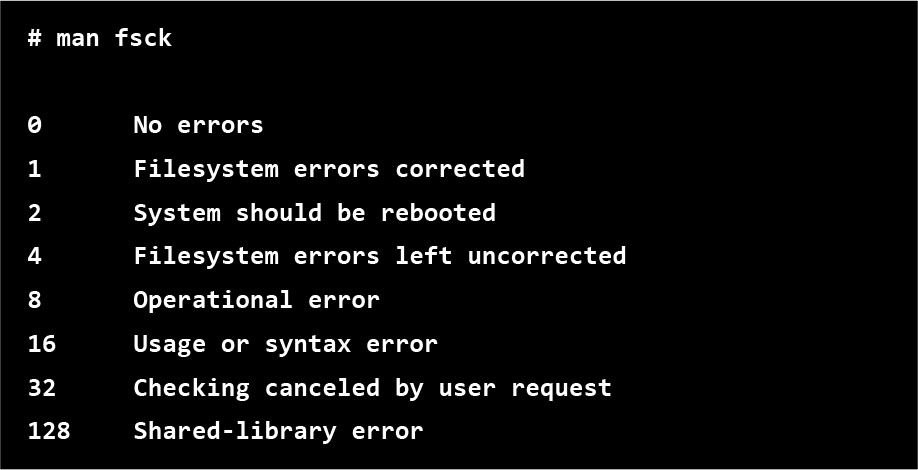
• Check consistency during reboot, and repair problem. A good example of checking for inconsistency is the file system check (fsck) command implementation for UNIX and UNIX-like file systems. The system executes fsck as part of every system boot sequence so it can check whether the system was shut down correctly or not. If it was properly shut down, it proceeds normally. In the alternative (e.g., crash, power failure, or any other reason), the recovery process will start. The recovery process will scan disk contents, identify inconsistencies, and repair them. The limitations of fsck are as follows: it will restore disk to consistency, but does not prevent information loss. This loss of information can lead to instability. Also, the fsck has security issues because a block could migrate from the password file to some other random file, which could make it visible to unauthorized users. In addition, running fsck may take a long time, and the user will not be able to restart the system until fsck completes. The recovery process with fsck will take more time if the disk size is big. Figure 6.37 illustrates an example of the code errors produced from fsck and the meaning of each code in the Linux OS.
英語のヒント
• 再起動時に整合性を確認し、問題を修復する。不整合を確認する代表例が、UNIXやUNIX系ファイルシステム向けの、ファイルシステム検査(fsck)コマンドの実装である。システムは、起動手順の一部として毎回fsckを実行し、正しく終了されていたかを確認する。正しく終了していれば、通常どおり進む。そうでない場合、たとえばクラッシュや電源断などがあった場合には、回復処理を始める。回復処理は、ディスクの内容を走査し、不整合を見つけて修復する。fsckの限界は次のとおりである。ディスクの整合性は回復するが、情報の喪失は防げない。その喪失が不安定さにつながる場合がある。また、パスワードファイルのブロックが、別の無関係なファイルへ移り、権限のない利用者に見えるようになる可能性があるため、fsckにはセキュリティー上の問題もある。さらに、fsckの実行には長い時間がかかる場合があり、完了するまで利用者はシステムを再起動できない。ディスクが大きいほど、fsckによる回復には時間がかかる。図6.37は、fsckから出るエラーコードの例と、Linux OSでの各コードの意味を示す。
attribution: Copyright Rice University, OpenStax, under CC BY 4.0 license · CC BY 4.0 · Source出典
Figure 6.37 Running a recovery process with fsck resulted in these code errors. The meaning of each code in Linux OS is also given. (attribution: Copyright Rice University, OpenStax, under CC BY 4.0 license)
図6.37 fsckで回復処理を実行したところ、これらのエラーコードが出た。Linux OSでの各コードの意味も示している。(出典:著作権 Rice University、OpenStax。CC BY 4.0ライセンス)
• Check the order of the writes. This approach avoids some discrepancies by applying changes in a specific write sequence. For instance, to ensure the free list doesn’t still contain the file’s new block, write the content of the list before adding that block to the file. After ensuring that the list is not including that block, create a reference for the new block in the inode. Using this approach, you’ll guarantee that you’ll never write a pointer prior to initializing the block to which it points without validation. The validation will force the system to never clear the last pointer prior to setting a new pointer. The advantage of this approach is that it reduces the time spent waiting, as there is no need to wait for fsck while rebooting. However, there are several drawbacks, such as the potential for resource leaks (e.g., when the system runs fsck to recover some lost resources). Another drawback is that this approach slows file operation because writing while running the system requires considerable metadata.
英語のヒント
• 書き込み順序を確認する。この方法は、特定の書き込み順序で変更を適用し、一部の食い違いを避ける。たとえば、ファイルの新しいブロックが空きリストに残らないよう、そのブロックをファイルへ追加する前に、リストの内容を書き込む。リストにそのブロックが含まれないことを確認してから、inode内に新しいブロックへの参照を作る。この方法では、検証なしに、参照先のブロックを初期化するより先にポインターを書き込むことがないようにできる。検証は、新しいポインターを設定するより先に、最後のポインターを消すことが決してないよう、システムに強制する。利点は、再起動時にfsckを待たなくてよいため、待ち時間が減ることだ。しかし、リソース漏れの可能性など、欠点もいくつかある。たとえば、失われたリソースを取り戻すために、システムがfsckを実行する場合である。また、システムを動かしながら書き込むには、大量のメタデータが必要なため、ファイル操作が遅くなるという欠点もある。
• Perform write-ahead logging. This term is known as journaling file system and refers to the practice of recording the changes in the information in a separate log file sometimes called a journal file. These changes will be recorded prior to any new change or update on the system. Windows NTFS and Linux ext3 implement this kind of log file. The log procedure is analogous to the way log files are used in a database system to enable the correction of updated inconsistencies, which enables the healing quickly in case of any error. Prior to performing any operation, the recovery process will initially store information regarding the operation in a special log file. The next step is to flush the information to the disk before updating any other blocks. For example, a log entry such as “I’ll add block 100101 to inode 313 at index 90” will be added to the system’s log in case the operation involves adding a block to a file. This will guarantee that the actual block modifications can be performed. The system will restore the log in case of any crash to ensure that all of the updates have been saved in the disk. There are many benefits to employing logging such as reducing the time needed to recover from any failure. Also, improving the ability of localizing logs in the disk will result in improving the system’s performance. However, this approach has some drawbacks, namely, the size of the log file will grow over time, and this will affect the system’s processing time. This problem can, however, be resolved by performing periodic checkpoints.
英語のヒント
• 先行書き込みログを行う。これは、ジャーナリングファイルシステムとして知られ、情報の変更を、ジャーナルファイルとも呼ぶ別のログファイルに記録する方法を指す。システム上で新しい変更や更新を行う前に、その変更を記録する。WindowsのNTFSやLinuxのext3は、この種のログファイルを実装している。このログの手順は、データベースシステムで更新に伴う不整合を修正できるようにするログの使い方に似ており、エラー時に素早く回復できる。操作を行う前に、回復処理は、まずその操作に関する情報を特別なログファイルへ保存する。次に、ほかのブロックを更新する前に、その情報をディスクへ書き出す。たとえば、ファイルにブロックを追加する操作なら、「ブロック100101を、inode 313の索引90に追加する」という項目を、システムのログへ加える。これにより、実際のブロックの変更を行えることを保証する。クラッシュがあれば、システムはログを復元し、すべての更新がディスクへ保存されたことを確保する。ログを使うと、障害からの回復時間を短縮するなど、多くの利点がある。また、ディスク内でログを一か所にまとめる能力を高めれば、システムの性能も向上する。ただし、ログファイルが時間とともに大きくなり、処理時間に影響するという欠点がある。この問題は、定期的にチェックポイントを設けることで解決できる。