第6章インフラストラクチャーの抽象化層:オペレーティングシステム
6.2 Fundamental OS Concepts6.2 OSの基本概念
Learning Objectives学習目標
By the end of this section, you will be able to:
この節を終えると、次のことができるようになる。
• Explain various key concepts and components of operating systems
• OSのさまざまな重要概念と構成要素を説明する。
• Discuss the various designs of operating systems
• OSのさまざまな設計について論じる。
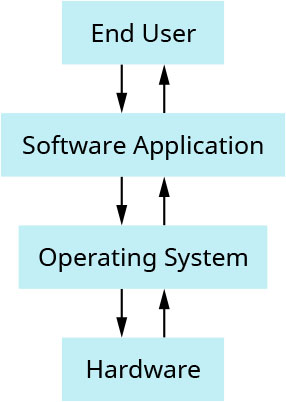
An OS manages computer resources (hardware) and provides services for computer programs (software). The OS works as an interface between the computer user and the system. The OS manages the memory, the files, the hardware, and the software; it also handles the inputs and the outputs such as the keyboard and printer (Figure 6.4).
英語のヒント
OSは、コンピューターの資源であるハードウェアを管理し、プログラムというソフトウェアにサービスを提供する。利用者とシステムの間のインターフェースとして働き、メモリ、ファイル、ハードウェア、ソフトウェアを管理するほか、キーボードやプリンターなどの入出力も扱う(図6.4)。
attribution: Copyright Rice University, OpenStax, under CC BY 4.0 license · CC BY 4.0 · Source出典
Figure 6.4 The end user initiates this process by using the software/applications, which are built on top of the operating system in the computer. (attribution: Copyright Rice University, OpenStax, under CC BY 4.0 license)
図6.4 エンドユーザーは、コンピューターのOS上に構築されたソフトウェアやアプリケーションを使うことで、この処理を開始する。(出典:著作権 Rice University、OpenStax。CC BY 4.0ライセンス)
In this module, we study OS components such as process management and threads, memory and address space management, and device drivers and I/O devices. In addition, we cover OS structures such as monolithic OS design, layered OS design, hardware abstraction layer (HAL), and microkernels.
英語のヒント
この単元では、プロセス管理とスレッド、メモリとアドレス空間の管理、デバイスドライバーと入出力機器など、OSの構成要素を学ぶ。さらに、モノリシックOS設計、階層型OS設計、ハードウェア抽象化層(HAL)、マイクロカーネルなど、OSの構造を扱う。
OS ComponentsOSの構成要素
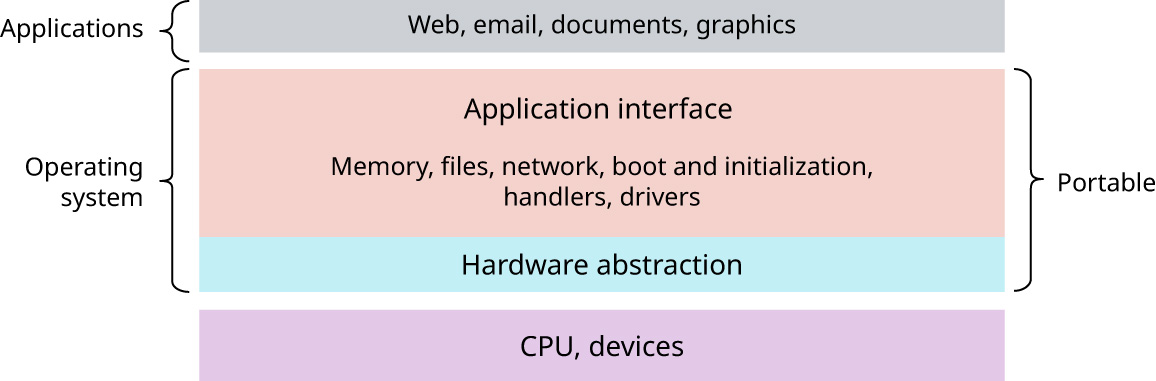
OS is a complex system that is typically created using the divide and conquer mechanism. That is, the system is divided into small pieces, each of which defines a part of the system. The OS component’s structure is static, and the OS and the hardware are tightly coupled together. The application programming interface (API) is a set of rules and tools that allows different software applications to communicate with each other. Applications make requests to the OS through API. The user can, using a keyboard and/or mouse, interact with the OS through the OS interface. The OS interface could be a graphical user interface (GUI), which allows users to interact with electronic devices through graphical icons and visual indicators (e.g., Windows), or a command line (e.g., DOS). For example, in Figure 6.5, the OS interface would be the window into which the Chrome browser opens.
英語のヒント
OSは複雑なシステムであり、通常、分割統治の仕組みを使って作る。つまり、小さな部分に分け、それぞれがシステムの一部を定める。OSの構成要素の構造は静的であり、OSとハードウェアは密接に結びついている。アプリケーションプログラミングインターフェース(API)は、異なるソフトウェアアプリケーションが互いに通信するための、規則と道具の集まりである。アプリケーションは、APIを通してOSに要求する。利用者は、キーボードやマウスを使い、OSのインターフェースを通じてやり取りできる。OSのインターフェースには、Windowsのように図形のアイコンや視覚的な表示で電子機器を操作するグラフィカルユーザーインターフェース(GUI)や、DOSのようなコマンドラインがある。たとえば図6.5では、Chromeブラウザーが開くウィンドウがOSのインターフェースにあたる。
attribution: Copyright Rice University, OpenStax, under CC BY 4.0 license · CC BY 4.0 · Source出典
Figure 6.5 The operating system and hardware are tightly linked. The end user is using multiple applications, such as Chrome, Photoshop, Acrobat, and JVM, which they had previously downloaded in a particular OS. To use these software programs, the user will interact through the OS interface and/or API, which is connected with OS components such as file systems, memory managers, process managers, network supports, device drivers, and interrupt handlers. (attribution: Copyright Rice University, OpenStax, under CC BY 4.0 license)
図6.5 OSとハードウェアは密接に結びついている。エンドユーザーは、特定のOSであらかじめダウンロードしたChrome、Photoshop、Acrobat、JVMなど、複数のアプリケーションを使う。これらを使うため、利用者はOSのインターフェースやAPIを通じてやり取りする。インターフェースやAPIは、ファイルシステム、メモリ管理、プロセス管理、ネットワーク支援、デバイスドライバー、割り込みハンドラーなどのOS構成要素につながっている。(出典:著作権 Rice University、OpenStax。CC BY 4.0ライセンス)
Process Management and Threadsプロセス管理とスレッド
With a single click, end users seamlessly launch applications, enjoying the simplicity of the process. Have you ever wondered what manages the application once it is launched? The direct answer is the OS. An OS executes many kinds of activities starting from users’ programs, background jobs or scripts, to system programs. There are many system programs such as print managers, name servers, and file servers. Each one of these programs or activities is encapsulated within a process. As you learned in the preceding section, a process is a running program that has an execution context plus the runtime instance of the program itself. Examples of an execution context are program counters (PCs), registers, VM maps, OS resources, and examples of runtime instance are code and data.
英語のヒント
エンドユーザーは、クリック一つで途切れることなくアプリケーションを起動し、その手順の簡単さを享受している。起動後のアプリケーションを何が管理するか、考えたことがあるだろうか。端的な答えはOSである。OSは、利用者のプログラムから、バックグラウンドのジョブやスクリプト、システムプログラムまで、多くの種類の活動を実行する。システムプログラムには、印刷マネージャー、ネームサーバー、ファイルサーバーなどがある。これらのプログラムや活動は、それぞれ一つのプロセス内に包み込まれる。前の節で学んだように、プロセスは実行中のプログラムであり、実行コンテキストと、プログラム自体の実行時インスタンスを持つ。実行コンテキストの例には、プログラムカウンター(PC)、レジスタ、VMマップ、OS資源があり、実行時インスタンスの例にはコードとデータがある。
Here are some other process-related concepts that will be introduced here and developed as the chapter progresses:
英語のヒント
プロセスに関するほかの概念を、ここでいくつか紹介する。この章が進むにつれて、さらに詳しく扱う。
• A register is a high-speed memory storing unit.
• レジスタは、高速な記憶装置である。
• A process can be in running state (when it is executed by the CPU), ready state (when it is waiting in the CPU), or blocked state (when it is waiting for an event to occur).
英語のヒント
• プロセスには、実行状態(CPUで実行されている)、実行可能状態(CPU内で待機している)、ブロック状態(ある出来事が起こるのを待っている)がある。
• The OS’s process module manages the processes via creation, destruction, and scheduling. One way an OS controls access to a resource is through a data type called a semaphore.
英語のヒント
• OSのプロセスモジュールは、生成、破棄、スケジューリングを通じてプロセスを管理する。OSが資源へのアクセスを制御する方法の一つに、セマフォというデータ型がある。
• Managing the sharing of a system’s resources to avoid interference and errors is called process synchronization.
英語のヒント
• 干渉やエラーを避けるために、システム資源の共有を管理することを、プロセス同期という。
THINK IT THROUGH考えてみよう
Failure Existence障害は起こる
Given the complexity of an OS’s tasks (i.e., the management of a computer system’s resources and the scheduling of tasks to make an application do what the user expects it to do) and the speed at which these tasks need to happen, it’s amazing how often technology doesn’t fail. But, of course, it does at times.
英語のヒント
OSの仕事は、コンピューターシステムの資源を管理し、利用者が期待するとおりにアプリケーションを動かすためにタスクをスケジューリングすることだ。その複雑さと、要求される処理速度を考えると、技術がこれほど頻繁に失敗せず動いていることは驚くべきことだ。しかし、もちろん、ときには失敗もする。
Let’s suppose you ran into an OS-related failure this morning—namely, your laptop did not fully boot. What are some steps you would take to diagnose the problem on your own before seeking help or a repair?
英語のヒント
今朝、OSに関係する障害に遭遇し、ノートパソコンが完全には起動しなかったとしよう。助けや修理を求める前に、自分で問題を診断するなら、どのような手順を踏むか。
Processes vs. Threads
プロセスとスレッドの比較
As we have learned, a process is an active program. A thread is a smaller or lightweight portion of a process that is managed independently. Table 6.2 shows a comparison between the process and the thread.
英語のヒント
学んだように、プロセスは動作中のプログラムである。スレッドは、独立して管理される、プロセスの小さな、あるいは軽量な部分だ。表6.2は、プロセスとスレッドを比較している。
Attribute 属性 | Process プロセス | Thread スレッド |
|---|---|---|
Definition 定義 | An executed program 実行されたプログラム | Part of the process プロセスの一部 |
Weight 重さ | It could be heavy 重くなる可能性がある | Lightweight 軽量 |
Processing time 処理時間 | More time より長い時間 | Less time より短い時間 |
Resources 資源 | Needs more resources より多くの資源を必要とする | Needs fewer resources 必要な資源が少ない |
Sharing 共有 | Mostly isolated 大部分が分離されている | Shares memory and data メモリとデータを共有する |
Table 6.2 Process vs Thread
表6.2 プロセスとスレッドの比較
Processing
処理
A program is passive; it is just bytes on a disk that encode instructions to be run. A process is an instance of a program being executed—or processed—by a processor. Thus, processing involves a program, a process, and a processor. The processor can be a real processor or a virtual processor (i.e., CPU core assigned to a virtual machine). At any time, there may be many processes running copies of the same program (e.g., an editor); each process is separate and usually independent. An OS is responsible for managing these processes.
英語のヒント
プログラムは受動的なもので、実行する命令を符号化した、ディスク上のバイト列にすぎない。プロセスは、プロセッサによって実行、つまり処理されているプログラムの一つの実体である。したがって、処理にはプログラム、プロセス、プロセッサが関わる。プロセッサは、実際のプロセッサでも仮想プロセッサ、つまり仮想マシンに割り当てられたCPUコアでもよい。ある時点で、エディターなど同じプログラムのコピーを実行するプロセスが、複数存在することもある。それぞれは分離され、通常は独立している。これらのプロセスを管理するのが、OSの役割である。
Different OSs approach process management in different ways. For example, the Windows operating system’s approach consists of adding an operating system call to create a process and other system calls for process operation. The approach used in the UNIX OS is different from this as it consists of splitting the process into two steps using fork and exec functionalities. The fork functionality is used to set up privileges by creating a complete copy of the process, and the exec functionality brings the executable file into memory to start the execution.
英語のヒント
OSによって、プロセス管理の方法は異なる。たとえばWindowsは、プロセス生成用のOS呼び出しと、プロセス操作用のほかのシステムコールを追加する方式を採る。一方UNIXは、forkとexecという機能を使って、処理を二段階に分ける方式である。forkは、プロセスの完全なコピーを作って権限を設定するために使い、execは、実行を始めるために実行可能ファイルをメモリへ取り込む。