第6章インフラストラクチャーの抽象化層:オペレーティングシステム
LINK TO LEARNING学習リンク
Are your Windows drivers up to date? Check out to see if you have the latest drivers (https://openstax.org/r/ 76latestdriver) for your Microsoft devices.
英語のヒント
Windowsのドライバーは最新の状態だろうか。Microsoft製機器の最新ドライバーがあるか、確認してみよう(https://openstax.org/r/ 76latestdriver)。
Device drivers are specialized software components that enable higher-level computer programs to interact with hardware devices. These drivers provide a software interface to hardware devices, allowing operating systems and other computer applications to access hardware functions without needing to know precise details about the hardware being used.
英語のヒント
デバイスドライバーは、高水準のプログラムがハードウェア機器とやり取りできるようにする、専用のソフトウェア構成要素である。ハードウェアへのソフトウェア上の窓口を提供することで、OSやアプリケーションは、使っているハードウェアの細かな仕様を知らなくても、その機能へアクセスできる。
• At the heart of any computer is the CPU, the primary component responsible for executing instructions. Interestingly, CPUs themselves do not typically require external device drivers for direct operation, as the core management of CPU resources is a fundamental role of the operating system.
英語のヒント
• どんなコンピューターの中心にも、命令実行を担当する主要な構成要素であるCPUがある。興味深いことに、CPUそのものを直接動かすためには、通常、外部のデバイスドライバーは必要ない。CPU資源の中心的な管理は、OSの基本的な役割だからである。
• Memory operates under the direct management of the operating system, which allocates and manages the system’s memory resources. RAM can be accessed randomly and used for storing data temporarily while a computer is running. While standard RAM modules—both dynamic and static RAM—do not necessitate distinct drivers, specialized memory hardware, such as flash memory devices, including solid-state drives (SSDs), USB flash drives, and memory cards, interact with the system through file system drivers that manage the organization and access of stored data.
英語のヒント
• メモリはOSの直接の管理下で動作し、OSがシステムのメモリ資源を割り当て、管理する。RAMには任意の場所へアクセスでき、コンピューターの動作中にデータを一時保存するために使える。ダイナミックRAMとスタティックRAMのどちらも、標準的なRAMモジュールには独自のドライバーを必要としない。一方、SSD、USBフラッシュドライブ、メモリカードを含むフラッシュメモリ機器などの特殊なメモリハードウェアは、保存データの構成とアクセスを管理する、ファイルシステムドライバーを通じてシステムとやり取りする。
• Storage devices, encompassing a broad range of hardware from traditional hard disk drives (HDDs) to modern SSDs and removable storage media, require device drivers to facilitate data read/write operations.
英語のヒント
• 従来のHDDから、現代のSSDや取り外し可能な記憶媒体まで、幅広いハードウェアを含むストレージ機器は、データの読み書きを行うためにデバイスドライバーを必要とする。
• Network connectivity relies on an array of device drivers designed to manage the protocols and hardware functions of network interfaces.
英語のヒント
• ネットワーク接続は、ネットワークインターフェースのプロトコルとハードウェア機能を管理するために設計された、多数のデバイスドライバーに支えられている。
Device Registersデバイスレジスタ
A device register is the interface a device presents to a programmer where each I/O device appears in the physical address space of the machine as a memory address. The operating system reads and writes device registers to control the device. There are three types of device registers: status, command, and data. The status register provides information about the current state of the device (e.g., read), the command register issues a command to the device (e.g., writing a value to the register), and the data register is used to transfer data between the computer and the device. Device registers use bits to service three purposes: parameters provided by the CPU to the device, status bits provided by the device, and control bits set by the CPU to initiate operations. Figure 6.8 provides an example of the content of each of a device register’s bits.
英語のヒント
デバイスレジスタは、機器がプログラマーに提供するインターフェースで、各入出力機器が、機械の物理アドレス空間に一つのメモリアドレスとして現れる。OSは、デバイスレジスタを読み書きして機器を制御する。デバイスレジスタには、状態、コマンド、データの三種類がある。状態レジスタは、読み取りなど機器の現在の状態について情報を提供する。コマンドレジスタは、レジスタへ値を書き込むなど、機器へ命令を発行する。データレジスタは、コンピューターと機器の間のデータ転送に使う。デバイスレジスタのビットには、CPUが機器へ与えるパラメーター、機器が提供する状態ビット、CPUが操作を開始するために設定する制御ビットという、三つの用途がある。図6.8は、各ビットの内容の例を示している。

attribution: Copyright Rice University, OpenStax, under CC BY 4.0 license · CC BY 4.0 · Source出典
Figure 6.8 Device register bits define the first sector to read, the status of the operation, and the operation itself. (attribution: Copyright Rice University, OpenStax, under CC BY 4.0 license)
図6.8 デバイスレジスタのビットは、読み取る最初のセクター、操作の状態、操作そのものを定める。(出典:著作権 Rice University、OpenStax。CC BY 4.0ライセンス)
The behavior of device registers is different from that of ordinary memory locations. For example, the start operation bit may always read as 0, and the bits may change from one status to another (i.e., the operation complete bit may change without being written by the CPU).
英語のヒント
デバイスレジスタの振る舞いは、通常のメモリ位置とは異なる。たとえば、操作開始ビットは、読み出すと常に0になる場合がある。また、ビットが別の状態へ変わることもある。つまり、操作完了ビットは、CPUが書き込まなくても変わる場合がある。
The OS uses the device register to communicate with an I/O device as follows:
OSは、次のようにデバイスレジスタを使って入出力機器と通信する。
1. The CPU writes device registers to start the operation.
1. CPUは、操作を始めるためにデバイスレジスタへ書き込む。
2. The CPU polls the ready bit in the device register.
英語のヒント
2. CPUは、デバイスレジスタ内のレディービットを繰り返し確認する。
3. The device sets the ready bit when the operation is finished.
3. 機器は、操作が終わるとレディービットを設定する。
4. The CPU loads the buffer address into a device register before starting the operation to define where to copy data read from disk.
英語のヒント
4. CPUは、ディスクから読み出したデータのコピー先を指定するため、操作の開始前に、バッファーのアドレスをデバイスレジスタへ読み込む。
5. Fast storage media devices move data directly to/from physical memory via direct memory access (DMA); other devices require the intervention of the CPU via programmed I/O or interrupt initiated I/O.
英語のヒント
5. 高速な記憶媒体の機器は、ダイレクトメモリアクセス(DMA)によって、物理メモリとの間でデータを直接転送する。ほかの機器では、プログラム制御入出力や、割り込みで開始する入出力を通じて、CPUの介入が必要になる。
6. Interrupts allow the CPU to do other work while devices are operating, and the OS figures out which device interrupted.
英語のヒント
6. 割り込みにより、機器が動作している間、CPUはほかの仕事を行える。OSは、どの機器が割り込みを発生させたかを特定する。
CONCEPTS IN PRACTICE概念を実践する
Operating Systems, Printing, and NetworkingOS、印刷、ネットワーク
Pretty much anyone needs to print a document these days. It is therefore important to understand how an operating system enables us to print documents so easily. When an application wants to print a document, it hands that task off to the operating system. The operating system sends instructions to the printer’s drivers, which then send the correct signals to the printer.
英語のヒント
今日では、ほとんど誰でも文書を印刷する必要がある。そのため、OSによって、なぜこれほど簡単に印刷できるのかを理解することは重要だ。アプリケーションが文書を印刷したいときは、その仕事をOSに引き渡す。OSがプリンターのドライバーへ命令を送り、ドライバーが適切な信号をプリンターへ送る。
Being able to access the network is another critical need in today’s business world. It is therefore important to understand how OSs facilitate access to the network and how they control it. When a user uses an application that interacts with the Internet, the application sends messages from process to process using the OS’s transport layer socket API. These messages are then split into packets within the operating system and eventually passed to a network interface card device, which transmits them to the Internet.
英語のヒント
ネットワークにアクセスできることも、現代のビジネスでは不可欠である。そのため、OSがネットワークへのアクセスをどう容易にし、どう制御するかを理解する必要がある。利用者がインターネットとやり取りするアプリケーションを使うと、アプリケーションはOSのトランスポート層のソケットAPIを使って、プロセスからプロセスへメッセージを送る。そのメッセージはOS内でパケットに分割され、最終的にネットワークインターフェースカードへ渡され、そこからインターネットへ送信される。
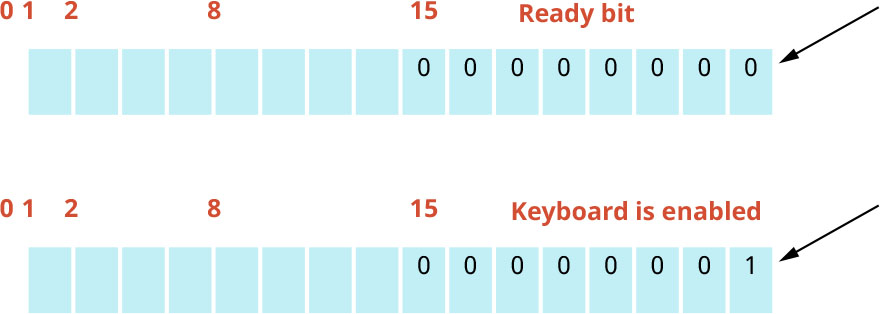
Figure 6.9 depicts the device register for a keyboard. Note that it has 2 bytes (16 bits). The data is in the first byte, and the second byte includes all zeros (i.e., from bit 8 to bit 15). When the user starts typing, the ready bit, which is bit number 15, sets to 1.
英語のヒント
図6.9は、キーボードのデバイスレジスタを示す。2バイト、つまり16ビットであることに注意しよう。最初のバイトにデータが入り、次のバイト、つまりビット8から15までは、すべて0である。利用者が入力を始めると、15番のビットであるレディービットが1になる。
attribution: Copyright Rice University, OpenStax, under CC BY 4.0 license · CC BY 4.0 · Source出典
Figure 6.9 In this device register for a keyboard, the ready bit is set to 1 for when a user starts using the keyboard. (attribution: Copyright Rice University, OpenStax, under CC BY 4.0 license)
図6.9 このキーボード用デバイスレジスタでは、利用者がキーボードを使い始めると、レディービットが1に設定される。(出典:著作権 Rice University、OpenStax。CC BY 4.0ライセンス)