第6章インフラストラクチャーの抽象化層:オペレーティングシステム
Address Space and Memory Space Managementアドレス空間とメモリ空間の管理
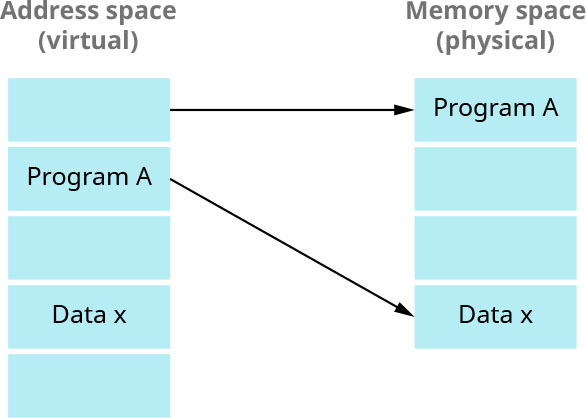
The address space is the set of addresses generated by programs as they reference instructions and data. The memory space holds the actual main memory locations that are directly addressable for processing. The OS is responsible for managing these memory and address spaces (Figure 6.6). To enhance performance, computers use virtual memory address space to create the illusion of a large and continuous block of memory for applications and the operating system to utilize. To do so, the computer’s physical memory is used in combination with a portion of a hard drive that contains the swap file or page file. Pages containing address space information for programs are moved in and out of physical memory as necessary to ensure that there is enough physical memory to hold the pages of programs that are running at a given time.
英語のヒント
アドレス空間は、プログラムが命令やデータを参照するときに生成するアドレスの集合である。メモリ空間には、処理のために直接アドレス指定できる、実際の主記憶の場所が含まれる。これらの空間を管理するのがOSの役割である(図6.6)。性能を高めるため、コンピューターは仮想メモリアドレス空間を使い、アプリケーションとOSが利用できる大きな連続したメモリ領域があるかのように見せる。そのために、物理メモリと、スワップファイルまたはページファイルを含むハードドライブの一部を組み合わせる。プログラムのアドレス空間の情報を含むページは、必要に応じて物理メモリへ出し入れされる。こうして、その時点で動作中のプログラムのページを保持するのに、十分な物理メモリを確保する。
attribution: Copyright Rice University, OpenStax, under CC BY 4.0 license · CC BY 4.0 · Source出典
Figure 6.6 The addresses of the data will be in the address space waiting for the execution to be moved to the memory space. (attribution: Copyright Rice University, OpenStax, under CC BY 4.0 license)
図6.6 データのアドレスはアドレス空間にあり、実行のためにメモリ空間へ移されるのを待つ。(出典:著作権 Rice University、OpenStax。CC BY 4.0ライセンス)
Computer memory consists of two main types: primary and secondary memory. The initial point of access for a processor that also serves as direct storage for the CPU is called primary memory. To be executed, programs must reside in primary memory. In multiprocessor systems, primary memory can be classified into three architectures. The first, uniform memory access (UMA), employs a single memory controller and, thus, access time to any memory location is the same across all processors. The second, non-uniform memory access (NUMA), is a computer memory design that uses different memory controllers, thus its memory access time varies depending on the memory’s location relative to a processor. The third, cache-only memory architecture (COMA), uses multiple interconnected processing nodes, each equipped with a processor (i.e., a cache). This allows for the dynamic allocation of data for optimized access and performance in multiprocessor environments.
英語のヒント
コンピューターのメモリには、主に一次記憶と二次記憶の二種類がある。プロセッサが最初にアクセスし、CPUの直接の記憶領域にもなるものを、一次記憶という。プログラムは、実行されるために一次記憶内に存在しなければならない。マルチプロセッサシステムでは、一次記憶は三つのアーキテクチャーに分類できる。第一のUMA(均一メモリアクセス)は、一つのメモリコントローラーを使うため、すべてのプロセッサから、どのメモリ位置へのアクセス時間も同じである。第二のNUMA(非均一メモリアクセス)は、異なるメモリコントローラーを使う設計で、プロセッサに対するメモリの位置によって、アクセス時間が変わる。第三のCOMA(キャッシュオンリーメモリアーキテクチャー)は、相互接続された複数の処理ノードを使い、それぞれにプロセッサ、つまりキャッシュを備える。これにより、マルチプロセッサ環境でアクセスと性能を最適化するため、データを動的に配置できる。
Memory that is used for long-term storage, housing the operating system, applications, and data that need to persist even when the power is off, is called secondary memory. Unlike primary memory, which is volatile and loses data during power interruptions, secondary memory is nonvolatile—meaning it retains data even during power failures—and thus it provides durability and data retention. Common examples of secondary memory include hard disk drives (HDDs) and solid-state drives (SSDs).
英語のヒント
電源を切っても残す必要があるOS、アプリケーション、データを収容し、長期保存に使う記憶装置を、二次記憶という。揮発性があり、電源が途切れるとデータを失う一次記憶とは異なり、二次記憶は不揮発性で、停電中もデータを保持する。そのため、耐久性とデータの保持が得られる。一般的な例には、ハードディスクドライブ(HDD)やソリッドステートドライブ(SSD)がある。
An OS must satisfy the policies of how much physical memory to allocate to each process and when to remove a process from memory. It must implement these policies using the following mechanisms: memory allocation and memory deallocation. Memory allocation is the process of setting aside sections of memory in a program to be used to store variables and instances of structures and classes. The memory allocation can be static memory allocation or dynamic memory allocation. Memory deallocation is the process of freeing the space corresponding to finished processes when that space is needed by the rest of the system. In addition, the OS must maintain mappings from virtual addresses to physical (i.e., page tables) and switch CPU context among address spaces.
英語のヒント
OSは、各プロセスにどれだけ物理メモリを割り当てるか、いつプロセスをメモリから取り除くかというポリシーを満たさなければならない。その実施には、メモリ割り当てとメモリ解放というメカニズムを使う。メモリ割り当ては、変数や、構造体・クラスのインスタンスを保存するために、プログラム中でメモリ領域を確保する処理である。静的メモリ割り当てと、動的メモリ割り当てがある。メモリ解放は、システムのほかの部分で領域が必要になったとき、終了したプロセスに対応する空間を空ける処理である。さらにOSは、仮想アドレスから物理アドレスへの対応、つまりページテーブルを保持し、アドレス空間の間でCPUのコンテキストを切り替えなければならない。
INDUSTRY SPOTLIGHT産業の現場から
Windowing Systemsウィンドウシステム
A windowing system is an OS software component that manages the display of graphical user interfaces (GUIs) on a computer screen. An investigation into the influence of windowing systems on various industries, particularly in sectors like retail marketing, has yielded insightful perspectives on how such systems impact business practices, productivity, customer engagement, and overall operational effectiveness. Namely, it’s been found that windowing systems significantly enhance user experience, which is critical to retail marketing. By making it easier to integrate marketing messages or interruptions with other media that customers are watching, a windowing system helps retailers conduct targeted marketing over the Internet. Windowing systems also improve the overall user experience for customers viewing the integrated content.
英語のヒント
ウィンドウシステムは、コンピューター画面上のグラフィカルユーザーインターフェース(GUI)の表示を管理する、OSのソフトウェア構成要素である。さまざまな産業、特に小売マーケティングなどへの影響を調べた研究から、業務慣行、生産性、顧客との関わり、業務全体の有効性に、どのような影響を与えるかについて、有益な知見が得られている。具体的には、ウィンドウシステムは、小売マーケティングに不可欠な利用体験を、大幅に向上させることがわかった。顧客が見ているほかのメディアに、マーケティングのメッセージや割り込みを組み込みやすくすることで、小売業者がインターネット上で対象を絞ったマーケティングを行うのを助ける。また、統合された内容を見る顧客の利用体験も、全体として改善する。
Device Drivers and I/O Devicesデバイスドライバーと入出力機器
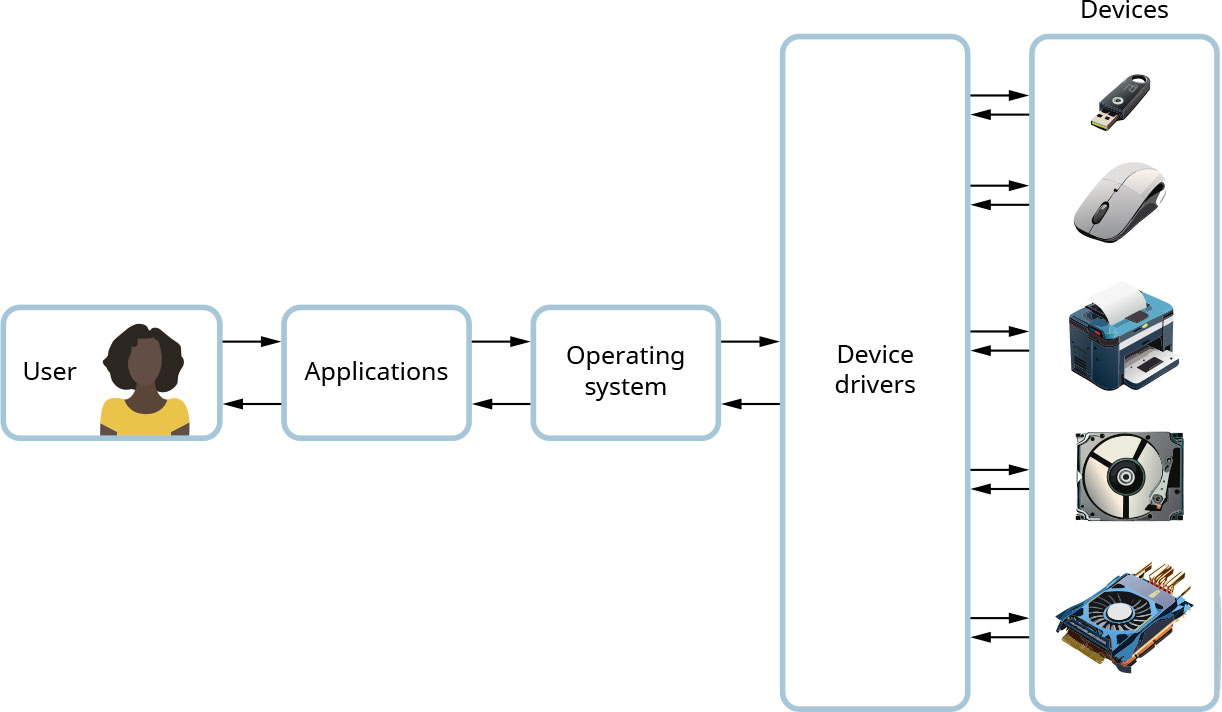
Computers have many input and output devices such as the keyboard, mouse, display, or USB port. Some examples of OS-specific devices include file system (disk), sockets (network), and frame buffer (video). A frame buffer is a portion of random access memory (RAM) containing a bitmap that drives a video display. A big chunk of the OS kernel deals with I/O (Input/Output). The OS provides a standard interface between programs/ users and devices to communicate with them (Figure 6.7). A device driver’s routines interact directly with specific device types and related hardware to initialize the device, request I/O, and respond to interrupts or errors. An interrupt is a signal to the processor from either software or hardware that indicate events that needs immediate attention. Examples of device drivers include Ethernet card drivers, video card drivers, sound card drivers, and PCIe (Peripheral Component Interconnect Express) device drivers, which are associated with graphics cards and other peripherals. Device drivers are implemented by device manufacturers or open-source contributors and support a standard, internal interface. They can execute in the OS address space and run at high privilege.
英語のヒント
コンピューターには、キーボード、マウス、ディスプレイ、USBポートなど、多くの入出力機器がある。OS固有の装置の例には、ファイルシステム(ディスク)、ソケット(ネットワーク)、フレームバッファー(映像)がある。フレームバッファーは、映像表示を駆動するビットマップを含む、RAMの一部である。OSカーネルのかなりの部分が、入出力を扱う。OSは、プログラムや利用者と機器の間に、通信のための標準インターフェースを提供する(図6.7)。デバイスドライバーのルーチンは、特定の機器の種類と、そのハードウェアに直接働きかけ、初期化、入出力の要求、割り込みやエラーへの応答を行う。割り込みは、ソフトウェアまたはハードウェアからプロセッサへの信号で、即座に対処すべき出来事を知らせる。ドライバーの例には、Ethernetカード、ビデオカード、サウンドカード用のものや、グラフィックスカードなどの周辺機器に関係するPCIe(Peripheral Component Interconnect Express)機器用のものがある。デバイスドライバーは、機器メーカーやオープンソースの貢献者が実装し、標準の内部インターフェースに対応する。OSのアドレス空間で、高い特権を持って実行できる。
attribution: Copyright Rice University, OpenStax, under CC BY 4.0 license · CC BY 4.0 · Source出典
Figure 6.7 Multiple I/O devices are typically connected to a computer. When the user starts using an application, the operating system will define the devices used by the application by using each device’s driver. (attribution: Copyright Rice University, OpenStax, under CC BY 4.0 license)
図6.7 通常、コンピューターには複数の入出力機器が接続されている。利用者がアプリケーションを使い始めると、OSは各機器のドライバーを使って、そのアプリケーションが使う機器を定める。(出典:著作権 Rice University、OpenStax。CC BY 4.0ライセンス)