第6章インフラストラクチャーの抽象化層:オペレーティングシステム
6.1 What Is an Operating System?6.1 オペレーティングシステムとは何か
Learning Objectives学習目標
By the end of this section, you will be able to:
この節を終えると、次のことができるようになる。
• Describe an operating system and its role in computing
• オペレーティングシステムと、コンピューティングにおけるその役割を説明する。
• Explain the architecture of operating systems
• オペレーティングシステムのアーキテクチャーを説明する。
An operating system (OS) is the core piece of software that typically manages and controls the interconnection of hardware and software on a computer. The OS is loaded upon start-up and is the key piece of software needed to operate any computerized device.
英語のヒント
オペレーティングシステム(OS)は、通常、コンピューター上のハードウェアとソフトウェアの相互接続を管理・制御する、中心となるソフトウェアである。OSは起動時に読み込まれ、コンピューターを内蔵するどんな機器を動作させるにも必要な、重要なソフトウェアである。
Introductionはじめに
There are many operating systems (OSs), and anyone using a modern computer is using one of them. The typical OSs for computers are Windows, macOS, and Linux and for mobile devices, iOS and Android (Figure 6.2). Microsoft Windows is a popular operating system, celebrated for its ease of use and broad software compatibility. Apple Inc.’s macOS, which is the driving force behind Apple computers, ensures tight hardware-software cohesion. Linux, a freely available open-source OS, is acclaimed for its reliability, safety, and adaptability. Linux source code has over 27 million lines of C, while Windows has over 50 million lines. Linux offers a variety of versions or distributions, such as Ubuntu for ease of use, Fedora for the latest features, Debian for stability, and Kali Linux for security tasks. Each version is designed to meet specific needs, from general computing to specialized applications. All the commercial operating systems today manage security for users.
英語のヒント
OSには多くの種類があり、現代のコンピューターを使う人は、誰でもそのいずれかを使っている。一般的なものは、コンピューターではWindows、macOS、Linux、モバイル機器ではiOSとAndroidである(図6.2)。Microsoft Windowsは、使いやすさと幅広いソフトウェア互換性で知られる、広く普及したOSだ。Appleのコンピューターを支えるmacOSは、ハードウェアとソフトウェアの緊密な一体性を確保する。自由に入手できるオープンソースOSのLinuxは、信頼性、安全性、適応性で高く評価されている。LinuxのソースコードはC言語で2,700万行を超え、Windowsは5,000万行を超える。Linuxには、使いやすさを重視するUbuntu、最新機能を重視するFedora、安定性を重視するDebian、セキュリティー作業向けのKali Linuxなど、さまざまな版、つまりディストリビューションがある。各版は、一般的な計算処理から専門的なアプリケーションまで、特定の要求を満たすように設計されている。今日の商用OSはすべて、利用者のセキュリティーを管理する。
attribution: Copyright Rice University, OpenStax, under CC BY 4.0 license · CC BY 4.0 · Source出典
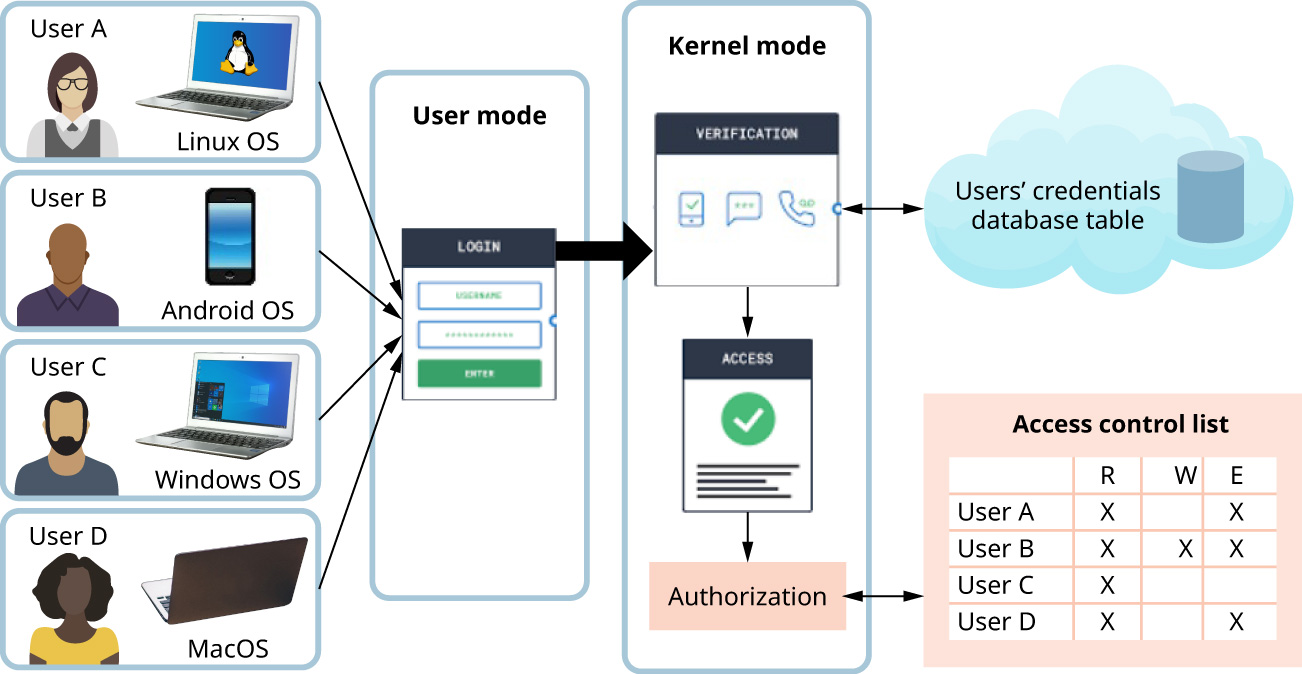
Figure 6.2 These days, organizations, such as companies and universities, must enable a variety of users using a variety of devices supported by a variety of operating systems to securely access their systems. (attribution: Copyright Rice University, OpenStax, under CC BY 4.0 license)
図6.2 今日、企業や大学などの組織は、多様なOSに対応した多様な機器を使う、多様な利用者が、安全に組織のシステムへアクセスできるようにしなければならない。(出典:著作権 Rice University、OpenStax。CC BY 4.0ライセンス)
The goal of this section is to explain what an OS is. Traditionally, we think of the OS as the means by which communication between applications that the user wants to run and the computer hardware that is responsible for running them is facilitated. Applications typically do not directly manipulate the hardware; instead, they must ask the OS to do this on their behalf. One of the primary goals of the OS from an application software point of view is isolation. Isolation ensures that the multiple programs that are running concurrently on the same CPU and memory operate independently without interfering with each other’s execution or data. This maintains system stability and security. From a hardware point of view, the hardware is designed to enable programmers to write OSs and applications. In general, the OS mediates a program’s access to hardware resources such as the CPU (for computation); memory (for volatile storage) and disk, flash memory, and so on (for persistent storage); TCP/IP stacks, Wi-Fi, and Ethernet network interface cards, and so forth (for network communications); and keyboard, display, touch screen, audio, game controllers, and so on (for input/output). Isolation is what allows device manufacturers to update their hardware without requiring software developers to rewrite their programs each time.
英語のヒント
この節の目的は、OSとは何かを説明することである。従来、OSは、利用者が動かしたいアプリケーションと、それを実行するハードウェアの間のやり取りを容易にする手段として捉えられている。通常、アプリケーションはハードウェアを直接操作せず、自分の代わりに操作するようOSに依頼する。アプリケーションソフトウェアから見たOSの主要な目的の一つは、分離である。分離により、同じCPUとメモリ上で並行して動く複数のプログラムが、互いの実行やデータに干渉せず、独立して動作できる。これによって、システムの安定性とセキュリティーが保たれる。ハードウェアの観点では、プログラマーがOSとアプリケーションを書けるように、ハードウェアが設計されている。一般に、OSはプログラムのハードウェア資源へのアクセスを仲介する。その資源には、計算用のCPU、揮発性記憶のためのメモリ、持続的な保存のためのディスクやフラッシュメモリなど、ネットワーク通信用のTCP/IPスタック、Wi-Fi、Ethernetネットワークインターフェースカードなど、そして入出力用のキーボード、ディスプレイ、タッチスクリーン、音声機器、ゲームコントローラーなどがある。分離があるからこそ、機器メーカーは、ソフトウェア開発者に毎回プログラムを書き直してもらわなくても、ハードウェアを更新できる。
LINK TO LEARNING学習リンク
To learn more about operating systems, read this informative article on understanding operating systems (https://openstax.org/r/76opsys) from How-To Geek.
英語のヒント
OSをさらに学ぶには、How-To Geekの、OSの理解に役立つこの記事(https://openstax.org/r/76opsys)を読んでみよう。
Monitoring Accessアクセスの監視
Operating systems play a crucial role in managing and controlling access to hardware devices within computer systems, including peripherals such as keyboards, mice, hard drives, and other critical components. They act as gatekeepers, ensuring that interactions with these devices occur smoothly and securely. One of the key responsibilities of an OS is monitoring hardware access, which involves tracking and regulating which applications or users can communicate with the hardware and how they do so. This capability is vital for maintaining a system’s overall integrity and performance.
英語のヒント
OSは、キーボード、マウス、ハードドライブなどの周辺機器や、ほかの重要な構成要素を含むハードウェア機器へのアクセスを、管理・制御する重要な役割を持つ。門番として、これらの機器とのやり取りが円滑かつ安全に行われるようにする。OSの主要な役割の一つは、ハードウェアへのアクセスを監視することである。どのアプリケーションや利用者が、ハードウェアとどのように通信できるかを追跡・制御する。この機能は、システム全体の完全性と性能を維持するうえで不可欠である。
In addition to hardware monitoring, the OS is instrumental in enforcing authentication mechanisms. This means the OS helps verify that only authorized users gain access to certain devices, especially those considered sensitive. By managing user permissions and access levels, the OS can prevent unauthorized access to critical hardware resources, safeguarding against potential security breaches or data theft. This aspect of the OS is particularly important in environments where access to information and resources needs to be tightly controlled, such as in corporate or government settings.
英語のヒント
OSは、ハードウェアの監視に加え、認証の仕組みを確実に実施するうえでも重要である。特に機密性が高いとされる機器など、特定の機器に、権限のある利用者だけがアクセスできるように確認する。利用者の許可とアクセスレベルを管理することで、重要なハードウェア資源への不正アクセスを防ぎ、セキュリティー侵害やデータ窃盗から保護する。OSのこの役割は、企業や政府機関など、情報や資源へのアクセスを厳密に制御する必要のある環境で、特に重要になる。
The role of an IT administrator is to define which hardware devices are available within a company’s network and determine their sensitivity levels. This task requires a deep understanding of both the technical specifications of the hardware and the security implications of its use.
英語のヒント
IT管理者の役割は、会社のネットワーク内で利用できるハードウェア機器を定め、それぞれの機密性のレベルを決めることだ。そのためには、ハードウェアの技術仕様と、それを使用することがセキュリティーにもたらす影響の両方を、深く理解する必要がある。
You may be wondering: How is the OS organized? How are resources shared across users? How is one user or process protected from another? Such questions relate to the characteristics or properties that are considered when designing an OS. Table 6.1 depicts various OS design questions and the properties they are associated with, such as structure, sharing, naming, protection, security, performance, availability, and reliability, among others.
英語のヒント
OSはどう構成されるのか。利用者間で資源をどう共有するのか。ある利用者やプロセスを、ほかの利用者やプロセスからどう保護するのか。このような疑問を抱くかもしれない。これらは、OSの設計時に検討する特徴や性質に関係する。表6.1は、構造、共有、命名、保護、セキュリティー、性能、可用性、信頼性などについて、OS設計上のさまざまな問いと、対応する性質を示している。
Property 性質 | Question 問い |
|---|---|
Structure 構造 | How is the OS organized? OSは、どのように構成されるか。 |
Sharing 共有 | How are resources shared across users? 利用者間で資源をどう共有するか。 |
Naming 命名 | How are resources named, and what is the scope? 資源にどう名前を付け、その名前の有効範囲をどう定めるか。 |
Protection 保護 | How is one user or process protected from another? ある利用者やプロセスを、ほかの利用者やプロセスからどう保護するか。 |
Table 6.1 Operating System Design Considerations
表6.1 オペレーティングシステム設計での検討事項
Property 性質 | Question 問い |
|---|---|
Security セキュリティー | How is the integrity of the OS and its resources ensured? OSとその資源の完全性をどう確保するか。 |
Performance 性能 | How does an OS avoid making all the applications run slowly? すべてのアプリケーションの動作を遅くしてしまうことを、OSはどう避けるか。 |
Availability 可用性 | Can the applications always access the services they need? アプリケーションは、必要なサービスにいつでもアクセスできるか。 |
Reliability 信頼性 | How often do things go wrong either with the hardware or with a program? ハードウェアやプログラムに問題が起こる頻度は、どの程度か。 |
Extensibility 拡張性 | Can new features be added? 新しい機能を追加できるか。 |
Communication 通信 | How do programs exchange information, including across a network? ネットワークを介する場合も含め、プログラムは情報をどう交換するか。 |
Concurrency 並行性 | How are simultaneous activities such as computation and I/O created and controlled? 計算と入出力など、同時に行う活動をどう作り、制御するか。 |
Scale 規模 | What happens as demands or resources increase? 要求や資源が増えたら、何が起こるか。 |
Persistence 永続性 | How can data be made to last longer than program executions? プログラムの実行が終わった後まで、データをどう存続させるか。 |
Distribution 分散 | How can a computation be allowed to span hardware, such as machine/network, boundaries? 機械やネットワークなどのハードウェアの境界を越えて、計算をどう実行できるようにするか。 |
Accounting 利用量の計測 | How can a user’s resource usage of an OS be tracked, and how might the user be charged for it? 利用者によるOS資源の使用量をどう追跡し、それに対してどう課金できるか。 |
Auditing 監査 | Can actions and processes be reconstructed? 行動や処理を再構成できるか。 |
Table 6.1 Operating System Design Considerations
表6.1 オペレーティングシステム設計での検討事項