第6章インフラストラクチャーの抽象化層:オペレーティングシステム
6.5 File Systems6.5 ファイルシステム
Learning Objectives学習目標
By the end of this section, you will be able to:
この節を終えると、次のことができるようになる。
• Explain features of various file systems
• さまざまなファイルシステムの特徴を説明する。
• Discuss file system structures and layers
• ファイルシステムの構造と層を論じる。
In this module, we learn about files, file management, disk devices, file systems, file system interface, and distributed file systems.
このモジュールでは、ファイル、ファイル管理、ディスク装置、ファイルシステム、ファイルシステムインターフェース、分散ファイルシステムを学ぶ。
Files, File Systems, Directories, and File Managementファイル、ファイルシステム、ディレクトリー、ファイル管理
A file is a collection of related information that is stored on a storage instrument such as a disk or secondary/ virtual storage. It is the smallest storage unit from the user’s perspective. The file name includes two parts: name and extension (e.g., filename.txt). Each extension is for a specific purpose such as .exe (in Windows OS) to run a program and .txt for text files.
英語のヒント
ファイルは、ディスクや二次記憶・仮想記憶などの記憶装置に保存された、関連する情報の集まりである。利用者の視点では、最小の記憶単位である。ファイル名は、名前と拡張子という二つの部分から構成される。たとえばfilename.txtである。拡張子にはそれぞれ特定の用途があり、.exeはWindows OSでプログラムを実行するため、.txtはテキストファイルのために使う。
A file system is responsible for defining file names, storing files on a storage device, and retrieving files from a storage device. When designing a file system for managing many files, some issues to consider are as follows: most files are small so per-file overheads must be low; most of the disk space is in large files; many of the I/O operations are for large files so performance must be good for large files; files may grow unpredictably over time; users want to use text names to refer to files.
英語のヒント
ファイルシステムは、ファイル名を定め、記憶装置へファイルを保存し、記憶装置からファイルを取り出す役割を担う。多数のファイルを管理するファイルシステムを設計するとき、考慮すべき事柄には次のようなものがある。大半のファイルは小さいので、ファイルごとの管理負担を小さくする必要がある。ディスク領域の大部分は大きなファイルが占める。I/O操作の多くも大きなファイルに対するものなので、大きなファイルを扱う性能をよくする必要がある。ファイルは、時間とともに予測できない増え方をすることがある。利用者は、ファイルを指すのに文字で表した名前を使いたい。
Special disk structures called directories are used to map names to support hierarchical directory structures. A directory is a set of files that is managed by the OS, and it also contains all the required information about the files, such as attributes, location, and ownership. The UNIX/Linux approach is as follows: directories are stored on disk just like regular files except with extra information to indicate that it is a directory. Each directory contains <name, address> pairs. The file referred to by the address may be another directory; hence, we can have nested and hierarchical directory structures.
英語のヒント
ディレクトリーというディスク上の特別な構造を、名前の対応付けに使い、階層的なディレクトリー構造を実現する。ディレクトリーは、OSが管理するファイルの集合であり、属性、場所、所有者など、ファイルについて必要な情報もすべて含む。UNIX/Linuxでは、ディレクトリーであることを示す追加情報がある点を除き、通常のファイルと同じようにディスクへ保存する。各ディレクトリーには、<名前, アドレス>の組が入っている。そのアドレスが指すファイルが別のディレクトリーである場合もあるので、入れ子の階層的なディレクトリー構造を作れる。
The problems facing modern file systems include disk management, naming, and protection. File systems are often trying to improve access to files by minimizing seeks, sharing space between users, and making efficient use of disk space. A system’s ability to reduce faults and ensure that the information in the system survives OS crashes and hardware failures is called its reliability. In addition to improving reliability, a file system should guarantee a high level of protection by maintaining isolation between users and controlling the sharing of resources.
英語のヒント
現代のファイルシステムが直面する問題には、ディスク管理、命名、保護がある。ファイルシステムは、シークを最小にし、利用者間で領域を共有し、ディスク領域を効率よく使うことで、ファイルへのアクセスを改善しようとする。障害を減らし、OSのクラッシュやハードウェア故障が起きてもシステム内の情報を残せる能力を、信頼性という。ファイルシステムには、信頼性を高めるだけでなく、利用者間の分離を保ち、リソースの共有を制御して、高い保護水準を保証することも求められる。
Disk Devicesディスク装置
While file systems are a layer of abstraction that provides structured storage and defines logical objects such as files and directories, disk devices are considered raw storage. Data that can be directly accessed by the CPU with minimum or no delay and does not survive a power failure is held in primary storage. Persistent memory that survives power failures most of the time, such as spinning disks, SSDs, and USB drives, is considered secondary storage. Routines that interact with disks are typically at a very low level in the OS and are used by many components such as file systems and virtual machines. These secondary storage devices may handle the scheduling of disk operations, error handling, and often the management of space on disks. A trend is for disks to do more of this themselves.
英語のヒント
ファイルシステムは、構造化された記憶領域を提供し、ファイルやディレクトリーといった論理的な対象を定義する抽象化の層である。それに対し、ディスク装置は、加工されていない記憶領域とみなされる。CPUが遅延なし、または最小限の遅延で直接アクセスでき、電源断に耐えて残ることはないデータは、一次記憶に置かれる。回転ディスク、SSD、USBドライブなど、多くの場合、電源断後も内容が残る持続的な記憶領域は、二次記憶とみなされる。ディスクとやり取りするルーチンは、通常、OSの非常に低い層にあり、ファイルシステムや仮想マシンなど、多くの構成要素が利用する。二次記憶装置は、ディスク操作のスケジューリング、エラー処理、しばしばディスク領域の管理も扱う。ディスク自身がこれらをより多く行う傾向にある。
File System Architecturesファイルシステムのアーキテクチャー
Operating systems use various methods to locate files by their names, and the methodology often depends on their underlying file system architecture. To illustrate these concepts, here are some examples from UNIX-like systems and Windows:
英語のヒント
OSは、名前からファイルの位置を見つけるために、さまざまな方法を使う。その方法は、多くの場合、土台となるファイルシステムのアーキテクチャーに依存する。これらの概念を具体的に示すため、UNIX系システムとWindowsの例を挙げる。
• UNIX/Linux (Inodes): In UNIX-like systems, the file system uses a structure called an inode to represent files and directories. An inode contains metadata about a file or directory but not its name. The name-to-inode mapping is stored in directories, which are special files that list names of files and their corresponding inodes. When searching for a file by name, the OS starts at the root directory and follows the path specified in the file name. Each part of the path is looked up in the current directory’s list of names and their associated inodes. The OS reads the directory file, finds the name, and retrieves the inode number, which then leads to the inode itself. The inode provides the location of the data blocks, allowing the OS to access the file’s data. This process may involve multiple steps if the file is in a nested directory structure.
英語のヒント
• UNIX/Linux(inode):UNIX系システムのファイルシステムは、inodeという構造でファイルやディレクトリーを表す。inodeには、それらのメタデータが入るが、名前は入らない。名前とinodeの対応は、ファイル名とそれに対応するinodeを列挙した特別なファイルである、ディレクトリーに保存する。名前でファイルを探すとき、OSはルートディレクトリーから始め、ファイル名で指定されたパスをたどる。パスの各部分を、現在のディレクトリー内の名前とinodeの対応一覧で調べる。OSは、ディレクトリーファイルを読み、名前を見つけ、inode番号を取り出し、その番号からinode本体へ進む。inodeがデータブロックの位置を提供するので、OSはファイルのデータへアクセスできる。ファイルが入れ子のディレクトリー構造内にある場合、この処理には複数の段階が必要になることがある。
• Windows (File Allocation Table and NTFS): In File Allocation Table (FAT) format, files are located using a table that maps file names to the clusters (blocks) on the disk where their data is stored. The FAT is essentially a list, with each entry containing the location of the next part of the file. This creates a chain that the OS follows to read the entire file. In New Technology File System (NTFS), files are located using a Master File Table (MFT), and each file and directory on an NTFS volume has an entry in the MFT containing data, including the file name, size, time stamps, permissions, and the locations of the file’s data on disk. When searching for a file, the OS consults the MFT to find the entry corresponding to the file name, which then provides the information necessary to access the file’s data.
英語のヒント
• Windows(ファイルアロケーションテーブルとNTFS):ファイルアロケーションテーブル(FAT)形式では、ファイル名と、データが入っているディスク上のクラスター(ブロック)を対応付ける表を使い、ファイルを見つける。FATは、本質的には一覧であり、各項目には、そのファイルの次の部分の位置が入る。これが鎖を作り、OSはそれをたどってファイル全体を読む。New Technology File System(NTFS)では、マスターファイルテーブル(MFT)でファイルを見つける。NTFSボリュームの各ファイルやディレクトリーには、MFT内の項目があり、ファイル名、大きさ、タイムスタンプ、権限、ディスク上のファイルデータの位置などが入る。ファイルを探すとき、OSはMFTを調べ、ファイル名に対応する項目を見つける。その項目から、ファイルデータへアクセスするために必要な情報を得る。
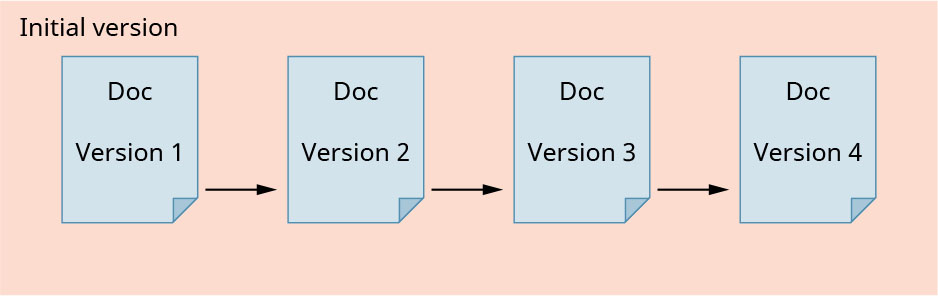
As you may recall, files represent values stored on disk and directories represent file metadata. File systems define operations on objects such as create, read, and write, and they may also provide higher-level services such as accounting and quotas, incremental backup indexing or search, file versioning, and encryption. A quota is the amount of space to store files based on the available memory space. Quotas are used to protect the system from unnecessary load and help in organizing the data in the storage. An incremental backup is a backup image containing the pages that have been updated from the time of the previous backup. The method that converts the data into secret code that hides the data’s true meaning is called encryption. The system that allows a file to exist in several versions at the same time, which gives the user complete control over file creation as in the file versioning example, is called file versioning (Figure 6.33).
英語のヒント
思い出してほしいが、ファイルはディスクに保存された値を表し、ディレクトリーはファイルのメタデータを表す。ファイルシステムは、対象に対する作成、読み取り、書き込みなどの操作を定義する。また、使用量の集計とクォータ、増分バックアップの索引付けや検索、ファイルの版管理、暗号化など、より高い水準のサービスを提供する場合もある。クォータは、利用可能なメモリ領域に基づく、ファイル保存用の領域量である。クォータは、不要な負荷からシステムを守り、記憶領域内のデータを整理するのに役立つ。増分バックアップは、前回のバックアップ以後に更新されたページを含むバックアップイメージである。データの本当の意味を隠す秘密の符号へ、データを変換する方法を、暗号化という。一つのファイルを同時に複数の版で存在させ、利用者がファイルの作成を完全に制御できるようにする仕組みが、ファイルの版管理である。図6.33にその例を示す。
attribution: Copyright Rice University, OpenStax, under CC BY 4.0 license · CC BY 4.0 · Source出典
Figure 6.33 In file versioning, the OS saves all copies of a file (in this case, a doc or document file) . (attribution: Copyright Rice University, OpenStax, under CC BY 4.0 license)
図6.33 ファイルの版管理では、OSはファイルのすべてのコピーを保存する。この例は、doc、つまり文書ファイルである。(出典:著作権 Rice University、OpenStax。CC BY 4.0ライセンス)
File systems are concerned with lower-level characteristics such as performance and failure resilience. Both performance and failure resilience may be strongly affected by hardware characteristics.
英語のヒント
ファイルシステムは、性能や障害への強さなど、低い水準の特性にも関わる。性能と障害への強さは、どちらもハードウェアの特性から大きな影響を受けることがある。