第11章Webアプリケーション開発
11.6 Sample Ethereum Blockchain Web 2.0/Web 3.0 Application11.6 Ethereumブロックチェーンを使うWeb 2.0/Web 3.0アプリケーションの例
Learning Objectives学習目標
By the end of this section, you will be able to:
この節を終えると、次のことができるようになる。
• Build a hybrid Ethereum blockchain Web 3.0 application
• Ethereumブロックチェーンを使う、ハイブリッドなWeb 3.0アプリケーションを構築する。
• Create the React app and install dependencies
• Reactアプリを作成し、依存パッケージをインストールする。
• Create the smart contract
• スマートコントラクトを作成する。
• Create the front-end React components
• フロントエンドのReactコンポーネントを作成する。
• Add Web3 to the React app
• ReactアプリにWeb3を追加する。
• Configure the React app to communicate with the smart contract
• スマートコントラクトと通信するように、Reactアプリを設定する。
So far, this chapter has explored how to develop a Todo web application, as well as a Todo mobile application, using Bootstrap, Django, React, React Native, and Node. In this final section, you will learn how to create a simple Todo application using React with Web 3.0 powered by Ethereum smart contracts on the blockchain.
英語のヒント
本章ではここまで、Bootstrap、Django、React、React Native、Nodeを使い、Todo WebアプリケーションとTodoモバイルアプリケーションを開発する方法を見てきた。最後のこの節では、Reactと、ブロックチェーン上のEthereumスマートコントラクトで動作するWeb 3.0を使い、単純なTodoアプリケーションを作る方法を学ぶ。
Creating a Todo Ethereum Blockchain Web 3.0 ApplicationEthereumブロックチェーンを使うTodo Web 3.0アプリケーションの作成
As you have learned, Todo applications can be created using different tools. In this section, you will explore the Ethereum blockchain, which creates a secure peer-to-peer network through the use of a smart contract, which is a secure digital agreement that enables users to transact directly with each other via the blockchain. You will use React to create a Todo Ethereum blockchain Web 3.0 application.
英語のヒント
これまで学んだように、Todoアプリケーションは、さまざまなツールを使って作成できる。この節では、スマートコントラクトによって安全なピアツーピアネットワークを作る、Ethereumブロックチェーンを取り上げる。スマートコントラクトは、安全なデジタルの合意であり、利用者がブロックチェーンを通じて直接取引できるようにする。Reactを使い、Ethereumブロックチェーンを用いたTodo Web 3.0アプリケーションを作成する。
LINK TO LEARNING学びを広げるリンク
Ganache (https://openstax.org/r/76Ganache) is a personal Ethereum blockchain environment that provides developers with the means to use a private blockchain for development and testing. Ganache can emulate the Ethereum blockchain, and because it is a private blockchain, it allows developers control over development and testing processes.
英語のヒント
Ganache(https://openstax.org/r/76Ganache)は、個人用のEthereumブロックチェーン環境であり、開発者が開発やテストに私的なブロックチェーンを使う手段を提供する。Ethereumブロックチェーンをエミュレートでき、私的なブロックチェーンであるため、開発者が開発とテストの過程を管理できる。
Prerequisites前提条件
To build the Todo Ethereum blockchain Web 3.0 application, you should use React v17.0.2, Bootstrap v4.5.0, Node v14.17.5, Web 3.js v1.2.2, Truffle v5.0.2, and Solidity v0.8.11. In addition, Ganache is used as the personal blockchain for development. To begin, do the following:
Ethereumブロックチェーンを使うTodo Web 3.0アプリケーションを作るには、React v17.0.2、Bootstrap v4.5.0、Node v14.17.5、Web 3.js v1.2.2、Truffle v5.0.2、Solidity v0.8.11を使う。また、開発用の個人ブロックチェーンとしてGanacheを使う。まず、次のことを行う。
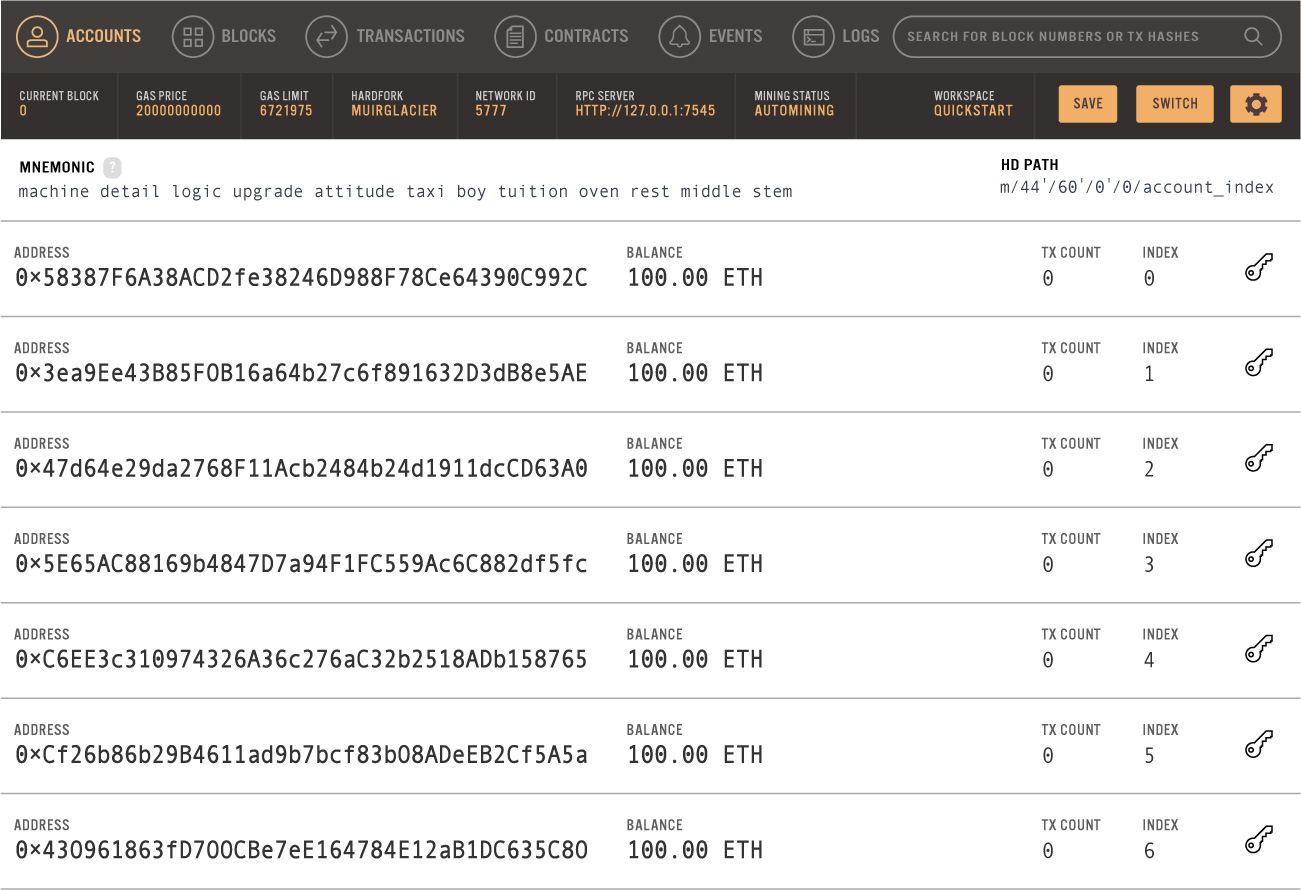
• Download and install Ganache. Launch Ganache and choose the quick start Ethereum option as seen in Figure 11.46.
• Ganacheをダウンロードし、インストールする。Ganacheを起動し、図11.46のように、Ethereumのクイックスタートを選ぶ。
credit: Ganache, under MIT license · MIT as stated in caption · Source出典
Figure 11.46 This is the quick start Ethereum option that is available after installing Ganache. (credit: Ganache, under MIT license)
図11.46 Ganacheのインストール後に利用できる、Ethereumのクイックスタート。(クレジット:Ganache、MITライセンス)
• The next step is to install the MetaMask Chrome plug-in. Configure the MetaMask account and log in.
• 次に、Chrome用のMetaMaskプラグインをインストールする。MetaMaskのアカウントを設定し、ログインする。
Creating the React AppReactアプリの作成
Previously in this chapter, you created React apps. For this application, you need to create a new React app.
本章の前の節でもReactアプリを作成したが、今回のアプリケーション用には、新しいReactアプリを作る必要がある。
To create the new React app, run the following command:
新しいReactアプリを作成するには、次のコマンドを実行する。
$ npx create-react-app ethreactInstall Bootstrap, Web3, and Other DependenciesBootstrap・Web3・その他の依存パッケージのインストール
To use Bootstrap and Web3 in a React app, corresponding packages must be installed. To do this, in the ethreact/ directory, run the following commands:
ReactアプリでBootstrapとWeb3を使うには、対応するパッケージをインストールする必要がある。そのために、ethreact/ディレクトリで、次のコマンドを実行する。
$ npm install bootstrap@4.6.0 reactstrap@8.9.0 --legacy-peer-deps
$ npm install react-bootstrap
$ npm install web3@1.2.2
Next, import the Bootstrap CSS file into the React application. Open ethreact/src/index.js and add the following Bootstrap import.
次に、BootstrapのCSSファイルをReactアプリケーションへインポートする。ethreact/src/index.jsを開き、次のBootstrapのインポートを追加する。
import React from 'react';
import ReactDOM from 'react-dom';
import 'bootstrap/dist/css/bootstrap.css';
import './index.css';
import App from './App';
import reportWebVitals from './reportWebVitals';

ReactDOM.render(
  <React.StrictMode>     <App />   </React.StrictMode>,
  document.getElementById('root')
);

// If you want to start measuring performance in your app, pass a function
// to log results (for example: reportWebVitals(console.log))
// or send to an analytics endpoint. Learn more: https://bit.ly/CRA-vitals
reportWebVitals();
LINK TO LEARNING学びを広げるリンク
Truffle (https://openstax.org/r/76Truffle) provides a suite of tools that can be used to develop smart contracts. Truffle offers end-to-end development that includes the ability to develop, test, and implement smart contracts, while using Truffle to manage the workflow.
英語のヒント
Truffle(https://openstax.org/r/76Truffle)は、スマートコントラクトの開発に使えるツール一式を提供する。Truffleで作業の流れを管理しながら、スマートコントラクトの開発・テスト・実装を行う、一貫した開発を可能にする。
Creating the Smart Contractスマートコントラクトの作成
To develop the Ethereum smart contract, you will use the Truffle Framework, which is a popular suite of tools used to develop smart contracts. Implement the Truffle Framework using Solidity, which is a high-level, object-oriented language that is focused on the implementation of smart contracts. To use the Truffle Framework, in the ethreact/ directory, run the installation following command:
Ethereumのスマートコントラクトを開発するために、スマートコントラクト開発用のよく使われるツール群である、Truffle Frameworkを使う。スマートコントラクトの実装に重点を置く、高水準のオブジェクト指向言語Solidityを使って、Truffle Frameworkを実装する。Truffle Frameworkを使うには、ethreact/ディレクトリで、次のインストールコマンドを実行する。
$ npm install -g truffle@5.0.2To set up the React app to use Truffle, in the ethreact/ directory, run the following command, which may take several minutes.
ReactアプリでTruffleを使う設定をするには、ethreact/ディレクトリで次のコマンドを実行する。数分かかる場合がある。
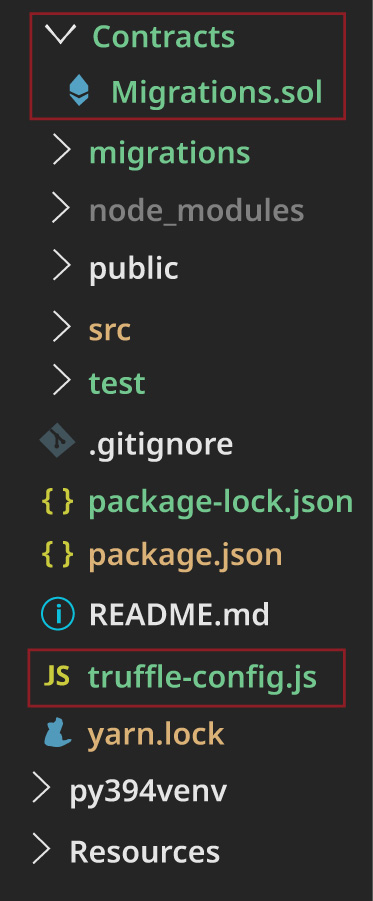
$ truffle initWhen the initialization is completed, the contracts/ directory and Migrations.sol file will be generated. In addition, the truffle-config.js file will be generated, as highlighted in Figure 11.47.
初期化が完了すると、contracts/ディレクトリとMigrations.solファイルが生成される。また、図11.47のように、truffle-config.jsファイルも生成される。
rendered with Truffle by Truffle Security Co., under MIT license; attribution: Copyright Rice University, OpenStax, under CC BY 4.0 license · MIT as stated in caption / CC BY 4.0 · Source出典
Figure 11.47 Here is the truffle-config.js file. (rendered with Truffle by Truffle Security Co., under MIT license; attribution: Copyright Rice University, OpenStax, under CC BY 4.0 license)
図11.47 truffle-config.jsファイル。(Truffle Security Co.によるMITライセンスのTruffleで表示。出典:Copyright Rice University, OpenStax、CC BY 4.0ライセンス)
To create the smart contract, in the ethreact/contracts/ directory, create the file TodoList.sol and add the following code.
スマートコントラクトを作成するには、ethreact/contracts/ディレクトリにTodoList.solファイルを作り、次のコードを追加する。
pragma solidity ^0.5.0;
contract TodoList {
  uint public taskCount = 0;

  struct Task {
    uint id;
    string content;
    bool completed;
  }

  mapping(uint => Task) public tasks;

  event TaskCreated(
    uint id,
    string content,
    bool completed
  );

  event TaskCompleted(
    uint id,
    bool completed
  );

  constructor () public {
    createTask("Check out dappuniversity.com");
  }

  function createTask(string memory _content) public {
    taskCount ++;
    tasks[taskCount] = Task(taskCount, _content, false);
    emit TaskCreated(taskCount, _content, false);
  }
  function toggleCompleted(uint _id) public {
    Task memory _task = tasks[_id];
    _task.completed = !_task.completed;
    tasks[_id] = _task;
    emit TaskCompleted(_id, _task.completed);
  }

}
Next, compile the smart contract. In the ethreact/ directory, run the following command:
次に、スマートコントラクトをコンパイルする。ethreact/ディレクトリで、次のコマンドを実行する。
$ truffle compileThis command should provide a status confirming that the smart contract has been successfully compiled as seen in the following code:
英語のヒント
このコマンドを実行すると、次のコードのように、スマートコントラクトが正常にコンパイルされたことを確認できる状態表示が出るはずである。
> Compiled successfully using:
  - solc: 0.5.16+commit.9c3226ce.Emscription.clang
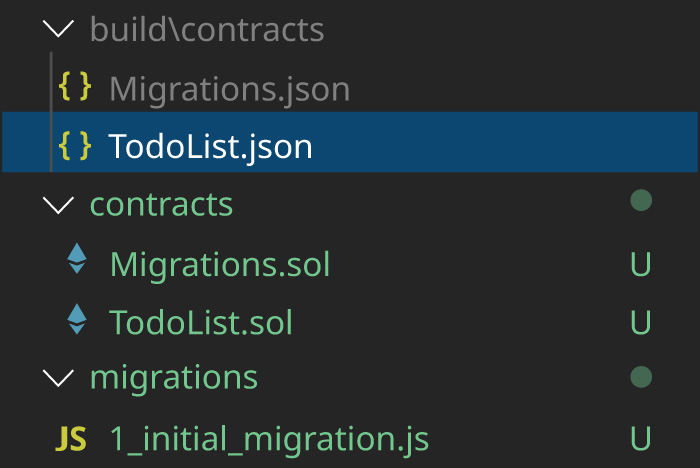
Figure 11.48 shows how this process will generate a few files, including two JSON files in the build/contracts/ directory and a migration file in the migrations/ directory.
図11.48は、この処理によって、build/contracts/ディレクトリ内の2つのJSONファイルと、migrations/ディレクトリ内のマイグレーションファイルなど、いくつかのファイルが生成されることを示している。
rendered using JSON; attribution: Copyright Rice University, OpenStax, under CC BY 4.0 license · CC BY 4.0 · Source出典
Figure 11.48 These are the JSON and migration files generated when the smart contract is compiled. (rendered using JSON; attribution: Copyright Rice University, OpenStax, under CC BY 4.0 license)
図11.48 スマートコントラクトのコンパイル時に生成される、JSONファイルとマイグレーションファイル。(JSONを使って表示。出典:Copyright Rice University, OpenStax、CC BY 4.0ライセンス)
The TodoList.json file in the build/contracts/ directory is the smart contract Abstract Binary Interface (ABI) file. This file contains the following:
build/contracts/ディレクトリ内のTodoList.jsonは、スマートコントラクトのAbstract Binary Interface(ABI)ファイルである。このファイルには、次のものが含まれる。
• compiled bytecode from the Solidity smart contract code that can run on the Ethereum Virtual Machine (EVM)
• Solidityのスマートコントラクトのコードからコンパイルされた、Ethereum Virtual Machine(EVM)上で動作できるバイトコード。
• a JSON representation of the smart contract.
• スマートコントラクトのJSON表現。
Next, configure the React app to connect to the Ganache blockchain network. To do this, open the ethreact/ truffle-config.js file and uncomment the two sections shown. Under “networks,” enable the connection host and port to the Ganache blockchain network. Ensure that the host and port are in sync with the following settings in Ganache.
英語のヒント
次に、Ganacheのブロックチェーンネットワークへ接続するよう、Reactアプリを設定する。そのために、ethreact/truffle-config.jsファイルを開き、示されている2か所のコメントを解除する。“networks”の下で、Ganacheブロックチェーンネットワークへの接続用のホストとポートを有効にする。ホストとポートが、次に示すGanacheの設定と一致していることを確認する。
development: {
  host: "127.0.0.1",     // Localhost (default: none)
  port: 7545,            // Standard Ethereum port (default: none)
  network_id: "*",       // Any network (default: none)
},
Next, under “compilers,” enable the solc optimizer.
次に、“compilers”の下で、solcのオプティマイザーを有効にする。
// Configure your compilers
compilers: {
  solc: {
    // version: "0.5.1",    // Fetch exact version from solc-bin (default: truffle's version)
    // docker: true,        // Use "0.5.1" you've installed locally with docker (default: false)
    // settings: {          // See the solidity docs for advice about optimization and evmVersion
     optimizer: {
       enabled: true,
       runs: 200
     },
    //  evmVersion: "byzantium"
    // }
  }
},
Next, create a migration script to deploy the smart contract to the Ganache blockchain network. In the ethreact/migrations/ directory, create the file 2_deploy_contracts.js and add the following code.
次に、Ganacheブロックチェーンネットワークへスマートコントラクトを配置するための、マイグレーションスクリプトを作成する。ethreact/migrations/ディレクトリに2_deploy_contracts.jsファイルを作り、次のコードを追加する。
var TodoList = artifacts.require("./TodoList.sol");

module.exports = function(deployer) {
  deployer.deploy(TodoList);
};
The next step is to migrate the contract. In the ethreact/ directory, run this command.
次に、コントラクトを移行する。ethreact/ディレクトリで、このコマンドを実行する。
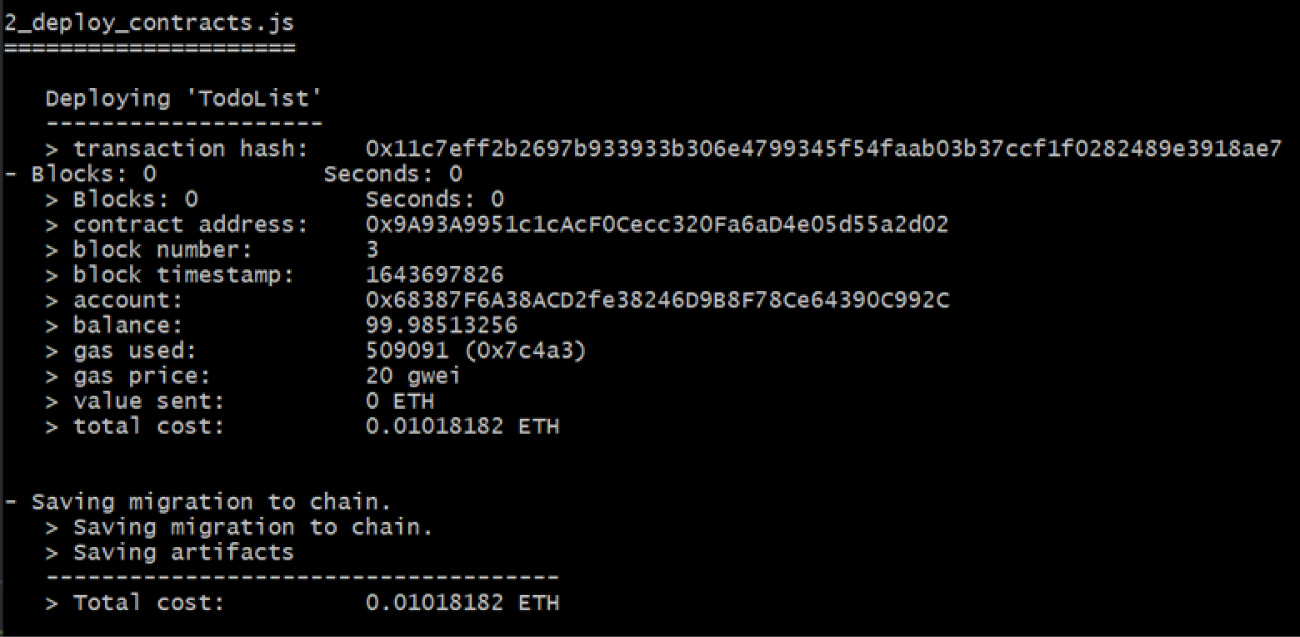
$ truffle migrateFigure 11.49 displays how the contract will be migrated and provides the transaction details. You should make a note of the contract address in the output because it will be added to the config.js file later.
英語のヒント
図11.49は、コントラクトの移行の様子と、取引の詳細を示している。出力されたコントラクトのアドレスは、後でconfig.jsファイルへ追加するので、記録しておく。
attribution: Copyright Rice University, OpenStax, under CC BY 4.0 license · CC BY 4.0 · Source出典
Figure 11.49 Here are the transaction details for migrating the contract. (attribution: Copyright Rice University, OpenStax, under CC BY 4.0 license)
図11.49 コントラクトの移行に伴う取引の詳細。(出典:Copyright Rice University, OpenStax、CC BY 4.0ライセンス)