第12章クラウドネイティブアプリケーション開発
Best Practices for Cloud-Native Application Developmentクラウドネイティブアプリケーション開発の優れた実践方法
Best practices for designing cloud-native applications are based on the DevOps principle of operational excellence to ensure the timely delivery of quality software. A cloud-native architecture has no unique rules, and businesses will approach development differently based on the business problem they are solving and the software they are using. Adopting the DevOps principles to develop cloud-native applications, businesses gain three core advantages, such as higher-quality software released more rapidly, faster responsiveness to customer needs, and improved working environment for development teams.
英語のヒント
クラウドネイティブアプリケーションの優れた設計方法は、高品質なソフトウェアを適時に届けるため、DevOpsの優れた運用という原則に基づいている。クラウドネイティブアーキテクチャに固有の規則はなく、企業は、解決しようとする事業上の問題と、使うソフトウェアに応じて、異なる方法で開発へ取り組む。開発にDevOpsの原則を採用すると、より高品質なソフトウェアを素早く公開すること、顧客の必要に素早く応じること、開発チームの作業環境を改善することという、3つの中核的な利点が得られる。
All cloud-native application designs should consider how the application will be built, how performance is measured, and how teams foster continuous improvement of the application’s performance, compliance through the application life cycle at a faster pace, and higher quality. Here are the five essential best practices for cloud-native application design:
クラウドネイティブアプリケーションを設計する際は、構築方法、性能の測り方、チームが性能の継続的な改善をどう促すか、ライフサイクルを通じて、より速いペースと高い品質で規則への適合をどう進めるかを考慮すべきである。設計に不可欠な、5つの優れた実践方法を次に示す。
1. Automation: A development team should automate as much of the cloud-native application development life cycle as possible. Automation helps reduce human errors and increase team productivity. It also allows for the consistent provisioning of cloud application environments across multiple cloud vendors. With automation, infrastructure as code (IaC) is used as a DevOps practice that uses versioning and a declarative language to automate the provisioning of infrastructure resources such as compute services, networks, and storage.
英語のヒント
1. 自動化:開発チームは、クラウドネイティブアプリケーションの開発ライフサイクルを、できるだけ自動化すべきである。自動化は人為的なミスを減らし、チームの生産性を高める。また、複数のクラウド事業者にまたがって、アプリケーションの環境を一貫して用意できる。自動化では、DevOpsの実践としてInfrastructure as Code(IaC)を使う。IaCは、バージョン管理と宣言的な言語を使い、計算サービス、ネットワーク、記憶領域などの基盤資源の準備を自動化する。
2. Monitoring: Teams should monitor the development environment, as well as how the application is being used. Monitoring ensures the cloud-native application performs without issues. Teams can also bolster the CI/CD pipeline with continuous monitoring of the application, logs, and supporting infrastructure. Continuous monitoring can also be used to identify productivity issues that may slow down the CI/CD pipeline.
英語のヒント
2. 監視:チームは、開発環境だけでなく、アプリケーションがどう使われているかも監視すべきである。監視は、クラウドネイティブアプリケーションが問題なく動作することを確かめる。また、アプリケーション、ログ、それを支える基盤を継続して監視し、CI/CDパイプラインを強化できる。継続的な監視は、パイプラインを遅らせる可能性のある、生産性の問題の特定にも使える。
3. Documentation: Many teams build cloud-native applications with limited to no visibility into what other teams are doing. Teams with specific skills are likely to manage certain aspects of the cloud-native application because microservices are built with different programming languages and frameworks that team members specialize in. It is important to document the specifics of the microservices they manage, track changes, and monitor team contributions to the cloud-native application.
英語のヒント
3. 文書化:多くのチームは、ほかのチームの作業がほとんど、あるいはまったく見えない状態で、クラウドネイティブアプリケーションを作っている。サービスは、メンバーが得意とするさまざまな言語やフレームワークで作られるため、特定の技能を持つチームが、アプリケーションの特定の側面を管理することになりやすい。各チームが管理するサービスの具体的な内容を文書化し、変更を追跡し、アプリケーションに対するチームの貢献を監視することが重要である。
4. Incremental releases: Changes made to the cloud-native application or the underlying architecture should be incremental and reversible. With IaC, developers can track changes in a source repository. Updates should be released as often as possible. Incremental releases reduce the possibility of errors and incompatibility issues.
英語のヒント
4. 段階的なリリース:クラウドネイティブアプリケーションや、その基盤となるアーキテクチャへの変更は、段階的で、元へ戻せるものにすべきである。IaCを使うと、開発者はソースリポジトリで変更を追跡できる。更新は、できるだけ頻繁に公開すべきである。段階的なリリースは、エラーや非互換性の問題が起こる可能性を減らす。
5. Design for failure: Processes should be designed for the possibility of failures in a cloud environment. Implementing test frameworks to simulate failures can mitigate risks. They can also be used to learn from failures and to improve the overall functionality of the cloud-native application.
英語のヒント
5. 障害を前提とした設計:クラウド環境での障害の可能性を考慮し、プロセスを設計すべきである。障害を模擬するテストフレームワークを実装すると、危険を軽減できる。また、それを使って障害から学び、クラウドネイティブアプリケーション全体の機能を改善できる。
GLOBAL ISSUES IN TECHNOLOGY技術をめぐる世界的な課題
Local and International Implications of Cloud Applicationsクラウドアプリケーションの地域的・国際的な影響
While cloud-native applications are used all over the world, specific internationalization (I18N) and localization (L10N) requirements must be observed to facilitate the creation of applications that people can use. Because microservices are part of an application’s back end, they typically return keywords that can be replaced via a I18N/L10N system within the application front end. What is your opinion regarding whether this approach addresses all I18N/L10N requirements for cloud-native applications?
クラウドネイティブアプリケーションは世界中で使われるが、人々が使えるものを作るためには、国際化(I18N)と地域化(L10N)の具体的な要件に従わなければならない。マイクロサービスはアプリケーションのバックエンドの一部であるため、通常はキーワードを返し、それをフロントエンド内のI18N/L10Nシステムで置き換えられる。この手法は、クラウドネイティブアプリケーションのI18N/L10Nの要件すべてに対応できるだろうか。意見を述べなさい。
Tools for Cloud-Native Application Developmentクラウドネイティブアプリケーション開発のツール
Several tools are used for the cloud-native application development process. Together, they create a development stack. The following tools are typically found in a cloud-native development stack.
クラウドネイティブアプリケーションの開発過程では、いくつかのツールを使う。それらを組み合わせて開発スタックを構成する。一般的なクラウドネイティブ開発スタックには、次のツールが含まれる。
DockerDocker
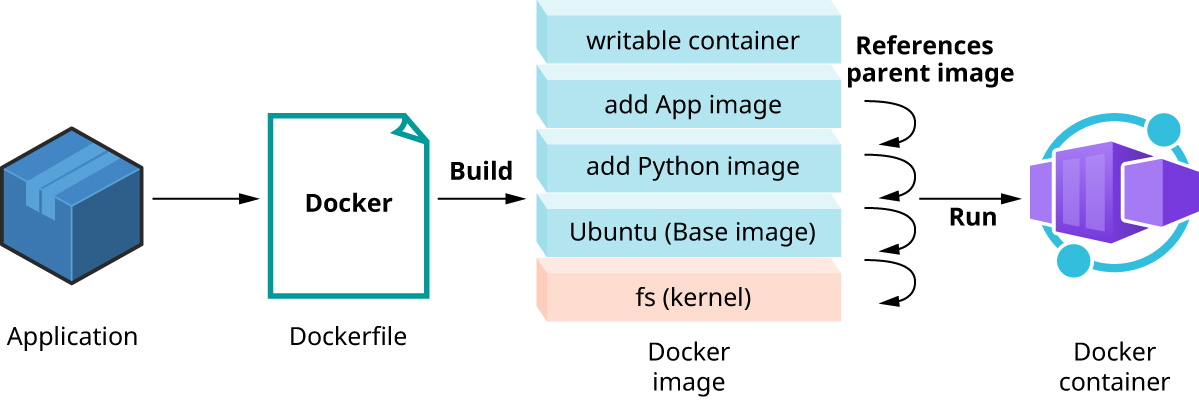
Docker is an open-source platform that creates, deploys, and manages containers using a common operating system. It isolates resources allowing multiple containers to use the same OS without contention. Docker has become the standard for container technology. An advantage containers offer is portability. Docker containers can be deployed anywhere, on any physical virtual machine or on the cloud. Using Docker helps reduce the size of development and provides smaller footprints of operating systems in containers. Typically measured in megabytes, Docker containers use far fewer resources than virtual machines and start up almost immediately. Docker containers are lightweight, which makes them easily scalable. Figure 12.18 illustrates an overview of the Docker process.
英語のヒント
Dockerは、共通のOSを使ってコンテナーを作成・配置・管理する、オープンソースのプラットフォームである。資源を分離し、複数のコンテナーが競合せずに同じOSを使えるようにする。Dockerは、コンテナー技術の標準となっている。コンテナーの利点の1つは、移植性である。Dockerコンテナーは、物理マシンや仮想マシン、クラウドなど、どこにでも配置できる。Dockerを使うと、開発の規模を抑え、コンテナー内のOSが占める資源も小さくできる。Dockerコンテナーの大きさは通常メガバイト単位で測られ、仮想マシンよりはるかに少ない資源を使い、ほぼ即座に起動する。軽量なため、容易に規模を拡張できる。図12.18は、Dockerの処理の概要を示している。
attribution: Copyright Rice University, OpenStax, under CC BY 4.0 license · CC BY 4.0 · Source出典
Figure 12.18 A Docker image is built from a Dockerfile to deploy an application that runs in a Docker container. (attribution: Copyright Rice University, OpenStax, under CC BY 4.0 license)
図12.18 DockerfileからDockerイメージをビルドし、Dockerコンテナーで動くアプリケーションを配置する。(出典:Copyright Rice University, OpenStax、CC BY 4.0ライセンス)
To deploy applications using Docker, the typical first step is to create a Dockerfile. The Dockerfile is a text document that contains instructions for building a Docker image. A Docker image may be based on another image with some additional customization. Docker images are a collection of immutable layers where each instruction in a Dockerfile creates a layer in the image. Once built, Docker images become immutable templates for creating Docker containers, which are running instances of those images containing everything needed for the application to run.
英語のヒント
Dockerでアプリケーションを配置する場合、通常、最初にDockerfileを作成する。Dockerfileは、Dockerイメージをビルドするための指示を含むテキスト文書である。Dockerイメージは、別のイメージを基に、追加の調整を加えて作ることもできる。Dockerイメージは、変更できない層の集合であり、Dockerfile内の各指示が、イメージ内の1つの層を作る。ビルドされると、イメージは、Dockerコンテナーを作成するための変更不能なテンプレートになる。コンテナーは、そのイメージの実行中のインスタンスであり、アプリケーションの実行に必要なものをすべて含む。