第12章クラウドネイティブアプリケーション開発
Sample Web-Native ArchitectureWebネイティブアーキテクチャの例
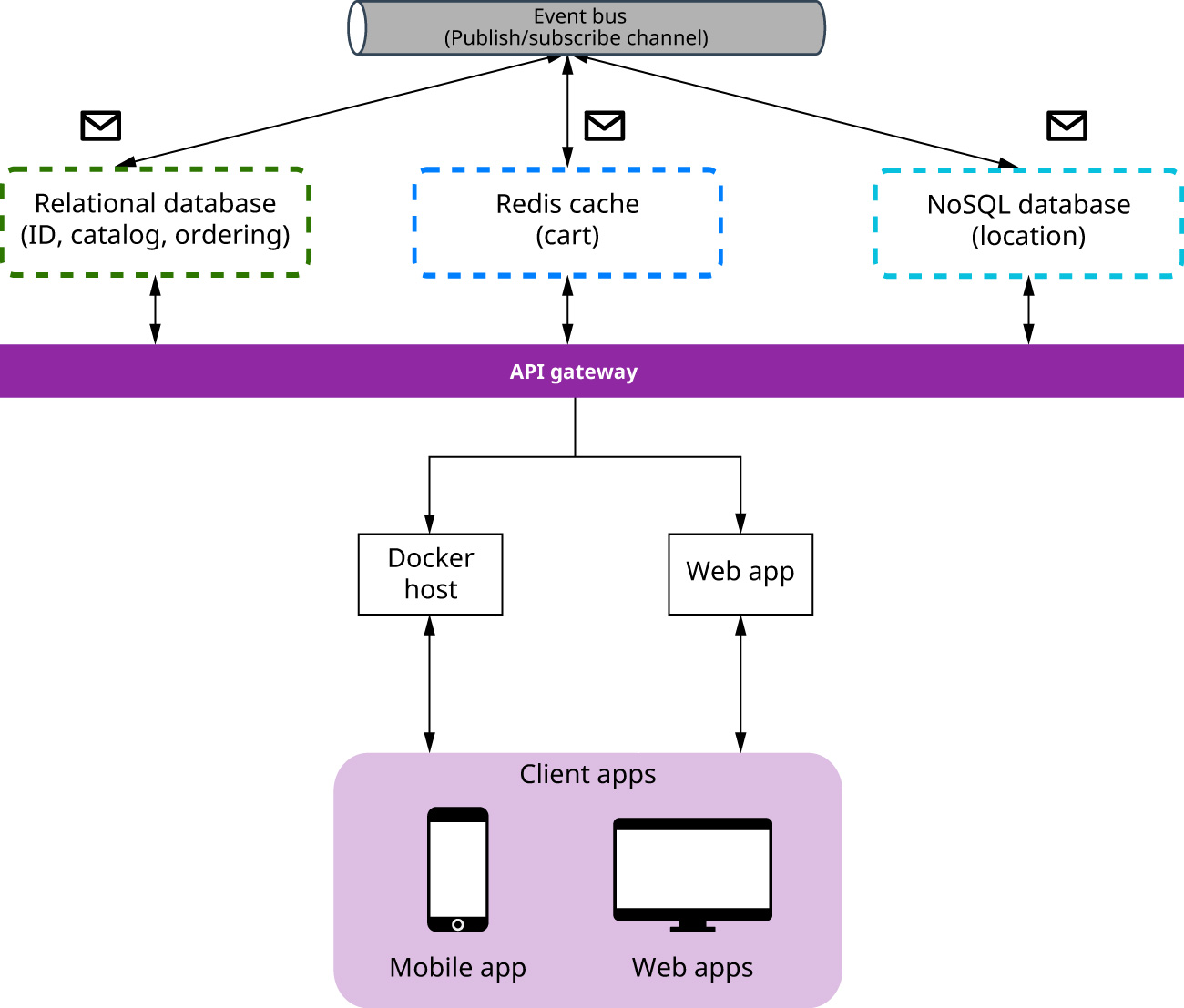
Figure 12.12 illustrates a sample web-based, cloud-native “web-native” architecture. This cloud-native application consists of several microservices that are deployed and managed on the cloud. Each microservice is self-contained as well as programming language and framework independent. Microservices are containerized and managed by a container orchestrator. Each microservice contains its datastore that best suits its data needs. Some of these datastores are relational databases whereas others are NoSQL databases.
英語のヒント
図12.12は、Webを基盤とするクラウドネイティブ、すなわち「Webネイティブ」アーキテクチャの例である。このアプリケーションは、クラウド上で配置・管理される、複数のマイクロサービスからなる。各サービスは自己完結しており、プログラミング言語やフレームワークにも依存しない。マイクロサービスはコンテナー化され、コンテナーオーケストレーターが管理する。各サービスには、必要なデータに最も適した独自のデータストアがある。その一部は関係データベースであり、ほかはNoSQLデータベースである。
attribution: Copyright Rice University, OpenStax, under CC BY 4.0 license · CC BY 4.0 · Source出典
Figure 12.12 A web-native application leverages features of modern cloud platforms.8 (attribution: Copyright Rice University, OpenStax, under CC BY 4.0 license)
図12.12 Webネイティブアプリケーションは、現代のクラウドプラットフォームの機能を活用する。8 (出典:Copyright Rice University, OpenStax、CC BY 4.0ライセンス)
8 Diagram is modernized by writer and based off https://devblogs.microsoft.com/premier-developer/wp-content/uploads/sites/31/ 2020/03/cloud-native-design.png
8 図は、https://devblogs.microsoft.com/premier-developer/wp-content/uploads/sites/31/2020/03/cloud-native-design.pngを基に、執筆者が現代向けに更新したもの。
One of the microservices stores its state in a distributed Redis cache. An API gateway is used to route traffic between client apps and microservices. Most important, this cloud-native application takes full advantage of the scalability and resiliency features of modern cloud platforms.
英語のヒント
マイクロサービスの1つは、分散したRedisキャッシュに自分の状態を保存する。APIゲートウェイは、クライアントアプリとマイクロサービスの間で通信を振り分けるために使う。最も重要なのは、このクラウドネイティブアプリケーションが、現代のクラウドプラットフォームのスケーラビリティと回復力を最大限に活用することである。
INDUSTRY SPOTLIGHT産業の現場
Cloud-Native Application in Industry産業でのクラウドネイティブアプリケーション
Cloud-native applications are broadly used in the industry today. In particular, Netflix, Uber, and WeChat expose cloud-native systems that consist of many independent services. Can you elaborate on the specific characteristics of these systems and explain why cloud-native is more suitable for the types of solutions provided by these companies? As an example, Netflix published the article “Completing the Netflix Cloud Migration”9 discussing the benefits of this migration. A case study10 was also published discussing Netflix’s adoption of cloud-native computing environments for their services.
英語のヒント
今日、クラウドネイティブアプリケーションは、産業で広く使われている。特に、Netflix、Uber、WeChatは、多数の独立したサービスからなる、クラウドネイティブシステムを提供している。これらのシステムの具体的な特徴を詳しく述べ、各企業が提供する種類の解決策に、なぜクラウドネイティブがより適しているのか説明できるだろうか。一例として、Netflixは「Completing the Netflix Cloud Migration」という記事を公開し、クラウドへの移行の利点を論じている。9 また、Netflixがサービスにクラウドネイティブな計算環境を採用したことを扱う事例研究も公開されている。10
Features of Cloud-Native Applicationsクラウドネイティブアプリケーションの特徴
As mentioned previously, cloud-native applications, in contrast to cloud-based applications, leverage inherent characteristics of the cloud such as resource pooling, on-demand self-services, automation, scalability, and rapid elasticity. Below is a list of the key capabilities of cloud-native applications that make this possible.
前述したように、クラウドネイティブアプリケーションは、クラウドベースのものとは異なり、資源のプール化、必要に応じたセルフサービス、自動化、スケーラビリティ、迅速な弾力的拡張など、クラウド本来の特徴を活用する。以下に、それを可能にする主な機能を挙げる。
Microservices-Based Applicationsマイクロサービスを基にしたアプリケーション
As noted earlier, microservices are based on a software architectural pattern where every functionality of a corresponding monolithic application is placed into its own microservice because it implements a separate business capability. These microservices are deployed and run in containers that communicate over application APIs, event streaming, and message brokers. Scheduling and orchestration tools manage these containers as they help coordinate and schedule the containers used to implement application services running on computing resources. Microservices development teams can rapidly add new capabilities whenever a business needs change.
英語のヒント
前述したように、マイクロサービスは、対応するモノリシックアプリケーションの各機能を、それぞれ固有のサービスへ置くソフトウェアアーキテクチャパターンに基づく。各機能が、それぞれ別の事業機能を実装するためである。これらのマイクロサービスは、コンテナーに配置されて動作し、アプリケーションAPI、イベントストリーミング、メッセージブローカーを通じて通信する。スケジューリングとオーケストレーションのツールは、コンピューティング資源上で動くアプリケーションのサービスを実装するコンテナーを調整・スケジュールし、管理する。事業の必要が変わるたびに、開発チームは新たな機能を素早く追加できる。
Microservices can also be scaled, when a single capability faces too much load, independently of other microservices. This reduces the time and cost associated with having to scale another instance of the entire application. Typically, scaling is achieved by containerizing microservices and managing the containers using a container management framework (e.g., K8s) provided by a cloud platform. Another alternative is to leverage Function as a Service (e.g., AWS Lambdas or Google/Microsoft functions) as part of microservices and rely on cloud platform(s) to manage scalability.
英語のヒント
また、1つの機能に負荷がかかりすぎるときには、ほかのマイクロサービスとは独立して、そのサービスの規模を拡張できる。これにより、アプリケーション全体の別のインスタンスを拡張しなければならない場合に比べて、時間と費用を削減できる。一般には、マイクロサービスをコンテナー化し、クラウドプラットフォームが提供するK8sなどのコンテナー管理フレームワークで管理することで、規模を拡張する。別の方法として、マイクロサービスの一部にFunction as a Service(AWS LambdaやGoogle/MicrosoftのFunctionsなど)を利用し、スケーラビリティの管理をクラウドプラットフォームに任せることもできる。
Microservices are also distributed and loosely coupled, making them easier to iterate through. Because microservices are independent and just communicate over APIs, teams can commit code for microservices through a DevOps pipeline. Once tested, the microservices can be automatically deployed, making it easier for teams to iterate as fast as they need to bring value to end users. Additionally, these iterations are minimal, and if there is any instance where a microservice fails, the rest of the application is still functional, making updates less risky.
英語のヒント
マイクロサービスは、分散され、疎結合でもあるため、反復して改善しやすい。サービスは独立しており、APIで通信するだけなので、チームはDevOpsのパイプラインを通じて、サービスのコードをコミットできる。テストが済むと、サービスを自動的に配置でき、最終利用者に価値を届けるために必要な速さで反復しやすくなる。また、これらの反復の変更は小さく、あるサービスが故障する場合でも、アプリケーションの残りは動作し続けるため、更新の危険が小さくなる。
Best-Suited Languages and Frameworks for Microservicesマイクロサービスに最適な言語とフレームワーク
The programming language and framework are chosen based on what is best suited for the functionality the microservice provides. Cloud-native applications are polyglots, meaning microservices are language and framework independent, making it possible to choose different technology stacks and frameworks for different microservices of a single cloud-native application.
英語のヒント
プログラミング言語とフレームワークは、そのマイクロサービスが提供する機能に最も適したものを選ぶ。クラウドネイティブアプリケーションは、複数の言語を使うポリグロットである。つまり、マイクロサービスは言語やフレームワークに依存せず、1つのクラウドネイティブアプリケーション内の異なるサービスに対し、異なる技術スタックやフレームワークを選べる。
9 https://about.netflix.com/en/news/completing-the-netflix-cloud-migration 10 https://www.cncf.io/case-studies/netflix/
9 https://about.netflix.com/en/news/completing-the-netflix-cloud-migration10 https://www.cncf.io/case-studies/netflix/
Container-Based Frameworkコンテナーを基にしたフレームワーク
A container is a standardized unit of software that logically isolates an application, enabling it to run independently of physical resources. The packaging of a standardized unit of software that isolates an application, enabling it to run independently of physical resources is containerization. Containers provide consistent, complete, and portable environments for running applications anywhere, including all the system files and dependencies needed to run applications. Containerization facilitates the creation of cloud-native applications and maximizes the benefits of containers. Containers keep microservices from interfering with one another. They keep applications from consuming all the host’s shared resources. They also enable multiple instances of the same microservice.
英語のヒント
コンテナーは、アプリケーションを論理的に分離し、物理資源に依存せず動作できるようにする、標準化されたソフトウェア単位である。このようにアプリケーションを分離し、物理資源に依存せず実行できる標準的なソフトウェア単位として梱包することを、コンテナー化という。コンテナーは、必要なシステムファイルや依存関係をすべて含み、どこでもアプリケーションを実行できる、一貫した、完全で移植可能な環境を提供する。コンテナー化は、クラウドネイティブアプリケーションの作成を容易にし、コンテナーの利点を最大化する。コンテナーは、マイクロサービス同士の干渉を防ぐ。アプリケーションがホストの共有資源をすべて消費することも防ぐ。また、同じマイクロサービスの複数のインスタンスを使えるようにする。
Containers boost DevOps efficiency and effectiveness through streamlined builds, testing, and deployments. They also provide consistent production environments that are isolated from other applications and processes. Because containers can run consistently anywhere, they facilitate hybrid and multicloud computing environments. Containers are lightweight because they are isolated from the operating system layer of a computer system. This makes them efficient and light on resources. Containers are portable because containers include all required dependencies and configurations, thus they, and the code contained within them, can be moved between different environments.
英語のヒント
コンテナーは、ビルド・テスト・配置を効率化することで、DevOpsの効率と効果を高める。また、ほかのアプリケーションやプロセスから分離された、一貫した本番環境を提供する。どこでも一貫して動作するため、ハイブリッドクラウドやマルチクラウドの計算環境を利用しやすくする。コンテナーは、コンピューターシステムのOSの層から分離されているため、軽量である。そのため、効率的で、資源への負担が軽い。必要な依存関係と設定をすべて含むので、移植も可能である。コンテナーとその中のコードを、異なる環境間で移動できる。
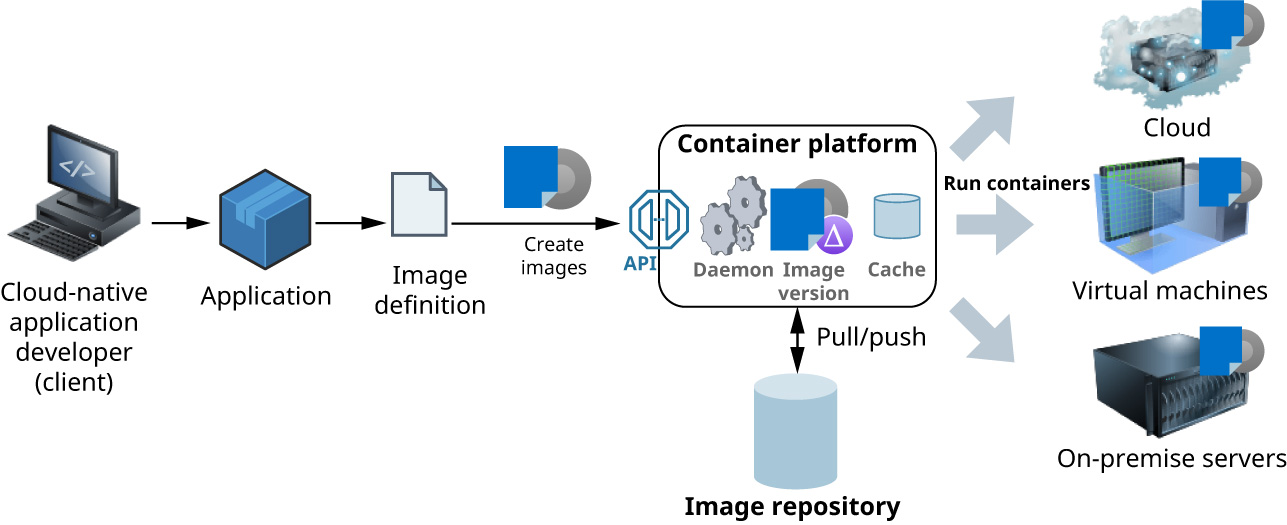
Figure 12.13 shows how containers in production can run on any computing resource that has a containerization platform. Containers are scalable due to their small size, making it easy to rapidly start up, scale, or shut down containers depending on use. Containers can be cost effective because they require fewer resources and are easier to scale.
図12.13は、本番のコンテナーが、コンテナー化のプラットフォームを備えるどのコンピューティング資源でも動作できることを示している。コンテナーは小さいため拡張しやすく、利用状況に応じて、素早く起動・拡張・停止できる。必要な資源が少なく、規模も変えやすいため、費用対効果が高くなりうる。
attribution: Copyright Rice University, OpenStax, under CC BY 4.0 license · CC BY 4.0 · Source出典
Figure 12.13 An image is built to deploy an application into containers that run on different computing resources. (attribution: Copyright Rice University, OpenStax, under CC BY 4.0 license)
図12.13 異なるコンピューティング資源で動くコンテナーへアプリケーションを配置するため、イメージをビルドする。(出典:Copyright Rice University, OpenStax、CC BY 4.0ライセンス)
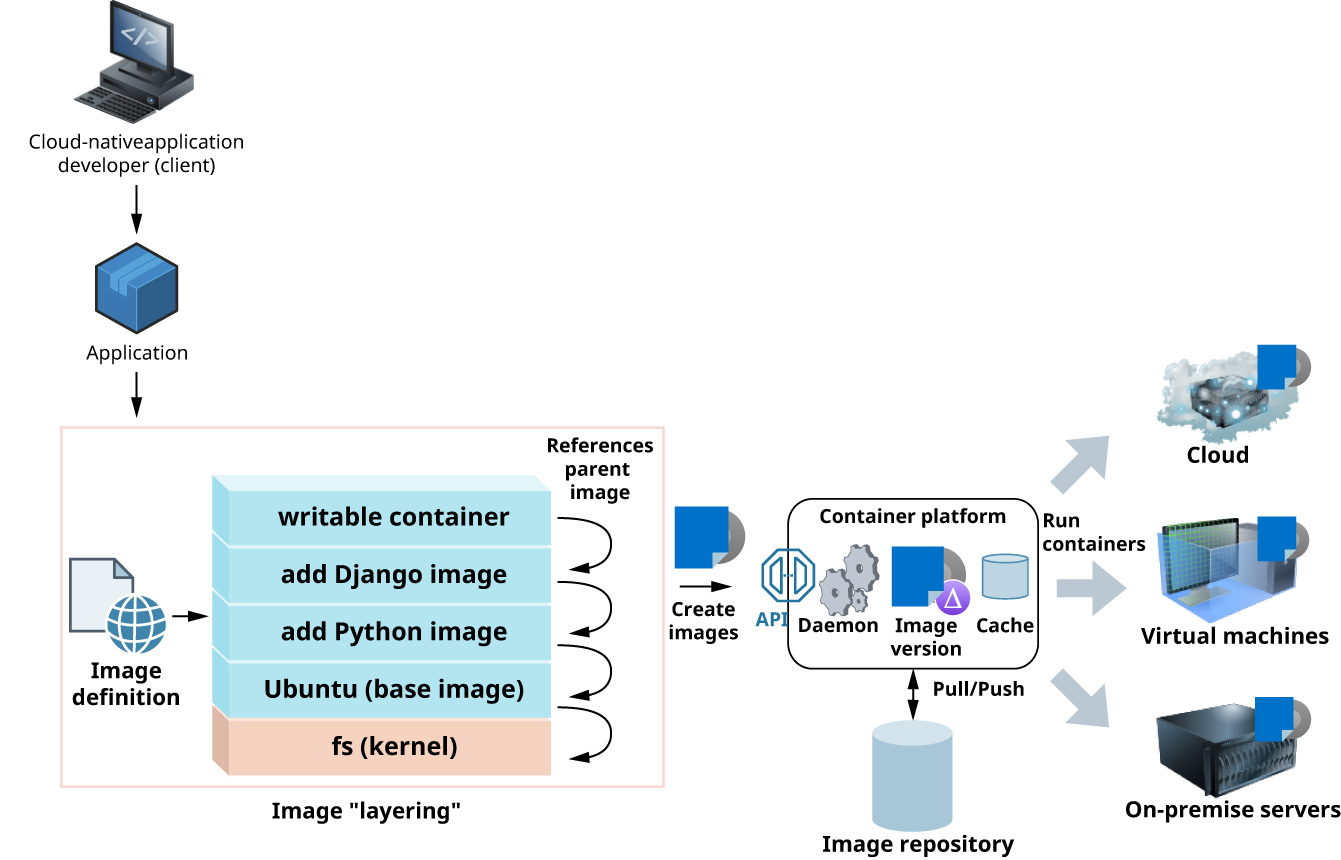
Containers are instances of a container image. A container image represents a binary state that is built by “layering” an application and its dependencies on top of the required “layer” of binaries and libraries of the operating system, which establishes a parent-child relationship between image layers. Figure 12.14 shows the process for building an image. For example, at the root of the parent-child tree is a layer that provides a formatted file system. On top of this layer is a base image that might contain Ubuntu, Debian, CentOS, or some other operating system. This base image can then be a parent of some other image, such as an image that adds Python. Finally, another image on top of the Python image may contain the application that was implemented in Python, such as a Django web application. Django is an open-source web application framework, which is a software framework that facilitates the development, maintenance, and scaling of web applications. In effect, these layers of images are arranged in an image hierarchy where each layer creates a snapshot.
英語のヒント
コンテナーは、コンテナーイメージのインスタンスである。コンテナーイメージは、OSの必要なバイナリやライブラリの「層」の上に、アプリケーションとその依存関係を重ねて作る、バイナリの状態を表す。この重ね合わせによって、イメージの各層の間に親子関係が生まれる。図12.14は、イメージのビルド過程を示している。たとえば、親子関係の木の根には、フォーマット済みのファイルシステムを提供する層がある。その上に、Ubuntu、Debian、CentOSなどのOSを含むベースイメージがある。このベースイメージは、Pythonを追加するイメージなど、別のイメージの親になれる。最後に、Pythonのイメージの上に置く別のイメージに、Django Webアプリケーションなど、Pythonで実装したアプリケーションを含められる。Djangoは、オープンソースのWebアプリケーションフレームワークである。これは、Webアプリケーションの開発・保守・規模の拡張を容易にするソフトウェアフレームワークをいう。実際には、こうしたイメージの各層はイメージ階層に配置され、それぞれの層がスナップショットを作る。
attribution: Copyright Rice University, OpenStax, under CC BY 4.0 license · CC BY 4.0 · Source出典
Figure 12.14 Images are built as layers of an application, its dependencies, and other required layers. (attribution: Copyright Rice University, OpenStax, under CC BY 4.0 license)
図12.14 イメージは、アプリケーション、その依存関係、その他の必要なものの層としてビルドされる。(出典:Copyright Rice University, OpenStax、CC BY 4.0ライセンス)
An advantage of this hierarchical structure is that it makes it possible to share images at different levels of the hierarchy. If you want to run the Django web application, you pull the entire hierarchy of the built image. However, other layers of the hierarchy can be shared with other things (e.g., the Python layer), reducing the need to shift entire application stacks. The built container image is an independent and self-contained artifact that can be deployed in any environment that has a container runtime environment (e.g., Docker) installed. The Open Container Initiative is a community trying to govern and address uniformity and standardization of the container runtimes and images. This is an important initiative for containers to be able to “build once and run anywhere.”
英語のヒント
この階層構造の利点は、階層内の異なるレベルでイメージを共有できることである。Django Webアプリケーションを動かすなら、ビルドされたイメージの階層全体を取得する。しかし、Pythonの層など、階層内のほかの層は、別のものと共有でき、アプリケーションスタック全体を移す必要を減らせる。ビルドされたコンテナーイメージは、独立した自己完結の成果物であり、Dockerなどのコンテナー実行環境がインストールされていれば、どの環境にも配置できる。Open Container Initiativeは、コンテナーのランタイムとイメージの統一性と標準化を管理し、その課題に取り組むコミュニティである。コンテナーで「一度ビルドすれば、どこでも動く」を実現するための、重要な取り組みである。