第5章アルゴリズムのハードウェアによる実現:コンピューターシステム設計
Hard Diskハードディスク
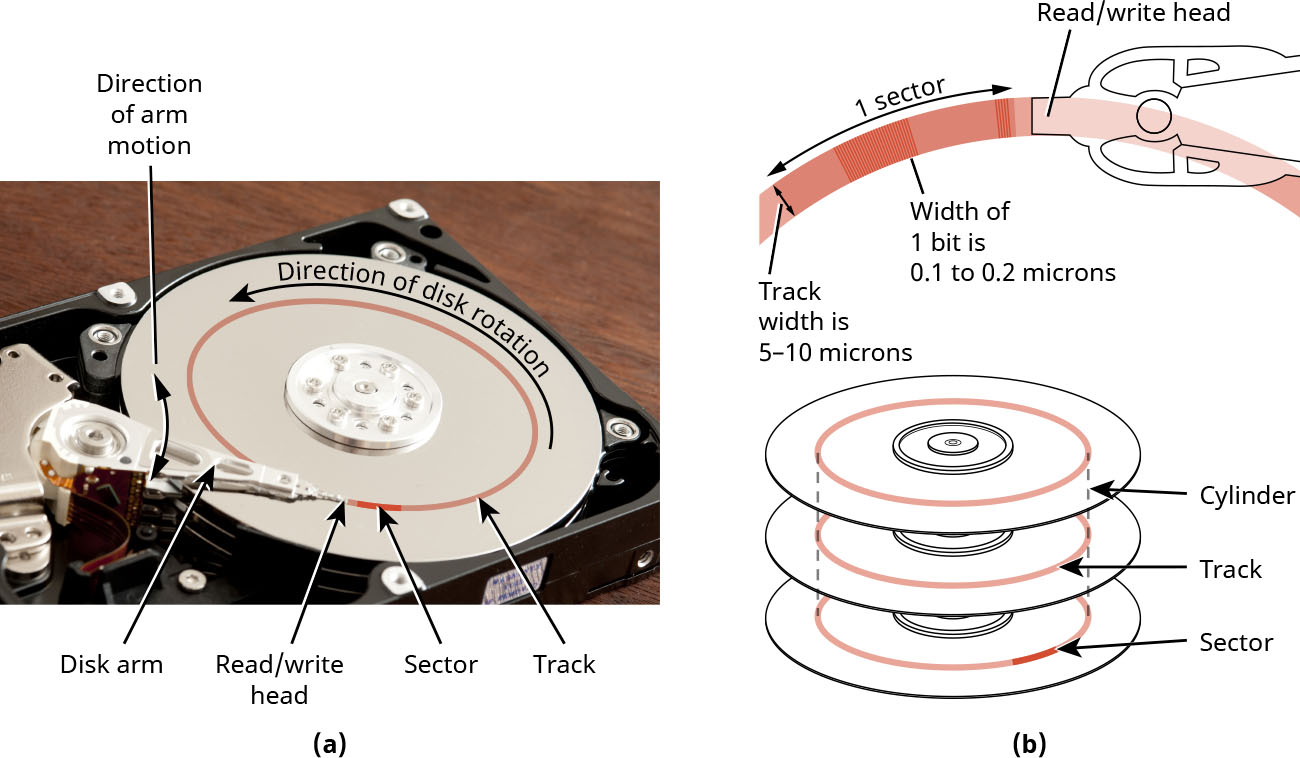
Hard disks were the main storage solutions for all computers in the 1980s, 1990s, and until the mid-2000s. A hard disk drive (HDD) stores data on a rotating platter, has a very large capacity, and uses a small motor to rotate platters to get the data. You can easily buy an 8TB disk for a modest amount of money. The industry took about 25 years to move from 5MB disk to 1TB, and only two years to go from 1TB to 2TB, and, after that, the capacity increased by a whopping 60% per year. So, we have a very ample size with a low price but also a very slow disk. It is several orders of magnitude slower than the DRAM memory. The reason is shown in Figure 5.24. The main reason the disk is slow is due to the mechanical movement. Therefore, computer designers have been looking for storage that does not need mechanical movement drives and that does not have any moving parts.
英語のヒント
ハードディスクは、1980年代、1990年代、そして2000年代半ばまで、すべてのコンピューターの主要なストレージだった。ハードディスクドライブ(HDD)は、回転する円盤にデータを保存し、非常に大きな容量を持ち、小型モーターで円盤を回転させてデータを取得する。8TBのディスクも、手ごろな金額で簡単に購入できる。業界では、5MBから1TBへの移行に約25年かかったが、1TBから2TBにはわずか2年しかかからず、その後は年60%という驚くべき割合で容量が増えた。そのため、大容量を安価に得られるが、ディスクは非常に低速である。DRAMより数桁も遅いのだ。その理由を図5.24に示している。主な原因は機械的な動きである。そのため、設計者たちは、機械的に動くドライブを必要とせず、可動部を持たないストレージを探してきた。
credit a: modification of “Open HDD” by Gratuit/Freeimageslive, CC BY 3.0; credit b: attribution: Copyright Rice University, OpenStax, under CC BY 4.0 license · CC BY 3.0 / CC BY 4.0 · Source出典
Figure 5.24 (a) The full hard disk drive (HDD) is (b) divided into platters, and each platter is divided into tracks and sectors. (credit a: modification of “Open HDD” by Gratuit/Freeimageslive, CC BY 3.0; credit b: attribution: Copyright Rice University, OpenStax, under CC BY 4.0 license)
図5.24 (a)ハードディスクドライブ(HDD)全体は、(b)複数の円盤に分かれ、各円盤はトラックとセクターに分かれている。(クレジットa:Gratuit/Freeimageslive「Open HDD」を改変、CC BY 3.0。bの出典:著作権 Rice University、OpenStax、CC BY 4.0ライセンス)
Solid-State Driveソリッドステートドライブ
The term solid state means that a system does not have moving parts and is expected to be fast. A solid-state drive (SSD) stores data on a chip and is two to three orders of magnitude faster than HDD. SSD has two main parts: the storage itself and the circuitry that accesses the storage. Nowadays SSDs use a storage technology called flash memory, which is a type of nonvolatile storage that can be electronically erased and reprogrammed. It is what you use in your thumb drives, just a bit faster. Flash memory in SSDs is based on NAND gates. A NAND gate is a type of logic gate used to store bits in flash memory. Flash memory is organized as pages, and a group of pages is called a block.
英語のヒント
ソリッドステートとは、システムに可動部がなく、高速な動作が期待されることを意味する。ソリッドステートドライブ(SSD)は、チップにデータを保存し、HDDより2〜3桁高速である。SSDには、記憶領域そのものと、それにアクセスする回路という二つの主要部分がある。現在のSSDは、フラッシュメモリという記憶技術を使う。これは、電子的に消去して再書き込みできる不揮発性ストレージである。USBメモリに使われているものと同じで、少し高速である。SSDのフラッシュメモリは、NANDゲートに基づいている。NANDゲートは、フラッシュメモリでビットを保存するために使う論理ゲートの一種である。フラッシュメモリはページに分かれ、複数のページをまとめてブロックという。
The circuitry that controls the flash memory, called the translation layer, has an important function. It maps the addresses to pages. One of the disadvantages of storage cells that make a page is that they wear out after 100 thousand to 1 million accesses. So, the translation layer tries to change the mapping to ensure that accesses are equally distributed among different cells. This is a complicated process and is one of the reasons SSDs are more expensive than HDDs. The sequential read from SSD reaches 7000 MB/s and the sequential write reaches 5000 MB/s. Random access to SSD has lower speed for reads and writes.
英語のヒント
フラッシュメモリを制御する回路は、変換層と呼ばれ、重要な機能を持つ。アドレスをページに対応づける機能である。ページを構成する記憶セルの欠点の一つは、10万〜100万回のアクセスで摩耗することだ。そのため、変換層は対応づけを変更し、異なるセルにアクセスが均等に分散するようにする。この処理は複雑で、SSDがHDDより高価になる理由の一つである。SSDのシーケンシャル読み出しは7000 MB/s、シーケンシャル書き込みは5000 MB/sに達する。ランダムアクセスでは、読み出しも書き込みも速度が低くなる。
LINK TO LEARNING学習リンク
Most laptops now have SSD storage, so it is good to know how SSD really works. Watch this video for a succinct explanation of how SSD works (https://openstax.org/r/76SSDHowItWorks) in the context of smartphones.
英語のヒント
現在のノートパソコンの大半はSSDストレージを搭載しているため、SSDの実際の動作を知っておくとよい。この動画では、スマートフォンを例として、SSDの仕組みを簡潔に説明している(https://openstax.org/r/76SSDHowItWorks)。
More About Cache Memoryキャッシュメモリをさらに詳しく
As you have learned, cache memory is used as a fast, small memory inside the processor to close the gap between the processor speed and the memory speed. Given that latency is the rate of data transfer, assume DRAM memory’s access latency is M cycles and the cache access latency is m. Also assume that for a specific program the probability of cache hits = p. Then the average latency of the combined cache + Memory = mp + (1 – p)(M + m) = m + (1 – p)M.
英語のヒント
学んだように、キャッシュメモリはプロセッサ内部の高速で小さなメモリとして使われ、プロセッサとメモリの速度差を埋める。レイテンシーをデータ転送の速度としたうえで、DRAMへのアクセスレイテンシーをMサイクル、キャッシュへのアクセスレイテンシーをmとする。また、あるプログラムでキャッシュヒットの確率をpとする。このとき、キャッシュ+メモリを合わせた平均レイテンシーは、mp + (1 − p)(M + m) = m + (1 − p)Mとなる。
Remember that whenever there is a cache miss, we have already spent m cycles searching the cache, then we go to the memory, which takes another M cycles. If we look at the equation m + (1 – p)M, we see that to get good performance, we need to do one or more of the following things:
英語のヒント
キャッシュミスが起きたときは、すでにキャッシュを探すためにmサイクルを使っており、その後でメモリへ行くために、さらにMサイクルかかることを思い出そう。式m + (1 − p)Mを見ると、よい性能を得るには、次のうち一つ以上を行う必要があるとわかる。
• Have a faster cache and lower m.
• キャッシュを高速にし、mを小さくする。
• Increase cache hit rate and reduce p.
• キャッシュヒット率を高め、pを小さくする。
• Have a faster memory and lower M.
• メモリを高速にし、Mを小さくする。
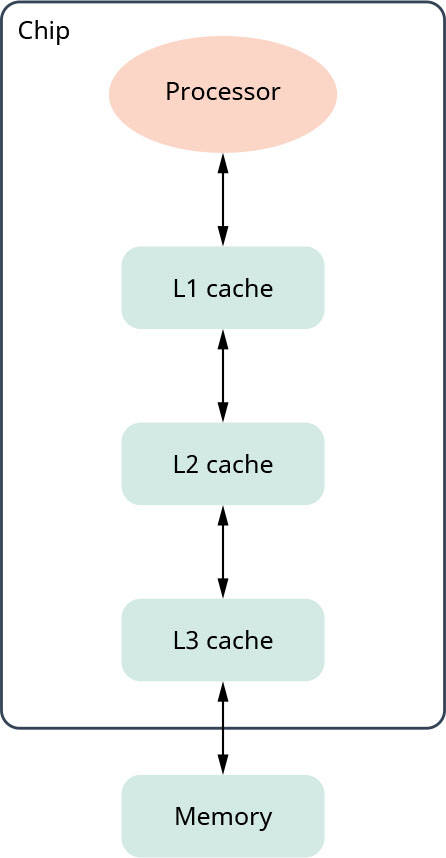
To have a faster cache, we must make it smaller in capacity, but smaller cache decreases hit rate, which is the number, usually a percentage, of times the cache was used to retrieve data. We cannot easily have faster memory to reduce M so the solution is to have more than one level of caches. Level 1 (L1), closest to the processor, is small in capacity and very fast but with a potentially low hit rate. When there is L1 cache miss, instead of going to the memory off-chip, we go to L2 cache, which is still on chip and bigger in capacity than L1. Most processors now have up to three levels of caches, as shown in Figure 5.25.
英語のヒント
キャッシュを高速にするには、容量を小さくしなければならない。しかし、小さくするとヒット率が下がる。ヒット率とは、データの取得にキャッシュが使われた回数を、通常は百分率で表したものだ。Mを小さくするために、簡単にメモリを高速化することはできない。そのため、複数の階層のキャッシュを設ける方法を採る。プロセッサに最も近いレベル1(L1)は、小容量で非常に高速だが、ヒット率は低い可能性がある。L1でキャッシュミスが起きたら、チップ外のメモリではなく、L2キャッシュへ進む。L2もチップ内にあり、L1より大容量である。図5.25に示すように、現在のほとんどのプロセッサは、最大3階層のキャッシュを持つ。
attribution: Copyright Rice University, OpenStax, under CC BY 4.0 license · CC BY 4.0 · Source出典
Figure 5.25 Most processors now have three levels of cache memory. (attribution: Copyright Rice University, OpenStax, under CC BY 4.0 license)
図5.25 現在のほとんどのプロセッサには、3階層のキャッシュメモリがある。(出典:著作権 Rice University、OpenStax。CC BY 4.0ライセンス)