第5章アルゴリズムのハードウェアによる実現:コンピューターシステム設計
5.1 Computer Systems Organization5.1 コンピューターシステムの構成
Learning Objectives学習目標
By the end of this section, you will be able to:
この節を学び終えると、次のことができるようになる。
• Define a computer system
• コンピューターシステムを定義する。
• Explain how information is stored and transferred in a computer system
• コンピューターシステムで情報がどう記憶され、転送されるかを説明する。
• Differentiate between high-level and machine-level programs
• 高水準のプログラムと機械語レベルのプログラムを区別する。
• Identify the elements of a typical computer system
• 一般的なコンピューターシステムの構成要素を特定する。
At its core, a computer system is an electronic device that does computations. These computations appear to the outside world as executing programs. When you play a game, listen to a song, or browse the web, you are instructing your computer to do computations. You may wonder how does the computer function and how do the computations performed such as browsing the web or listening to a song relate to one another?
英語のヒント
基本的に、コンピューターシステムとは計算を行う電子装置である。この計算は、外から見るとプログラムの実行として現れる。ゲームをしたり、曲を聴いたり、Webを閲覧したりするとき、私たちはコンピューターに計算を指示している。コンピューターはどのように働くのか、Webの閲覧や音楽の再生の際に行われる計算にはどのような関係があるのか、不思議に思うかもしれない。
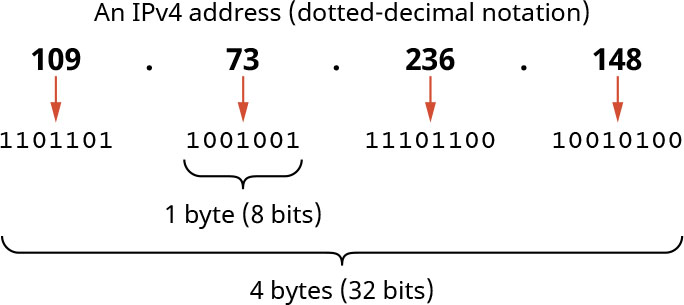
Let us start with the second part of that question: the relationship between computation and executing a program. A song that has been digitized for storage is actually a bunch of numbers that the computer reads; it produces sound based on those numbers. The computer must calculate (i.e., compute) the frequency and volume of the sound based on the numbers read. Another example is when you open a browser and type the address of a website. The computer reads what you typed on the keyboard and leverages network capabilities to translate it to a long number called an Internet Protocol (IP) address (Figure 5.2). The IP address consists of several digits, similar to your phone number, that allow the data to reach your computer over the Internet and for other computers over the Internet to recognize your computer. Your computer passes that IP address over the Internet to another big computer asking for the content of the required website, receives the content from that big computer, and executes browser software that translates it to content such as pictures, sounds, and animations on the screen. All these steps involve computations. But how does the computer do all this? To answer this question, we first need to know the components of a computer system.
英語のヒント
まず、その問いの後半、計算とプログラム実行の関係から考えてみよう。保存するためにデジタル化された曲は、実際にはコンピューターが読み取る数の集まりであり、その数に基づいて音が生成される。コンピューターは読み取った数から、音の周波数と音量を計算しなければならない。別の例として、ブラウザーを開いてWebサイトのアドレスを入力する場合を考えよう。コンピューターはキーボードからの入力を読み取り、ネットワークの機能を利用して、それをインターネットプロトコル(IP)アドレスと呼ばれる長い数に変換する(図5.2)。IPアドレスは電話番号のように複数の数字で構成され、インターネット経由でデータをそのコンピューターへ届けたり、ほかのコンピューターがそのコンピューターを識別したりできるようにする。あなたのコンピューターはインターネット経由でそのIPアドレスを別の大きなコンピューターへ渡し、目的のWebサイトの内容を要求する。その大きなコンピューターから内容を受け取ると、ブラウザーソフトウェアを実行して、それを画面上の画像・音・アニメーションなどに変換する。これらの手順はすべて計算を伴う。では、コンピューターはどうやってこのすべてを行うのだろうか。答えるには、まずコンピューターシステムの構成要素を知る必要がある。
attribution: Copyright Rice University, OpenStax, under CC BY 4.0 license · CC BY 4.0 · Source出典
Figure 5.2 IP addresses use a standardized dotted-decimal notation that corresponds to a string of bits. (attribution: Copyright Rice University, OpenStax, under CC BY 4.0 license)
図5.2 IPアドレスは、ビット列に対応する標準化されたドット区切りの10進表記を用いる。(出典表示:著作権者Rice University、OpenStax、CC BY 4.0ライセンス)
Computer Systemsコンピューターシステム
A computer system consists of two major parts: hardware and software. The hardware includes the physical components of the computer system, such as hard drives, motherboards, and processor chips. The software consists of the programs you execute, such as media players or web browsers, and the data needed for these programs to function. For example, the media player is a program, and the songs that you listen to using the media player are data. So, the hardware executes programs that are fed with data. Computers come in different shapes, from the small ones in your smartwatch, for example, to big supercomputers. Different computers may have different components besides the components that exist in all computer shapes. Bigger computers, datacenters, and supercomputers need extra components for getting data from multiple sources, more sophisticated parts to connect to the Internet, and cooling equipment. Mainframes that were created a few decades ago are big computers used for a different purpose. You don’t need those in your smartphone.
英語のヒント
コンピューターシステムは、ハードウェアとソフトウェアという2つの主要部分からなる。ハードウェアには、ハードドライブ、マザーボード、プロセッサチップなど、コンピューターシステムの物理的な部品が含まれる。ソフトウェアは、メディアプレーヤーやWebブラウザーなどの実行するプログラムと、それらの動作に必要なデータからなる。例えば、メディアプレーヤーはプログラムであり、それを使って聴く曲はデータである。つまり、ハードウェアはデータを与えられたプログラムを実行する。コンピューターには、例えばスマートウォッチ内の小さなものから大型スーパーコンピューターまで、さまざまな形がある。すべての形態に共通する部品のほかに、機種ごとに異なる部品を備えることもある。大型コンピューター、データセンター、スーパーコンピューターには、複数の情報源からデータを得るための追加部品、インターネットへ接続するためのより高度な部品、冷却装置が必要になる。数十年前に生まれたメインフレームは、また別の目的に用いられる大型コンピューターである。こうしたものはスマートフォンには必要ない。
Data Storage Inside a Computerコンピューター内部のデータ記憶
All programs and their corresponding data are stored inside a computer or downloaded from the Internet. So how are these programs and data stored? And how does a computer understand and execute them? Computers do not understand English or other natural languages; they can only relate to strings of 1s and 0s and therefore all the programs and data must be stored inside the computer as a sequence of 1s and 0s. A 1 or a 0 is called a binary digit or bit. Every 8 bits unit is called a byte. This is pretty much how computers that depend on electricity work. Other types, still not in the mainstream market but in design and testing stages, such as quantum computers, do not use bits but use something else called quantum bits or qubits.
英語のヒント
すべてのプログラムと、それに対応するデータは、コンピューター内部に保存されるか、インターネットからダウンロードされる。では、プログラムとデータはどう保存されているのだろうか。また、コンピューターはどう理解して実行するのだろうか。コンピューターは英語などの自然言語を理解せず、1と0の列しか扱えない。そのため、すべてのプログラムとデータを1と0の並びとして内部に保存しなければならない。1または0の1桁を、2進数の桁、すなわちビットと呼ぶ。8ビットの単位をバイトと呼ぶ。電気で動くコンピューターは、おおむねこのように働く。量子コンピューターなど、まだ主流市場にはなく設計・試験段階にある別種のコンピューターは、ビットではなく、量子ビット(qubit)と呼ばれるものを使う。
If we say that a text editor program takes 1 megabyte of storage, it means that the editor is stored inside the computer, more specifically in the disk of your computer, which is a storage mechanism for data, as a sequence of almost 1 million bytes (1 megabyte is a bit larger than 1 million bytes). We call a program stored inside a computer an executable. Since programs and data are stored as a sequence of bits or bytes, what is the difference between a program and the data?
英語のヒント
テキストエディターのプログラムが1メガバイトの記憶容量を使うというのは、そのエディターが約100万バイトの並びとしてコンピューター内部に保存されているという意味である。より具体的には、データの記憶装置であるディスクに保存される(1メガバイトは100万バイトより少し大きい)。コンピューター内部に保存されたプログラムを、実行可能プログラムと呼ぶ。プログラムもデータもビットやバイトの並びとして保存されるのなら、プログラムとデータの違いは何だろうか。