第5章アルゴリズムのハードウェアによる実現:コンピューターシステム設計
Memory: SRAMメモリ:SRAM
There are several reasons for the slow speed of getting the data from DRAM to processor. One is the much slower speed of DRAM technology relative to the processor. The second reason is that going off the chip that contains the processor and to the bus to reach the DRAM memory is a slow process. To overcome this, we need to have a faster memory technology inside the chip together with the processor.
英語のヒント
DRAMからプロセッサへのデータ取得が遅いのには、複数の理由がある。一つは、DRAM技術自体の速度がプロセッサよりはるかに遅いことである。もう一つは、プロセッサを含むチップの外に出て、バスを通ってDRAMへ到達する処理が遅いことである。これを克服するには、プロセッサと同じチップの内部に、より高速なメモリ技術を置く必要がある。
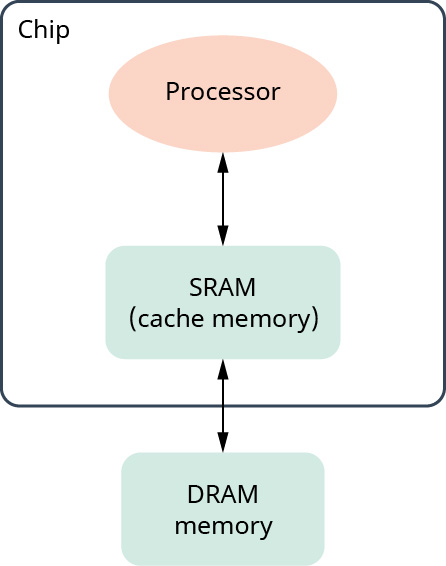
The solution is to use static random access memory (SRAM) which keeps data in the computer’s memory for as long as the machine is powered on. This means it does not need a refresh like the DRAM and is designed with a faster technology than DRAM. However, SRAMs are bigger in area; a single bit requires a large area in the chip as it needs four to six transistors, which is much larger than the capacitor in DRAM. Moreover, inside the chip we do not have a lot of space due to the existence of the processor itself. So, SRAM is a small, fast memory inside the chip that is connected to the processor from one side and to the DRAM off-chip from the other side, as shown in Figure 5.23. The DRAM is in the range of 8–64GB, while the SRAM starts from the KB range to a few MBs.
英語のヒント
解決策は、スタティックランダムアクセスメモリ(SRAM)を使うことである。SRAMは、電源が入っている間、コンピューターのメモリにデータを保持する。つまり、DRAMのようなリフレッシュが不要で、DRAMより高速な技術で設計されている。しかし、SRAMは大きな面積を必要とする。1ビットに4〜6個のトランジスタが必要で、DRAMのコンデンサーよりずっと大きな領域を使うためである。しかも、チップ内部にはプロセッサ自体があるので、空間はあまりない。そのためSRAMは、チップ内の小容量で高速なメモリとなり、図5.23のように、一方でプロセッサに、もう一方でチップ外のDRAMに接続される。DRAMは8〜64GB程度であるが、SRAMはKB単位から数MB程度である。
attribution: Copyright Rice University, OpenStax, under CC BY 4.0 license · CC BY 4.0 · Source出典
Figure 5.23 SRAM was introduced to overcome the slow speed of DRAM. (attribution: Copyright Rice University, OpenStax, under CC BY 4.0 license)
図5.23 SRAMは、DRAMの遅さを克服するために導入された。(出典:著作権 Rice University、OpenStax。CC BY 4.0ライセンス)
One important distinction between the cache memory and the DRAM is that the former is programmer-transparent (i.e., its use cannot be managed by the programmer), but the latter is not. Your laptop has 32GB of RAM, which is the size of the DRAM, but you may not know how much cache your processor has. However, if you know how the cache works, you can write more efficient programs as we learn when we talk about locality.
英語のヒント
キャッシュメモリとDRAMの重要な違いの一つは、前者はプログラマーが意識しなくてよい、つまりその使用をプログラマーが管理できないのに対し、後者はそうではないことである。ノートパソコンのRAMが32GBなら、それはDRAMの容量であるが、プロセッサのキャッシュ容量は知らないかもしれない。それでも、局所性の話で学ぶように、キャッシュの仕組みを知っていれば、より効率のよいプログラムを書ける。
In Figure 5.23, SRAM is more commonly referred to as cache memory, which is the memory that allows for high-speed retrieval of data. Let us see how the cache and the DRAM memory work together. From now on, whenever we say cache we mean the SRAM, and whenever we say memory, we mean the DRAM.
英語のヒント
図5.23のSRAMは、一般にはキャッシュメモリと呼ばれ、データの高速な取り出しを可能にするメモリである。キャッシュとDRAMがどう連携するかを見てみよう。以後、キャッシュというときはSRAM、メモリというときはDRAMを指す。
Suppose the processor executes a program that accesses array A consecutively. The processor starts with A[0] and asks the cache memory whether it has A[0]. Initially the cache is empty, so it does not have the needed data which is called a cache miss. The cache then gets the data from the memory. But instead of just getting A[0], it gets A[0], A[1], A[2], …, A[x]. The number of extra elements the cache brings depends on the design of the cache. In most processors available now, the cache usually brings 64 bytes from the memory. So, if array A is an array of integers, that is, each element is 4 bytes in length, then the cache brings 16 elements from the memory, from A[0] to A[15]. The processor gets the A[0] it wants, and the extra elements brought from memory, which are in the cache. Now, if the processor wants A[1], it finds it right away in the cache, which is called a cache hit. However, if the processor instead needs A[17], then we have another cache miss and the cache gets to the memory again to bring several elements, including A[17].
英語のヒント
プロセッサが、配列Aに連続してアクセスするプログラムを実行するとしよう。A[0]から始め、キャッシュメモリにA[0]があるか問い合わせる。最初はキャッシュが空なので、必要なデータはない。これをキャッシュミスという。すると、キャッシュはメモリからデータを取得する。ただし、A[0]だけでなく、A[0]、A[1]、A[2]、…、A[x]を取得する。追加で持ってくる要素数は、キャッシュの設計によって決まる。現在のほとんどのプロセッサでは、通常64バイトをメモリから取得する。したがって、配列Aが整数の配列、つまり各要素が4バイトなら、A[0]からA[15]までの16要素を取得する。プロセッサは必要なA[0]を受け取り、メモリから追加で取り込まれた要素はキャッシュ内にある。次にA[1]が必要になれば、キャッシュですぐに見つかる。これをキャッシュヒットという。しかし、その代わりにA[17]が必要なら、またキャッシュミスになり、キャッシュは再びメモリへ行って、A[17]を含むいくつかの要素を取得する。
Both the SRAM and DRAM, or cache and memory, are volatile—whenever there is a power perturbation or the machine runs out of battery, everything in the cache and the memory is gone. And we cannot build a full-fledged computer with volatile memory only; we need persistent storage too.
英語のヒント
SRAMとDRAM、つまりキャッシュとメモリは、どちらも揮発性である。電源に異常が起きたり、電池が切れたりすると、内容はすべて失われる。揮発性メモリだけでは、本格的なコンピューターは作れない。データを持続的に保持するストレージも必要である。
Storage Technologiesストレージ技術
Storage exists in computer systems to ensure that data continues to exist even after the computer is powered off. Storage, presented as technologies 3 and 4 in Figure 5.20, has few characteristics that differ from DRAM and SRAM (technologies 1 and 2). The first, and most important one, is that they are persistent—they are non-volatile. The second characteristic is that they are slower in speed than DRAM and SRAM but have lower costs and higher capacities. It is to be noted that technologies 3 and 4 do not have to exist together in a computer system; you can have a computer with either or both.
英語のヒント
ストレージは、コンピューターの電源を切った後もデータを存在させるために、システムに備えられている。図5.20の技術3と4にあたるストレージは、DRAMとSRAM(技術1と2)とはいくつかの性質が異なる。第一に、最も重要な性質として、データを持続的に保持できる、つまり不揮発性である。第二に、DRAMやSRAMより遅い代わりに、低コストで大容量である。技術3と4の両方を同じコンピューターに搭載する必要はなく、一方だけでも、両方でもよいことに注意しよう。
Besides the storage that exists inside the computer system, there is a lot of storage in the cloud. That is, storage does not exist in your computer, but you can access it through the Internet. This storage is managed by big tech companies. For example, we have Azure from Microsoft, AWS from Amazon, Google Drive from Google, and so on. These companies are serving millions of users and are isolating users’ data from each other. There are techniques to make each user access cloud storage and even software in the cloud.
英語のヒント
コンピューター内部のストレージのほかに、クラウドにも大量のストレージがある。つまり、手元のコンピューター内にはないが、インターネット経由でアクセスできる。これは大手テクノロジー企業が管理している。たとえば、MicrosoftのAzure、AmazonのAWS、GoogleのGoogle Driveなどである。これらの企業は何百万人もの利用者にサービスを提供し、利用者どうしのデータを分離している。各利用者がクラウドストレージ、さらにはクラウド上のソフトウェアへアクセスできるようにする技術がある。
Now, it is time to give them names. Technology 3 is called a solid state disk (SSD) and technology 4 is called hard disk drive (HDD). What are the differences and where does the commonly encountered term “flash drive” fit in? Let us start with the older technology first.
英語のヒント
ここで、これらの技術に名前を付けよう。技術3はソリッドステートディスク(SSD)、技術4はハードディスクドライブ(HDD)である。何が違うのだろうか。また、よく聞く「フラッシュドライブ」は、どこに位置づくのだろうか。まず、古いほうの技術から見ていこう。