第5章アルゴリズムのハードウェアによる実現:コンピューターシステム設計
THINK IT THROUGH考えてみよう
Why Integers?なぜ整数なのか?
A real number, represented on a computer as a single precision floating point, takes four bytes. An integer also takes four bytes. Yet, the range of numbers that a floating point can represent is much larger than the integer.
英語のヒント
コンピューター上で単精度浮動小数点として表される実数は、4バイトを使う。整数も4バイトを使う。それでも、浮動小数点で表せる数の範囲は、整数よりはるかに広いのだ。
• Why do we use an integer in the first place?
• そもそも、なぜ整数を使うのだろうか。
Computers are much slower dealing with floating points because the hardware for a floating point is much more complicated than the one for an integer, and it is better to make things faster by performing computations with an integer. We also only use floating points if it is an absolute need.
英語のヒント
浮動小数点用のハードウェアは、整数用よりずっと複雑なので、コンピューターが浮動小数点を扱う速度は大幅に遅くなる。整数を使って計算し、処理を速くするほうがよいのだ。また、浮動小数点は、絶対に必要な場合だけ使う。
Character Representation文字の表現
Remember that what is stored inside the computer is not only integers. If you look at a keyboard you see a bunch of characters, digits, and symbols and when you press a key, that symbol appears on the screen. But how do computers recognize these characters and deal with them?
英語のヒント
コンピューターの内部に保存されるのは、整数だけではないことを思い出そう。キーボードには、文字や数字や記号が並んでおり、キーを押すと、その記号が画面に現れる。では、コンピューターはこれらの文字をどう認識し、扱うのだろうか。
Each printable and non-printable character on the keyboard has a unit code or unique binary number. These codes are known as American Standard Code for Information Interchange (ASCII). Capital letters have different codes from lowercase letters. For example, “A” has a different code than “a.” Decimal digits also have their own code. The code is 7-bit length, which covers 128 characters. This encoding has been extended to 8 bits to encompass non-printable characters as well (i.e., characters on the keyboard that cannot be printed on the screen: can you guess them?). The reason to have standardized codes across all machines is to allow computers of different brands, specifications, and sizes to work together. This code was approved in 1963, before personal computers existed, and then revised in 1965, 1967, 1968, 1977, and 1986. Now, all computers use this code to represent the characters.
英語のヒント
キーボード上の印字可能な文字にも、印字できない文字にも、それぞれコード、つまり固有の2進数が割り当てられている。これらのコードを、American Standard Code for Information Interchange(情報交換用米国標準コード、ASCII)という。大文字と小文字には異なるコードがあり、たとえば「A」と「a」のコードは違う。10進数字にも、それぞれのコードがある。コード長は7ビットで、128文字を表せる。この符号化は、印字できない文字も含めるために8ビットへ拡張された。印字できない文字とは、キーボード上にはあっても画面には印字できない文字のことである。何かわかるか。すべての機械でコードを標準化するのは、ブランド、仕様、大きさの異なるコンピューターが連携できるようにするためである。このコードは、パーソナルコンピューターが存在する前の1963年に承認され、その後1965年、1967年、1968年、1977年、1986年に改訂された。現在、すべてのコンピューターが、文字の表現にこのコードを使っている。
You may realize that 128 characters, or even 256 ones, cannot include all written languages which is why there are new encoding standards such as Universal Coded Character Set (UCS) and Unicode that encompass all written languages and incorporate ASCII as the first 128 codes, which is backward compatible, allowing for the integration with older legacy systems.
英語のヒント
128文字、あるいは256文字でも、文字で書かれるすべての言語を含められないと気づくだろう。そのため、Universal Coded Character Set(UCS)やUnicodeなどの新しい符号化標準がある。これらはすべての書記言語を包含し、最初の128コードとしてASCIIを組み込んでいる。これによって後方互換性が得られ、従来のレガシーシステムとの統合が可能になる。
Real Numbers (Floating Points)実数(浮動小数点)
There is no computer worth its salt that cannot present and manipulate real numbers. A real number, such as 3.14, is also called a floating point number because there is a decimal point somewhere in the middle. In most HLLs, a single precision floating point number requires four bytes of storage such as integers (signed and unsigned).
英語のヒント
まともに役に立つコンピューターで、実数を表現・操作できないものはない。3.14のような実数は、途中のどこかに小数点があるため、浮動小数点数とも呼ばれる。ほとんどのHLLでは、単精度浮動小数点数には、整数(符号付き・符号なし)と同じく4バイトの記憶領域が必要である。
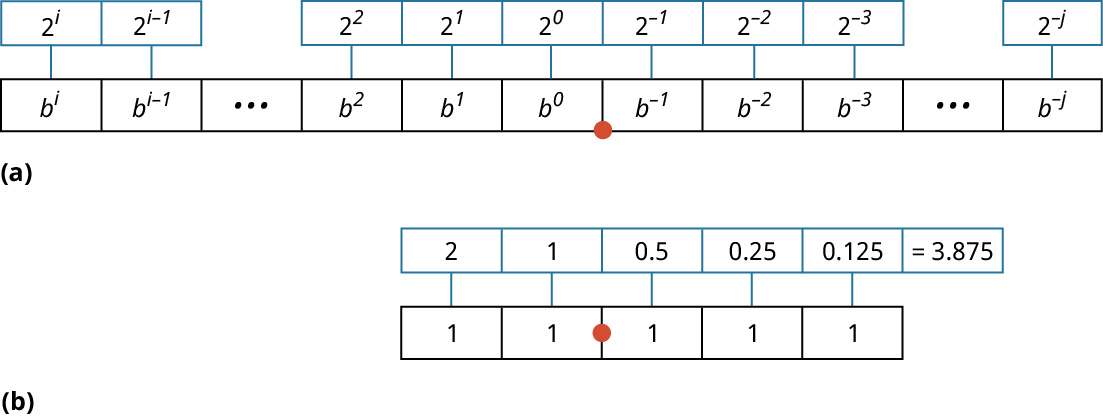
Let us start with an easy question: if given a binary floating-point number, for example 1010.010101, how do we get the decimal equivalent? Figure 5.14 illustrates how fractional binary numbers are represented. We use the same technique as getting the decimal equivalent of an unsigned integer. The only difference is that the digits at the right, after the floating point, have negative ranks starting from –1. If we have a number such as 11.111, the rank of the first digit after the floating point is –1, the following one is –2, and the leftmost one is –3. The digits at the left of the floating point have the usual rank that starts from 0. Therefore, the decimal equivalent of 11.111 = 21 + 20 + 2–1 + 2–2 + 2–3 = 2 + 1 + 0.5 + 0.25 + 0.125 = 3.875.
英語のヒント
簡単な問いから始めよう。たとえば1010.010101という2進の浮動小数点数が与えられたら、等価な10進数をどう求めるのだろうか。図5.14は、小数部分のある2進数の表現方法を示している。符号なし整数から等価な10進数を求めるのと同じ手法を使う。唯一の違いは、小数点より右側の桁の位が、−1から始まる負の値になることである。11.111という数なら、小数点直後の最初の桁の位が−1、その次が−2、最も左の桁が−3である。小数点の左側の桁には、通常どおり0から始まる位を付ける。したがって、11.111に等しい10進数は、21 + 20 + 2–1 + 2–2 + 2–3 = 2 + 1 + 0.5 + 0.25 + 0.125 = 3.875となる。
attribution: Copyright Rice University, OpenStax, under CC BY 4.0 license · CC BY 4.0 · Source出典
Figure 5.14 Floating point uses the same base 2, but after the decimal point the exponent is negative. (attribution: Copyright Rice University, OpenStax, under CC BY 4.0 license)
図5.14 浮動小数点も同じ基数2を使うが、小数点の後ろでは指数が負になる。(出典:著作権 Rice University、OpenStax。CC BY 4.0ライセンス)
LINK TO LEARNING学習リンク
The best way to get a clear view of how numbers are translated to binary so that computers can deal with them is to see the process in action. Visit this site to convert any number from floating point to binary and vice versa (https://openstax.org/r/76FloatPoBinary) and to read more about how to do it manually.
英語のヒント
コンピューターが扱えるように数を2進数へ変換する仕組みを、はっきり理解する最善の方法は、その処理が実際に動く様子を見ることである。このサイトで、任意の数を浮動小数点から2進数へ、またはその逆へ変換し(https://openstax.org/r/76FloatPoBinary)、手作業で変換する方法についても読んでみよう。
But how do we store numbers like 11.111 inside the computer memory or register? The hard part is the position of the floating point itself because it is not known beforehand and can change during computations, which makes it very hard to decide how many bits to reserve for the digits at the right of the floating point and the digits at the left of the floating points. If we try to make it a fixed number, say 16 bits and 16 bits, we do not get good precision. Going back to the mathematical representation of decimal floating point numbers, you may recall that we can move the floating point to the left or to the right and keep the final value unchanged by multiplying by 10 to some power. For example, 1.875 is the same as 18.75 × 10⁻¹, which is the same as 1875 × 10–3, which is the same as 0.1875 × 10, and so on. In binary, we can do the same by multiplying by 2 to the power of something. The number 11.111 is the same as 111.11 × 2–1 and so on. In fact, we can express any floating point binary number in the form 1.xxxx × 2y. Except for special cases, such as 0, expressing any binary number in this format requires storing three pieces of information:
英語のヒント
では、11.111のような数を、コンピューターのメモリやレジスタの内部にどう保存するのだろうか。難しいのは、小数点そのものの位置である。位置は事前にはわからず、計算中にも変わるため、小数点の右側の桁と左側の桁にそれぞれ何ビットを確保するかを決めるのが、とても難しくなる。たとえば16ビットずつのように固定しようとすると、十分な精度が得られない。10進の浮動小数点数の数学的表現に戻ると、10の何乗かを掛ければ、最終的な値を変えずに、小数点を左右へ移動できることを思い出すだろう。たとえば、1.875は18.75 × 10⁻¹と同じで、1875 × 10–3や0.1875 × 10とも同じである。2進数でも、2の何乗かを掛ければ同じことができる。11.111は、111.11 × 2–1などと同じである。実際、どんな2進の浮動小数点数も、1.xxxx × 2yの形で表現できる。0のような特殊な場合を除くと、この形式で2進数を表すには、三つの情報を保存する必要がある。
• The sign bit specifying if the whole number is positive (sign bit of 0) or negative (sign bit of 1)
英語のヒント
• 数全体が正(符号ビット0)か負(符号ビット1)かを指定する符号ビット。
• The exponent (the y in 1.xxxx × 2y)
• 指数(1.xxxx × 2yのy)。
• The fraction (the xxxx in 1.xxxx × 2y)
• 小数部(1.xxxx × 2yのxxxx)。
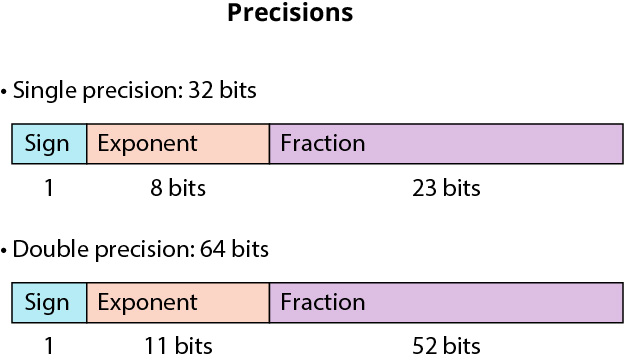
Note we don’t need to store the “1.” because we know that it exists except for some special cases. And this is why one of the names of the floating point format is “the hidden 1 technique.” If we are talking about single precision floating point, it takes 4 bytes (32 bits) and the format is shown in Figure 5.15. One bit is needed for the sign, 8 bits for the exponent, and the rest (32 bits) for the fraction. This format is called IEEE 754 format, developed by the Institute of Electrical and Electronics Engineers (IEEE). It is the standard format used by almost all computers that support floating points with very few exceptions.
英語のヒント
一部の特殊な場合を除けば「1.」が存在することはわかっているので、保存する必要はない。このため、浮動小数点形式は「隠れた1の技法」とも呼ばれる。単精度浮動小数点は4バイト(32ビット)を使い、その形式を図5.15に示す。符号に1ビット、指数に8ビット、残り(32ビット)を小数部に使う。この形式は、Institute of Electrical and Electronics Engineers(米国電気電子学会、IEEE)が策定したIEEE 754形式と呼ばれる。ごくわずかな例外を除き、浮動小数点に対応するほぼすべてのコンピューターが使う標準形式である。
attribution: Copyright Rice University, OpenStax, under CC BY 4.0 license · CC BY 4.0 · Source出典
Figure 5.15 IEEE 754 is the standard of choice in most machines to present floating points. (attribution: Copyright Rice University, OpenStax, under CC BY 4.0 license)
図5.15 ほとんどの機械は、浮動小数点の表現にIEEE 754標準を採用している。(出典:著作権 Rice University、OpenStax。CC BY 4.0ライセンス)
There is one piece of complexity regarding the exponent—the sign bit is responsible for the sign of the whole number. But, what about the exponent? We need to be able to have positive and negative exponents. If we use the two’s complement format for the exponent, the whole floating point format is overly complicated. The hardware that deals with floating point operations is very complicated and much slower than the one dealing with integers, and we do not want to make it even more complicated. The solution is to shift the range of the numbers presented by the 8 bits of the exponent. What does that mean? With 8 bits, we can present numbers from 0 to 256. What if we subtract 127 from each number? That is, you read the 8 bits, get the decimal equivalent (same way as an unsigned integer), then subtract 127. The result will be the range that can be presented is now from –127 to +128. You get the idea.
英語のヒント
指数について、一つ複雑な点がある。符号ビットが担当するのは、数全体の符号である。では、指数の符号はどうだろうか。正の指数と負の指数の両方を使える必要がある。指数に2の補数形式を使うと、浮動小数点形式全体が複雑になりすぎる。浮動小数点演算を扱うハードウェアは、整数を扱うものよりずっと複雑で遅いため、さらに複雑にはしたくない。解決策は、指数の8ビットで表す数の範囲をずらすことである。どういうことだろうか。8ビットなら、0から256までの数を表せる。それぞれの数から127を引いたらどうなるだろうか。つまり、8ビットを読み、符号なし整数と同じ方法で等価な10進数を求めてから、127を引く。すると、表せる範囲は−127から+128になる。考え方がつかめただろう。
Another name for the IEEE 754 format is “excess 127.” Note that 127 is for the single precision. For double precision that takes 64 bits, we subtract 1023, which is roughly half the range. The double precision is shown at the bottom of Figure 5.15. Let us see an example. What is the decimal equivalent of 10111011010110000…0?
英語のヒント
IEEE 754形式は「excess 127」とも呼ばれる。127は単精度の場合の値であることに注意しよう。64ビットを使う倍精度の場合は、範囲のおよそ半分にあたる1023を引く。倍精度の形式は図5.15の下段に示されている。例を見てみよう。10111011010110000…0に等しい10進数は何だろうか。
• First, let us divide it into its three main components: sign, exponent, and fraction. This makes it: 1 01110110 10110000…0.
• まず、符号、指数、小数部という三つの主要部分に分ける。1 01110110 10110000…0となる。
• Sign bit is 1, so the whole number is negative.
• 符号ビットが1なので、数全体は負である。
• Exponent = 01110110. Its decimal equivalent is 118. We subtract 127. This makes the exponent: 118 – 127 = –9.
• 指数=01110110。等価な10進数は118である。127を引くので、指数は118 − 127 = −9となる。
• The rest is the fraction, but we need to add the hidden one, so 1011000…0 becomes 1.1011, which has a decimal equivalent of 1 + 2–1 + 2–3 + 2–4 = 1.6875.
• 残りが小数部であるが、隠れた1を加える必要があるので、1011000…0は1.1011になる。等価な10進数は、1 + 2–1 + 2–3 + 2–4 = 1.6875である。
• This makes the whole number = –1.6875 × 2–9.
• したがって、数全体=−1.6875 × 2–9である。
Before we finish our discussion about floating points, there is the question of 0. How to present the 0? Even if we make all bits 0, the hidden 1 makes the final value a non-zero one. How can we deal with this problem? The representation approach that we have learned so far is called the normalized encoding of the IEEE 754 format. This is used if the exponent is non-zero and is not 11111111. If the exponent is 0 (i.e., 00000000) we are in denormalized encoding (also called subnormal). When we are in this special case, there are some differences in the translation to decimal:
英語のヒント
浮動小数点の話を終える前に、0の問題がある。0をどう表すのだろうか。すべてのビットを0にしても、隠れた1があるため、最終的な値は0にならない。この問題にどう対処すればよいのだろうか。ここまで学んだ表現方法は、IEEE 754形式の正規化符号化という。指数が0ではなく、かつ11111111でもない場合に使う。指数が0、つまり00000000の場合は、非正規化符号化(サブノーマルとも呼ばれる)になる。この特殊な場合は、10進数への変換方法にいくつか違いがある。
• The exponent is 1-bias instead of 0-bias. The bias is 127 in single precision and 1023 in double precision.
• 指数は0 − バイアスではなく、1 − バイアスである。バイアスは単精度で127、倍精度で1023である。
• There is no hidden 1, so the fraction part is 0.xxxx (the 23 bits in the fraction in single precision) instead of 1.xxxx….
• 隠れた1がないので、小数部は1.xxxx…ではなく、0.xxxx(単精度の場合、小数部は23ビット)になる。
With these exceptions, we cannot present the 0 (but setting all 32 bits to 0) but can present very small numbers.
英語のヒント
これらの例外により、0を表すことはできないが(32ビットをすべて0に設定して)、非常に小さな数を表すことができる。
The case where the exponent is all 1s is called “special values encoding.” If the exponent is all 1s and the fraction is all 0s, it represents infinity. If the exponent is all 1s and the fraction is non-zero, this is called NaN (Not a Number) and raises an exception. This happens when there is a bug in your program that does a division by 0 or the square root of –1, for example.
英語のヒント
指数がすべて1の場合を、「特殊値の符号化」という。指数がすべて1で、小数部がすべて0なら、無限大を表す。指数がすべて1で、小数部が0でなければ、NaN(Not a Number、非数)と呼ばれ、例外が発生する。これは、たとえばプログラムにバグがあり、0による除算や−1の平方根の計算を行ったときに起こる。