第5章アルゴリズムのハードウェアによる実現:コンピューターシステム設計
5.3 Machine-Level Information Representation5.3 機械レベルでの情報表現
Learning Objectives学習目標
By the end of this section, you will be able to:
この節を終えると、次のことができるようになる。
• Interpret binary numbers
• 2進数を解釈する。
• Explain the use of standard character codes to represent letters and symbols
• 文字や記号を表す標準文字コードの使い方を説明する。
• Define fractional binary numbers and explain how they are used
• 小数部分を持つ2進数を定義し、その使い方を説明する。
In this section we look at two very important and widely used types of information: numbers and text. The reason we concentrate on these two types is because they are standardized, and almost all computers store them in the same format, unlike other types of information that have many different formats, some of which are proprietary.
英語のヒント
この節では、非常に重要で広く使われている二つの情報、数値とテキストを取り上げる。この二つに注目するのは、標準化されており、ほぼすべてのコンピューターが同じ形式で保存しているからである。それ以外の種類の情報には多くの異なる形式があり、中には独自仕様のものもある。
It is important to know that a series of bits does not have a meaning by itself. For example, in order to interpret or translate the binary number 0011 as a decimal number, you need to know whether it is an unsigned or a signed integer. Therefore, we need to understand how the different types of information are presented in binary.
英語のヒント
ビットの並びは、それだけでは意味を持たないと知っておくことが重要である。たとえば、2進数0011を10進数として解釈したり変換したりするには、それが符号なし整数なのか、符号付き整数なのかを知る必要がある。したがって、異なる種類の情報が、2進数でどう表現されるかを理解しなければならない。
Integer Numbers Representation整数の表現
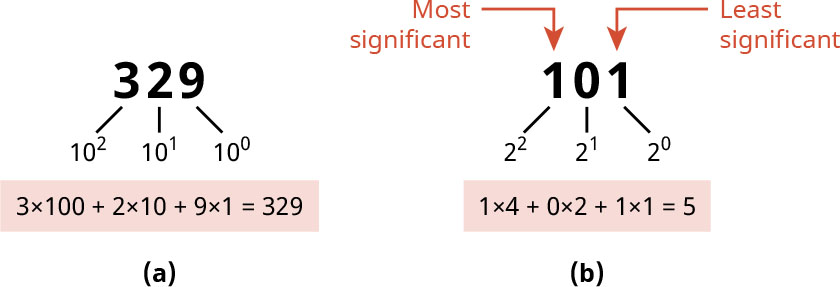
As human beings, we always think in numbers, specifically decimals. Whenever you mention a number, it is usually in decimal form; that is, base-10. But what does base-10 mean? It means the value of the number is calculated by scanning the number from right to left. And as you pass by a digit, multiply it by 10 to the power of the position of that digit. The number at the far right, called the least significant digit, has position 0. The one after is at position 1, and so on. Figure 5.11(a) shows this process.
英語のヒント
人間は普段、数、特に10進数で考えている。数を口にするときは、通常、10進表記、つまり基数10を使っている。では、基数10とはどういう意味だろうか。それは、数を右から左へたどって、その値を計算するということである。各桁を通るたびに、その数字に、10をその桁位置で累乗した値を掛ける。一番右の数字は最下位桁と呼ばれ、位置は0である。その次は位置1、というように続く。図5.11(a)に、この手順を示す。
attribution: Copyright Rice University, OpenStax, under CC BY 4.0 license · CC BY 4.0 · Source出典
Figure 5.11 The only difference between (a) decimal and (b) binary is the base. (attribution: Copyright Rice University, OpenStax, under CC BY 4.0 license)
図5.11 (a)10進数と(b)2進数の唯一の違いは、基数である。(出典:著作権 Rice University、OpenStax。CC BY 4.0ライセンス)
What about binary numbers? Binary numbers use base-2 and are presented as a series of 1s and 0s. In order to go from binary to the equivalent decimal, we need to differentiate between the ways unsigned integers and signed integers are represented in binary.
英語のヒント
2進数はどうだろうか。2進数は基数2を使い、1と0の並びとして表される。2進数から等価な10進数へ変換するには、符号なし整数と符号付き整数の2進表現の違いを区別する必要がある。
LINK TO LEARNING学習リンク
The best way to get a clear view of how numbers are translated to binary so that computers can deal with them is to see the process in action. Visit this site to convert any number from decimal to binary and vice versa (https://openstax.org/r/76DecimalBinary) and to read more about how to do it manually.
英語のヒント
コンピューターが扱えるように数を2進数へ変換する仕組みを、はっきり理解する最善の方法は、その処理が実際に動く様子を見ることである。このサイトで、任意の数を10進数から2進数へ、またはその逆へ変換し(https://openstax.org/r/76DecimalBinary)、手作業で変換する方法についても読んでみよう。
Unsigned Integer Numbers Representation符号なし整数の表現
An unsigned integer is a non-negative integer that starts from 0. If you see a number in binary and you are told that this number represents an unsigned number, you can get its decimal equivalent in the same way as base-10 integers but using base-2 instead. Figure 5.11(b) shows the operation of getting the decimal equivalent of the binary number 101 by starting from the right and moving left. The least significant bit has a position 0, the next one has position 1, and so on. As you pass by each element, add X × 2p, where p is the position of the digit and X is the digit itself (0 or 1), to the total sum.
英語のヒント
符号なし整数は、0から始まる非負の整数である。ある2進数が符号なし整数を表しているとわかっていれば、基数10の整数と同じ方法で、ただし基数2を使って、等価な10進数を求められる。図5.11(b)は、右から左へ進み、2進数101に等しい10進数を求める操作を示している。最下位ビットの位置が0、その次が1、というように続く。各桁を通るとき、合計にX × 2pを加える。ここでpは桁の位置、Xはその桁の数字そのもの(0または1)である。
One important thing to keep in mind is the range of numbers that can be presented by an unsigned number. One bit can present two values only: 1 and 0. Two bits can present four values: 00, 01, 10, and 11 which correspond to 0, 1, 2, and 3. Three bits can present eight values. In general n bits can present 2n values, which is the range from 0 to 2n – 1. As you can see, there are no negative numbers. To be able to present negative numbers, we need to use signed numbers.
英語のヒント
覚えておくべき重要な点の一つは、符号なしの数で表せる数値の範囲である。1ビットで表せるのは、1と0の二つの値だけである。2ビットでは、00、01、10、11の四つの値を表せ、それぞれ0、1、2、3に対応する。3ビットでは八つの値を表せる。一般に、nビットでは2n個の値を表せ、その範囲は0から2n − 1である。このように、負の数は含まれない。負の数を表すには、符号付きの数を使う必要がある。
Signed Integer Numbers Representation符号付き整数の表現
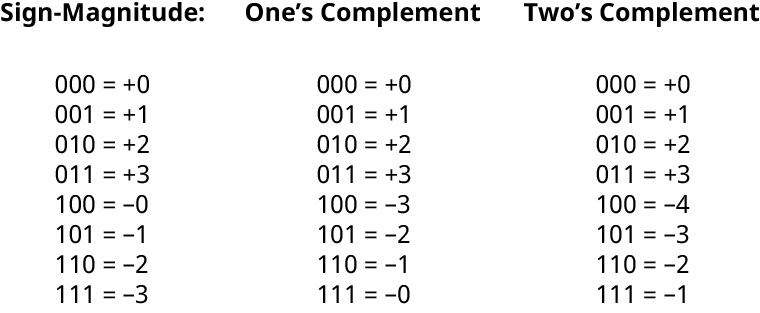
A signed integer is an integer that can be negative or positive. The word signed means that they have a sign of + or –. To present negative numbers, designers experimented with several options before picking the de facto choice. The obvious option is to use the most significant bit (i.e., the leftmost bit) as a sign bit where 0 means positive and 1 means negative. The rest of the number is treated with a method called sign-magnitude. Is it a good option? Let us look at the first column of Figure 5.12. It represents the sign-magnitude for a 3-bit number. We see two things.
英語のヒント
符号付き整数は、負にも正にもなれる整数である。「符号付き」とは、+または−の符号を持つという意味である。負の数を表現するために、設計者たちはいくつもの方法を試した後、事実上の標準となる方法を選んだ。わかりやすい方法は、最上位ビット、つまり一番左のビットを符号ビットとして使い、0を正、1を負とすることである。残りの部分を扱うこの方法を、符号・絶対値表現という。よい方法だろうか。図5.12の最初の列を見てみよう。3ビットの数の符号・絶対値表現である。二つの点に気づく。
attribution: Copyright Rice University, OpenStax, under CC BY 4.0 license · CC BY 4.0 · Source出典
Figure 5.12 Two’s complement is the representation of choice for signed numbers. (attribution: Copyright Rice University, OpenStax, under CC BY 4.0 license)
図5.12 符号付きの数には、2の補数表現が選ばれる。(出典:著作権 Rice University、OpenStax。CC BY 4.0ライセンス)
First, there are two presentations of 0 (+0 and –0), which is a waste of data. Second, the numbers are not mirrored around 0. That is, usually, the number after 0 is +1 and the one before 0 is –1. This is not realized here. The importance of this mirror is to make the hardware a bit simpler.
英語のヒント
第一に、0に二つの表現(+0と−0)があり、データの無駄になる。第二に、0を中心に数が対称に並んでいない。通常なら、0の次が+1、0の前が−1であるが、ここではそうなっていない。この対称性が重要なのは、ハードウェアを少し単純にできるからである。
The second method to try is a bit less intuitive. It is called the one’s complement method of a binary number, which is obtained by flipping each 1 in the original number to 0 and each 0 to 1. For example, 101 has its one’s complement as 010. The one’s complement method is explained in more detail:
英語のヒント
次に試す方法は、やや直感的でなくなる。2進数の1の補数という方法で、元の数の1をすべて0に、0をすべて1に反転して求める。たとえば、101の1の補数は010である。1の補数の方法を詳しく説明すると、次のようになる。
• Check the most significant bit and if it is 1, the number is negative and is represented in its one’s complement form. To get the original number, you need to get its one’s complement.
英語のヒント
• 最上位ビットを確認する。1なら、その数は負で、1の補数の形で表されている。元の数を得るには、その1の補数を求める必要がある。
• The one’s complement of the one’s complement is the original number. For example, the one’s complement of 101 is 010. The one’s complement of 010 is 101.
• 1の補数の、さらに1の補数を取ると、元の数になる。たとえば、101の1の補数は010である。010の1の補数は101である。
• Looking at the second column of Figure 5.12, let us take a number such as 110. Its most significant bit is 1 so the number is negative and in its one’s complement form. To know its original value, we need to get its one’s complement again. The one’s complement of 110 is 001 which corresponds to decimal number 1, so the result is –1.
英語のヒント
• 図5.12の2列目で、110という数を取り上げよう。最上位ビットは1なので、負の数が1の補数の形で表されている。元の値を知るには、もう一度1の補数を求める必要がある。110の1の補数は001で、10進数の1に対応するので、結果は−1である。
• If the most significant bit is 0, then the number is positive, and to get its decimal equivalent, we treat it as if it is unsigned. With the number 010, the most significant bit is 0, so the number is positive and the decimal equivalent of 010 is 2. Therefore, the result is +2.
英語のヒント
• 最上位ビットが0なら、その数は正である。等価な10進数を求めるには、符号なしの数として扱う。010なら、最上位ビットが0なので正で、等価な10進数は2である。したがって、結果は+2になる。
Is the one’s complement a good method? There is a mirroring effect around the +3/–3. But we still have the two presentations of 0. The third method is called the two’s complement, which is the least intuitive method. It is important to note that what is good for machines is not intuitive or easy for human beings!
英語のヒント
1の補数はよい方法だろうか。+3/−3を境に対称に並ぶ。しかし、0には依然として二つの表現がある。第三の方法は2の補数で、最も直感的でない方法である。機械にとってよいものが、人間にとって直感的、あるいは容易とは限らないことに注意しよう。
The two’s complement of a binary number is simply the one’s complement with 1 added to the result. For example, to get the one’s complement of 011, we do it in two steps. First, we get the one’s complement: 011 is 100. Second, we add 1 to the result: 100 + 1 = 101, and 101 is the two’s complement of 011. Now that we know the definition of two’s complement, let us see how we can get the decimal equivalent of a binary number. We perform a very similar technique as the one’s complement but use the two’s complement.
英語のヒント
2進数の2の補数は、単に1の補数の結果に1を加えたものだ。たとえば、011の1の補数を求めるには、二つの手順を実行する。まず1の補数を求めると、011は100になる。次に、その結果に1を加える。100 + 1 = 101なので、101が011の2の補数である。2の補数の定義がわかったところで、2進数に等しい10進数をどう求めるか見てみよう。1の補数と非常によく似た手法を使うが、使うのは2の補数である。
Look at the most significant bit. If it is 0, the number is positive, and the decimal equivalent can be calculated as if the number is unsigned. For example, 011 is positive and the decimal equivalent is +3. If the most significant bit is 1, then the number is negative, and it is written in its two’s complement form. Also, the two’s complement of the two’s complement brings the original number so 101 has the most significant bit of 1. The number is negative and written in its two’s complement form.
英語のヒント
最上位ビットを見る。0なら正の数なので、符号なしの数と同じように、等価な10進数を計算できる。たとえば、011は正で、等価な10進数は+3である。最上位ビットが1なら負の数であり、2の補数の形で書かれている。また、2の補数のさらに2の補数を求めると、元の数に戻る。101は最上位ビットが1である。この数は負であり、2の補数の形で書かれている。
The two’s complement of 101 is 011, which corresponds to 3. The number 101 represents –3, as you can see in the third column of Figure 5.12. A close look at the figure shows that even though the two’s complement is not the most intuitive method, it is the most efficient. Since we have only one presentation of 0, we can see from the figure that with three bits, the two’s complement method can present up to –4, which we did not find in the other two methods.
英語のヒント
101の2の補数は011で、3に対応する。図5.12の3列目にあるように、101は−3を表している。図をよく見ると、2の補数は最も直感的な方法ではないものの、最も効率的だとわかる。0の表現が一つだけなので、図からわかるように、3ビットの2の補数表現なら−4まで表せる。ほかの二つの方法では、この値は表せなかった。
Another important issue with the two’s complement is that the hardware implementation of it is very efficient because we can use the same piece of hardware for both addition and subtraction and for both signed and unsigned integers. Therefore, a two’s complement presentation of a signed number is the standard presentation in all computer systems. With n bits, the range of numbers that can be presented is [–2n – 1, +2n – 1 – 1]. You can see that this range contains 2n different numbers, exactly like n-bit unsigned integer numbers. The only difference is that in the signed range, half the range is negative, while in an unsigned integer, the whole range is positive.
英語のヒント
2の補数のもう一つの重要な点は、ハードウェアによる実装が非常に効率的なことである。加算と減算の両方に、また符号付き整数と符号なし整数の両方に、同じハードウェアを使えるからである。そのため、符号付きの数の2の補数表現は、すべてのコンピューターシステムで標準となっている。nビットで表せる数の範囲は、[−2n – 1, +2n – 1 − 1]である。この範囲に含まれる数は2n個で、nビットの符号なし整数とまったく同じである。唯一の違いは、符号付きの場合は範囲の半分が負であるのに対し、符号なし整数では範囲全体が正であることである。
Lastly, let us look at how additions and subtractions are done. The process is similar to a decimal by starting from the right and a possible carry propagates to the left. Additionally, the subtraction is nothing but an addition; that is, A – B is the same as A + two’s complement of B. When we add two numbers in decimal, it is straightforward. With binary, it is also straightforward. Just remember the information in Table 5.2; op1 and op2 are the two inputs to the addition operation.
英語のヒント
最後に、加算と減算をどう行うか見てみよう。手順は10進数と似ており、右から始めて、繰り上がりが生じたら左へ伝える。また、減算は加算にほかならない。つまり、A − Bは、AにBの2の補数を足すことと同じである。10進数の二つの数を足すのは簡単であるが、2進数でも同様に簡単である。表5.2の内容を覚えておくだけである。op1とop2は、加算演算への二つの入力である。
Op1 | Op2 | Carry 桁上がり | Sum 和 |
|---|---|---|---|
0 | 0 | 0 | 0 |
0 | 1 | 0 | 1 |
1 | 0 | 0 | 1 |
1 | 1 | 1 | 1 |
Table 5.2 Op1 and Op2 Inputs to the Addition Operation
表5.2 加算演算への入力op1とop2
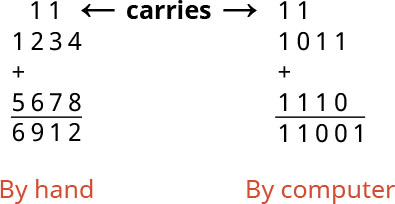
Let us apply this to numbers longer than one bit. In Figure 5.13, the left side of the example is a traditional decimal addition as done on paper by hand. The right side of the example shows what computers do. Computers, as we already know by now, use only 1s and 0s. So, if they add 1 to 1, for example, the result is not 2 because computers do not know 2. The result of 1 + 1 is 10, which is the binary representation of 2. From this 10, the 0 is the result and 1 is used as carry.
英語のヒント
これを、1ビットより長い数に適用してみよう。図5.13の左側は、紙に手書きする通常の10進数の足し算である。右側は、コンピューターの処理を示している。すでに学んだように、コンピューターは1と0しか使わない。たとえば1に1を足しても、コンピューターは2を知らないので、結果は2ではない。1 + 1の結果は、2の2進表現である10である。この10のうち、0がその桁の結果で、1が繰り上がりとして使われる。
attribution: Copyright Rice University, OpenStax, under CC BY 4.0 license · CC BY 4.0 · Source出典
Figure 5.13 This illustrates the difference between traditional addition versus computer computation. (attribution: Copyright Rice University, OpenStax, under CC BY 4.0 license)
図5.13 通常の足し算とコンピューターの計算の違いを示している。(出典:著作権 Rice University、OpenStax。CC BY 4.0ライセンス)