第5章アルゴリズムのハードウェアによる実現:コンピューターシステム設計
THINK IT THROUGH考えてみよう
Why Learn About Computer Systems?コンピューターシステムを学ぶ理由
Whether you want to be a software developer, a programmer, or a hardware designer, or even to efficiently use any computer system, you need a minimum knowledge of computer organization. You need to know what the different pieces in the computer systems are, how they interact, and how fast each piece is. Knowing the internal workings of computers helps you write more efficient software, design computers of different sizes (like the one in your watch, the one in your phone, or big supercomputers), and make the best decisions when buying a computer.
英語のヒント
ソフトウェア開発者、プログラマー、ハードウェア設計者を目指す場合でも、単にコンピューターシステムを効率よく使いたい場合でも、コンピューターの構成について最低限の知識が必要になる。各部品が何であり、どう相互に働き、それぞれがどれほど速いのかを知る必要がある。コンピューター内部の仕組みを知ることは、より効率のよいソフトウェアを書くこと、腕時計や携帯電話内のコンピューターから大型スーパーコンピューターまで異なる規模のものを設計すること、購入時に最適な判断をすることに役立つ。
Application Programs and Executablesアプリケーションプログラムと実行可能プログラム
The programs we use in our computer systems, called applications, have been designed and written by software developers using computer languages, also called high-level languages (HLLs). HLLs have been designed to make the interaction between software developers and computers easier. However, computers do not understand HLLs. Computers understand only 1s and 0s. So, there is a set of programs designed to translate the programs written in an HLL into the 1s and 0s that computers can relate to. The programs written by software developers are translated into a set of instructions such as, “Add number 1 to number 2 and save the result as number 3.” These instructions are stored as a series of 1s and 0s. Each group of those 1s and 0s represents a single instruction. All the instructions, in their representation as 1s and 0s, are stored in a file called an executable file on the disk.
英語のヒント
コンピューターシステムで使うプログラムはアプリケーションと呼ばれ、ソフトウェア開発者が、高水準言語(HLL)とも呼ばれるコンピューター言語を使って設計し、記述している。HLLは、ソフトウェア開発者とコンピューターのやり取りを容易にするために設計されている。しかし、コンピューターはHLLを理解せず、1と0しか理解しない。そこで、HLLで書かれたプログラムを、コンピューターが扱える1と0へ翻訳する一群のプログラムがある。ソフトウェア開発者が書いたプログラムは、例えば「数1を数2に加え、結果を数3として保存せよ」というような一連の命令に翻訳される。命令は1と0の列として保存され、その1と0の各まとまりが1つの命令を表す。1と0で表現されたすべての命令は、実行可能ファイルと呼ばれるファイルにまとめて、ディスク上に保存される。
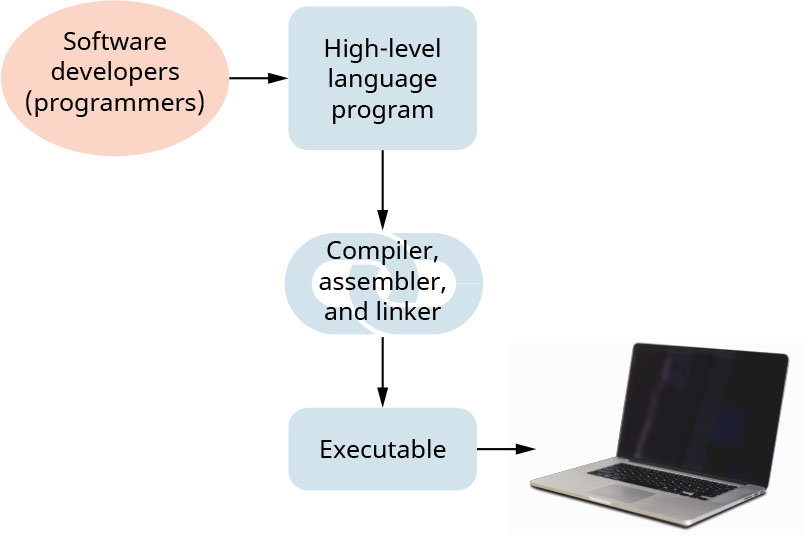
When you click an icon or type a command, the operating system, software whose job is to manage the interaction between the user of the computer, the hardware, and the programs, loads the executable from storage into the computer memory. At this point, the computer is ready to start executing the program. Figure 5.3 shows the steps for writing programs, in various HLLs by software developers, and then translating these programs to an executable (the 1s and 0s representation of the program) using a special software toolchain (Figure 5.3). This special software that translates HLLs to executables includes tools called compilers, assemblers, and linkers. We will not discuss these tools here, (refer to 5.2 Computer Levels of Abstraction and 5.4 Machine-Level Program Representation), but we now know what they do. Here, we will look at how the hardware executes instructions.
英語のヒント
アイコンをクリックしたりコマンドを入力したりすると、オペレーティングシステムが実行可能プログラムをストレージからコンピューターのメモリへ読み込む。オペレーティングシステムとは、利用者、ハードウェア、プログラムの間のやり取りを管理するソフトウェアである。この時点で、コンピューターはプログラムの実行を開始できる。図5.3は、ソフトウェア開発者が各種HLLでプログラムを書き、専用のソフトウェアツールチェーンで実行可能プログラム(プログラムを1と0で表現したもの)へ翻訳する手順を示す(図5.3)。この専用ソフトウェアには、コンパイラ、アセンブラ、リンカーというツールが含まれる。ここではこれらのツールの詳しい説明はせず、5.2「コンピューターの抽象化レベル」と5.4「機械語レベルのプログラム表現」を参照してほしい。これで役割は分かったので、ここからはハードウェアが命令を実行する仕組みを見ていこう。
attribution: Copyright Rice University, OpenStax, under CC BY 4.0 license · CC BY 4.0 · Source出典
Figure 5.3 Programs developed in high-level languages (HLLs) such as C++, Java, or Python are then translated into executables that a computer can run. (attribution: Copyright Rice University, OpenStax, under CC BY 4.0 license)
図5.3 C++、Java、Pythonなどの高水準言語(HLL)で開発したプログラムは、コンピューターが実行できる実行可能プログラムへ翻訳される。(出典表示:著作権者Rice University、OpenStax、CC BY 4.0ライセンス)
Hardware Organization of Systemsシステムのハードウェア構成
Once the executable is in the memory, the hardware needs to do several things in order to execute it. Recall that an executable is a group of instructions in the form of 1s and 0s. The hardware first needs to fetch an instruction from memory by bringing it from the memory to inside the CPU, which is the brain of the computer that performs and executes the instructions of a program. Once the instruction is fetched from memory and stored in temporary storage inside the CPU, called a register, the CPU decodes this instruction; that is, it deciphers or understands the meaning of the several 1s and 0s that constitute the instruction. For example, the software program may contain an instruction such as “add this number x to the number y and put the result in z.” Since computers do not understand English, this instruction is stored inside the computer in the form of 1s and 0s. The CPU has to read those 1s and 0s, understand what they mean (i.e., decode it), and then execute it.
英語のヒント
実行可能プログラムがメモリに入ると、ハードウェアはそれを実行するためにいくつかの処理を行う必要がある。実行可能プログラムは1と0の形で表された命令の集まりだった。ハードウェアはまず、命令をメモリからCPU内へ取り込まなければならない。CPUはプログラムの命令を処理・実行する、コンピューターの頭脳である。命令がメモリから取得され、CPU内のレジスタと呼ばれる一時記憶領域に保存されると、CPUはその命令をデコードする。つまり、命令を構成する1と0の意味を解読し、理解する。例えば、ソフトウェアのプログラムには「この数xを数yに加え、結果をzに入れよ」という命令が含まれているかもしれない。コンピューターは英語を理解しないため、この命令は1と0の形で内部に保存される。CPUはその1と0を読み、意味を理解し(デコードし)、実行する必要がある。
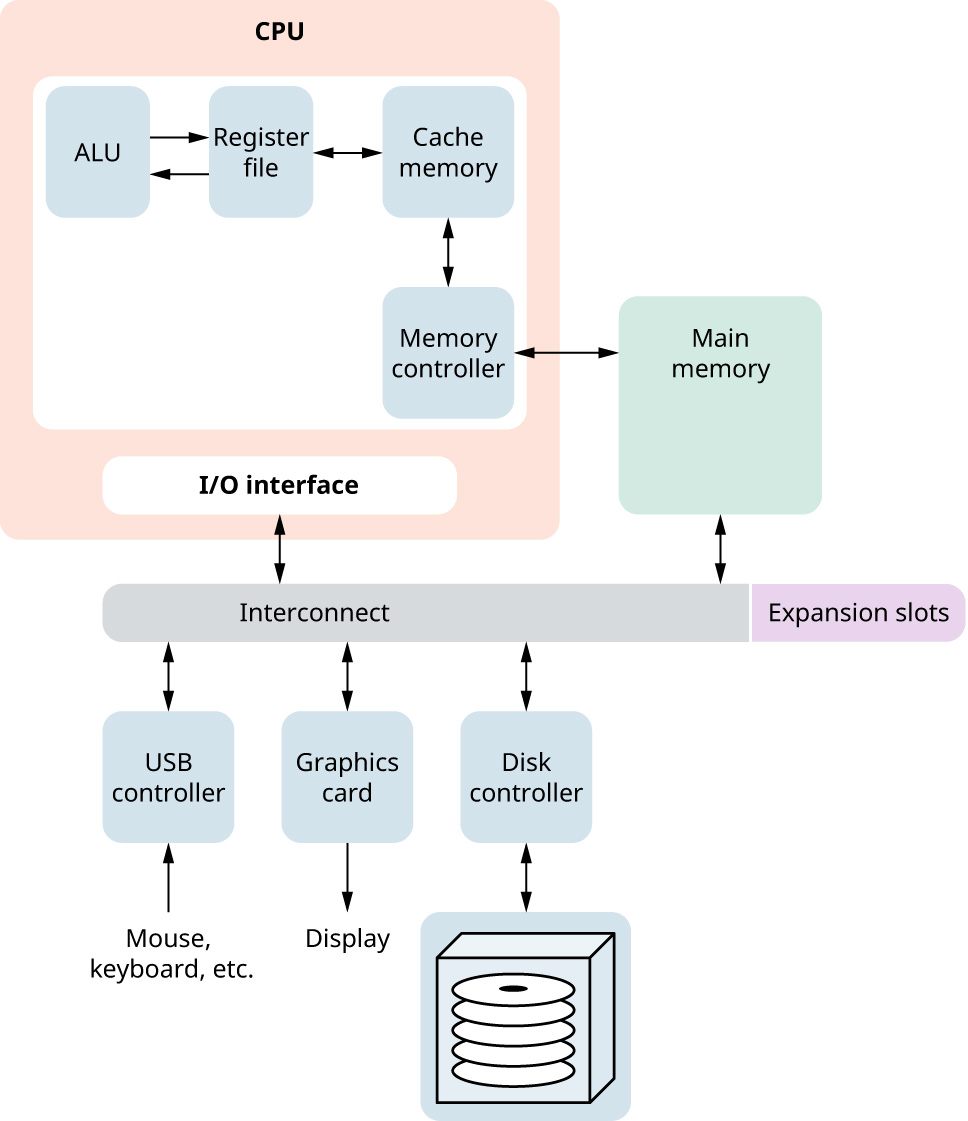
After the instruction has been decoded, the CPU instructs the arithmetic logic unit (ALU) to execute it. The ALU is the piece of hardware inside the CPU that performs computations and logical operations such as comparisons. Once the instruction is executed, the result is saved into a register or sent back to the memory. The CPU is now ready to fetch the next instruction. Figure 5.4 shows a computer system’s hardware. Inside the CPU we can see the ALU, a group of registers (called a register file), and a piece of hardware, called the memory controller, that helps the CPU talk to the memory. Inside the CPU we also find fast storage, which is faster than the memory but slower than the register, called cache memory. We will discuss cache memory in 5.5 Memory Hierarchy.
英語のヒント
命令をデコードした後、CPUは算術論理演算装置(ALU)にその実行を指示する。ALUは、計算や比較などの論理演算を行うCPU内部のハードウェアである。命令の実行が終わると、結果はレジスタへ保存されるか、メモリへ戻される。これでCPUは次の命令を取り込める。図5.4はコンピューターシステムのハードウェアを示す。CPU内には、ALU、レジスタの集まりであるレジスタファイル、そしてCPUとメモリの通信を助けるメモリコントローラーというハードウェアがある。また、CPU内にはキャッシュメモリという高速な記憶装置もあり、メモリより速いがレジスタより遅い。キャッシュメモリは5.5「メモリ階層」で扱う。
attribution: Copyright Rice University, OpenStax, under CC BY 4.0 license · CC BY 4.0 · Source出典
Figure 5.4 Any computer system consists of several components that, together, help the computer do its job of executing programs. (attribution: Copyright Rice University, OpenStax, under CC BY 4.0 license)
図5.4 どのコンピューターシステムも複数の部品からなり、それらが連携して、プログラムを実行するという仕事を支えている。(出典表示:著作権者Rice University、OpenStax、CC BY 4.0ライセンス)
One final piece of hardware inside the CPU is the I/O interface. The input/output (I/O) interface helps the CPU talk to the other I/O devices such as a keyboard or mouse. All the pieces—CPU, memory, graphics card—are connected via a collection of wires referred to as a bus. The purpose of a bus is to transfer data between the various pieces in the computer. Buses can differ in speed, which affects how fast the data are transferred. Figure 5.4 uses the generic word interconnect to designate buses. We can add more devices to the computer system such as a different display through expansion slots.
英語のヒント
CPU内部の最後のハードウェアがI/Oインターフェースである。入出力(I/O)インターフェースは、CPUがキーボードやマウスなどの入出力装置と通信するのを助ける。CPU、メモリ、グラフィックスカードなどの部品はすべて、バスと呼ばれる配線の集まりで接続されている。バスの目的は、コンピューター内の各部品間でデータを転送することにある。バスには速度の違いがあり、それによってデータ転送の速さも変わる。図5.4では、バスを表すためにインターコネクトという一般的な言葉を使っている。拡張スロットを使えば、別のディスプレイなど、さらに装置をコンピューターシステムへ追加できる。