第5章アルゴリズムのハードウェアによる実現:コンピューターシステム設計
Digital Logic Abstractionデジタル論理の抽象化
The main building block that forms the processor is called a logic gate. There are very few logic gate types: AND, OR, NOT, NAND, NOR, XOR, and XNOR. Using these gates, and most of the time only a subset of them, you can design all the pieces that form the processor discussed earlier. But what is inside these gates? How are they built?
英語のヒント
プロセッサを構成する主要な基本要素を、論理ゲートという。その種類は、AND、OR、NOT、NAND、NOR、XOR、XNORと、ごくわずかである。これらのゲートを使えば、しかも大抵はその一部だけで、先に述べたプロセッサのすべての部分を設計できる。しかし、ゲートの内部には何があるのだろうか。どのように作られているのだろうか。
The Lowest Level of Abstraction最も低い抽象化レベル
The main building block of all logic gates, and hence of all processors, is the transistor. This is shown at the bottom of Figure 5.5 as device level. Though you may have heard the word transistor before, you may not know exactly what it does. Simply speaking, a transistor is an on and off switch. This is very similar to the light switch in your house that can turn a light on or off. A transistor lets an electrical current pass, the ON state, or can block the electrical current, the OFF state. Transistors are turned ON/OFF based on the voltage input to the transistor. If the voltage is higher than a threshold, the transistor is in the ON state. Otherwise, it is in the OFF state. There are only two states: ON/OFF, which correspond to 1 and 0. This is why computers understand only 1s and 0s. By interconnecting several transistors in some way, we build an AND gate. If we connect them in a different way, we build an OR gate, and so on.
英語のヒント
あらゆる論理ゲート、したがってあらゆるプロセッサの主要な基本構成要素は、トランジスタである。図5.5の最下部には、デバイスレベルとして示されている。トランジスタという言葉を聞いたことがあっても、何をするものなのか、正確には知らないかもしれない。簡単にいうと、トランジスタはオンとオフを切り替えるスイッチである。家の照明をつけたり消したりするスイッチとよく似ている。トランジスタは、電流を通すことも(ON状態)、遮断することも(OFF状態)できる。トランジスタへの入力電圧に応じて、ON/OFFが切り替わる。電圧がしきい値より高ければON状態、それ以外ならOFF状態である。状態はON/OFFの二つだけで、1と0に対応する。コンピューターが1と0だけを理解するのは、このためである。複数のトランジスタをある方法で相互接続すれば、ANDゲートができる。別の方法で接続すればORゲートになる、という具合である。
If we try to see how transistors are built and work, then we move to the semiconductor level. At this level we use a special material such as silicon and a special, and very expensive, process to turn it into a working transistor. A single processor contains billions of transistors. How can a material like silicon make a transistor? This takes us to the level of atoms and quantum physics.
英語のヒント
トランジスタがどう作られ、どう動くかを見ようとすると、半導体のレベルへ進む。このレベルでは、シリコンなどの特殊な材料に、特殊で非常に高価な加工を施して、動作するトランジスタを作る。一つのプロセッサには、何十億ものトランジスタが含まれている。シリコンのような材料で、どうしてトランジスタができるのだろうか。ここで、原子と量子物理学のレベルへと進むことになる。
The Role of the Operating Systemオペレーティングシステムの役割
Now that we have rundown the problem definition to quantum physics, you may wonder where the operating system (OS) (i.e., OS X, Windows, Linux) fits in this bigger scheme. The OS is similar to any application program in the sense that it has to be written in an HLL, typically C/C++, and passed through the compiler and assembler to generate machine code. However, the OS differs from traditional application programs in that it has more privileges in the computer system.
英語のヒント
ここまで問題の定義から量子物理学までたどってきたので、オペレーティングシステム(OS)、たとえばOS X、Windows、Linuxは、この全体の仕組みのどこに入るのか、と思うかもしれない。OSも、HLL(通常はC/C++)で書かれ、コンパイラとアセンブラを通して機械語コードを生成しなければならない点では、どのアプリケーションプログラムとも似ている。しかし、コンピューターシステム内でより多くの特権を持つという点で、通常のアプリケーションプログラムとは異なる。
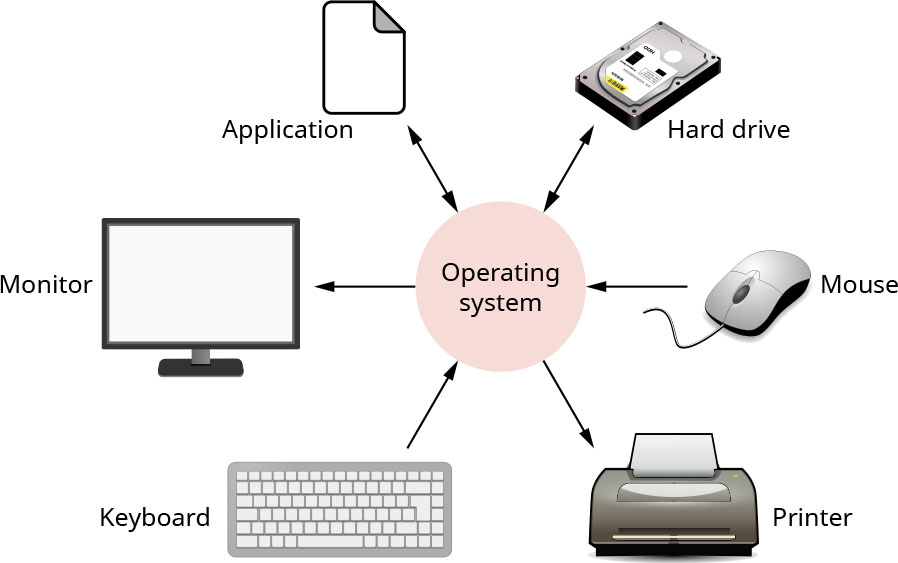
The operating system (OS), shown in Figure 5.10 is the only piece of software that can directly access the hardware. Any other program that needs to access the hardware, such as printing something, must talk to the OS, and the OS achieves the requested task on behalf of the program. The reason all computers are designed this way is to increase security (only one program deals with the hardware so other programs cannot affect the machine) and reliability (a program cannot affect a piece of hardware, which would then affect other programs). In order for the OS to do its job efficiently, it stores the data and programs on disk in an organized way using a file system. The file system helps organize files so that it is easier to find them when needed.
英語のヒント
図5.10に示すオペレーティングシステム(OS)は、ハードウェアに直接アクセスできる唯一のソフトウェアである。何かを印刷するなど、ハードウェアへのアクセスが必要なほかのプログラムは、必ずOSに依頼し、OSがそのプログラムに代わって要求されたタスクを実行する。すべてのコンピューターがこのように設計されているのは、セキュリティーと信頼性を高めるためである。セキュリティーについては、一つのプログラムだけがハードウェアを扱うので、ほかのプログラムは機械に影響を与えられない。信頼性については、あるプログラムがハードウェアに影響を与え、そのハードウェアがさらにほかのプログラムへ影響を及ぼす、ということができなくなる。OSは仕事を効率よく行うため、ファイルシステムを使って、データとプログラムを整理された形でディスクに保存する。ファイルシステムは、必要なときに見つけやすいようにファイルを整理する。
attribution: Copyright Rice University, OpenStax, under CC BY 4.0 license · CC BY 4.0 · Source出典
Figure 5.10 The operating system functions as a manager that connects the hardware in the computer to the software. (attribution: Copyright Rice University, OpenStax, under CC BY 4.0 license)
図5.10 オペレーティングシステムは、コンピューター内のハードウェアとソフトウェアを結ぶ管理者として働く。(出典:著作権 Rice University、OpenStax。CC BY 4.0ライセンス)
A file is a generic name for any entity we want to store in the computer. For example, any program that you use consists of one or more files. Each song you listen to is a file. Any image or video you watch is a file, and so on. The process in which the OS manages which program to use with what part of the hardware at any given time is called scheduling. That is, the OS decides when your web browser must use the processor and when your media player uses the screen or speaker. There is a generic name for all programs running on your computer: process. So, if you are listening to music while browsing the web then you are using two processes: your media player and your browser. Therefore, part of the job of the OS is process scheduling.
英語のヒント
ファイルとは、コンピューターに保存したいものの総称である。たとえば、使っているプログラムはどれも、一つ以上のファイルから構成されている。聴いている曲も、見ている画像や動画もファイルである。OSが、ある時点でどのプログラムにハードウェアのどの部分を使わせるか管理する処理を、スケジューリングという。つまり、ウェブブラウザーがプロセッサを使う時点や、メディアプレーヤーが画面やスピーカーを使う時点を、OSが決めるのだ。コンピューター上で実行中のプログラムには、プロセスという総称がある。そのため、音楽を聴きながらウェブを閲覧しているなら、メディアプレーヤーとブラウザーという二つのプロセスを使っている。したがって、OSの仕事の一部はプロセスのスケジューリングである。
The technique that the OS uses to isolate different programs from each other so that they do not overwrite each other’s data or corrupt each other’s files is called virtual memory. Additionally, the OS can leverage several computers referred to as virtual machines together to act as one big computer and to serve several uses at the same time. Users may think they have control of the whole machine, even though the reality is not so. This is why this technology used by the OS is called virtual machine.
英語のヒント
異なるプログラムが、互いのデータを上書きしたり、互いのファイルを破損させたりしないように、OSがプログラムどうしを分離する技法を、仮想記憶という。さらにOSは、仮想マシンと呼ばれる複数のコンピューターをまとめて活用し、一つの大きなコンピューターのように動作させ、同時に複数の用途に対応できる。利用者は、実際にはそうでなくても、マシン全体を自由に使えていると思うことがある。このため、OSが使うこの技術を仮想マシンという。
There are many OSs in the world but the most famous are Windows from Microsoft, macOS from Apple, and Linux.
世界には多くのOSがあるが、最もよく知られているのは、MicrosoftのWindows、AppleのmacOS、そしてLinuxである。