第9章ソフトウェア工学
INDUSTRY SPOTLIGHT産業界に注目
Usability and Acceptance Testing by Car Manufacturers自動車メーカーによるユーザビリティテストと受け入れテスト
Usability and acceptance testing are quite different. Let’s consider again the software for the lane departure systems (LDS) that are incorporated into automobiles these days. Acceptance testing would confirm that the lane departure system works as expected: Did the warning happen when a vehicle crossed a lane line? Did the software recognize when the vehicle departed the lane? Did the system warning start and end in an amount of time that was appropriate to the user? When the system is disabled, did the software ignore lane departures and not trigger the warnings?
英語のヒント
ユーザビリティテストと受け入れテストは大きく異なる。現在の自動車に組み込まれている車線逸脱システム(LDS)のソフトウェアを、もう一度考えよう。受け入れテストでは、車線逸脱システムが期待どおりに動作するかを確認する。車両が車線を区切る線を越えたときに、警報が出たか。車線を外れたことをソフトウェアが認識したか。システムの警報は、ユーザーにとって適切な時間で始まり、終わったか。システムを無効にしたときには、車線の逸脱を無視して警報を作動させなかったか。
With usability testing, the focus is more on whether the system met the expectations of the users interacting with it: Was the system usable? Did the user use the feature as intended? Did the user react appropriately to the warning signal? Was the signal so startling it caused the user to jerk and risk an accident? Did the user simply turn off the system because they found it annoying? The focus of usability testing is on how the solution is being used and whether it was created in the most intuitive manner
英語のヒント
ユーザビリティテストでは、システムを操作するユーザーの期待を満たしたかに、より重点を置く。システムは使えるものだったか。ユーザーは意図どおりに機能を使ったか。警報に適切に反応したか。信号に驚き、急に体を動かして事故の危険を生じるほどではなかったか。ユーザーは単に煩わしいと感じ、システムを切ってしまわなかったか。ユーザビリティテストの焦点は、仕組みがどのように使われているか、そして、できる限り直感的な形に作られているかにある。
The Insurance Institute for Highway Safety found that 49% of users turned the LDS off during their normal commuting. More important, it was found that 54% turned it on if it used tactile warnings compared to only 46% turning it on if it used an audible alert. From a usability testing standpoint, this shows that it is better to focus on a tactile warning over an audible one if the goal is to get the most usage. Because LDS has been shown to decrease the chance of fatal accidents, even with low usage, it can still help save lives.
英語のヒント
米国道路安全保険協会の調査では、ユーザーの49%が通常の通勤時にLDSを切っていた。さらに重要なのは、触覚による警告を使う場合には54%がオンにしたのに対し、音による警告では46%にとどまったことである。ユーザビリティテストの観点では、できるだけ多く利用してもらうことが目標なら、音による警告より触覚による警告を重視したほうがよいと分かる。LDSは死亡事故の可能性を下げることが示されているため、利用率が低くても命を救う助けにはなりうる。
Software Engineering Toolsソフトウェア工学のツール
Software developers use many tools that facilitate development; some of them are used daily while others only occasionally, but they all play an important role in software engineering process.
英語のヒント
ソフトウェア開発者は、開発を容易にする多くのツールを使う。毎日使うものもあれば、たまにしか使わないものもあるが、どれもソフトウェア工学のプロセスで重要な役割を果たす。
Compilerコンパイラー
A compiler is a program that converts source code into a syntax or format that a computer can execute. Programming languages such as C and C++ compile into machine code, which consists of instructions for a specific processor. Other programming languages such as Java compile into machine independent code. For example, Java program code is generally compiled into Java bytecode. This machine independent code is then executed on a Java Virtual Machine.
英語のヒント
コンパイラーは、ソースコードをコンピューターが実行できる構文や形式に変換するプログラムである。CやC++などのプログラミング言語は、特定のプロセッサー向けの命令からなる機械語にコンパイルする。Javaなどのほかの言語は、機種に依存しないコードにコンパイルする。たとえば、Javaのプログラムコードは一般にJavaバイトコードへコンパイルする。この機種に依存しないコードを、Java仮想マシン上で実行する。
Debuggerデバッガー
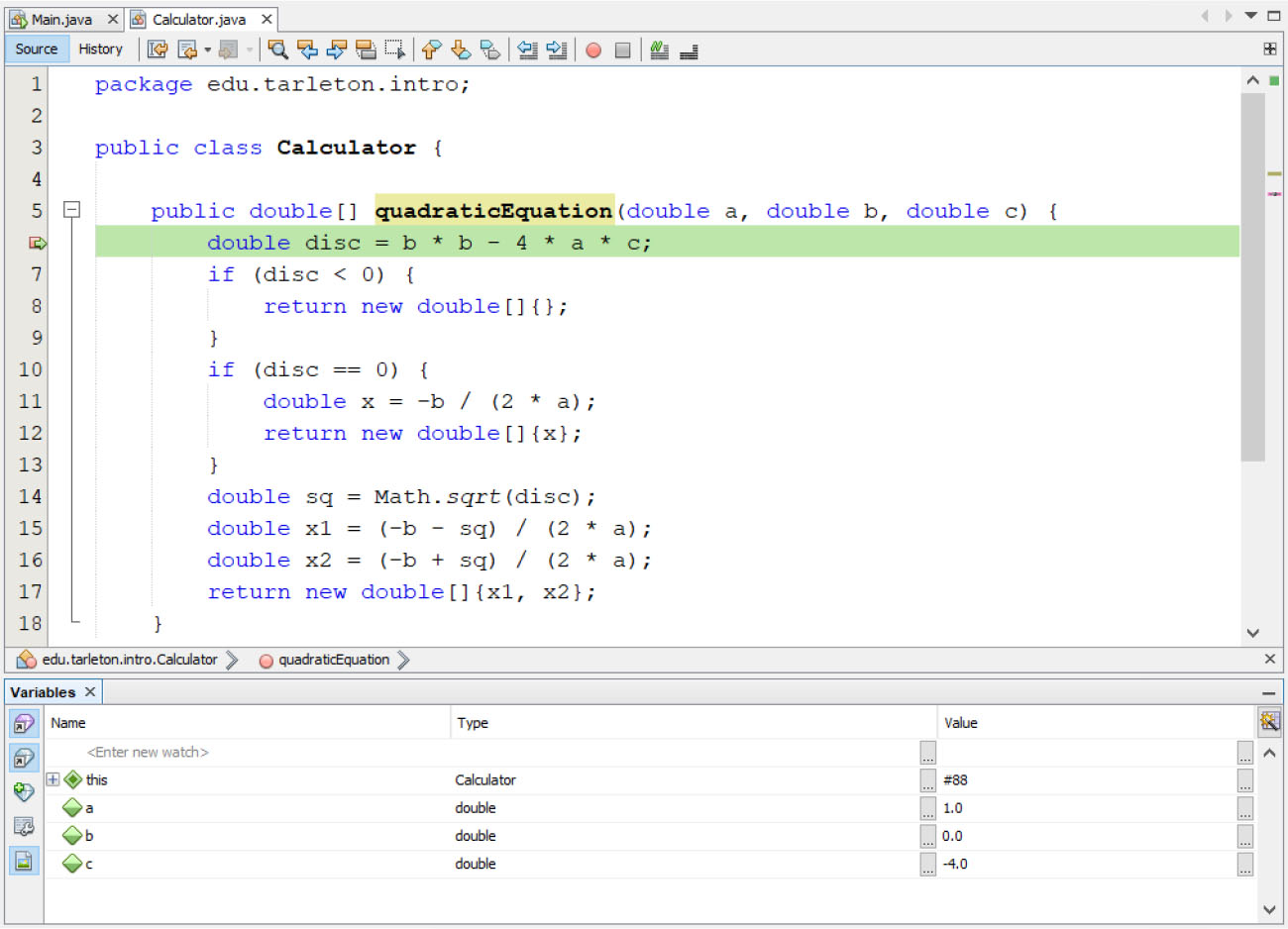
A debugger is a program that assists in detecting and correcting of bugs. It typically helps in finding issues in code by enabling features such as the ability to halt a program while it’s running so that variable values can be displayed and even changed. Debuggers can also run a program line by line to see what each line of code is doing. More advanced features involve halting a program on a specified condition and checking for deadlock and memory leaks. Figure 9.21 shows the NetBeans debugger stopped on line 6 of a program. In the lower part of the screen, the software developer can see the values of the variables currently used by the program.
英語のヒント
デバッガーは、バグの発見と修正を支援するプログラムである。一般に、実行中のプログラムを停止させて変数の値を表示したり、さらには変更したりできる機能などによって、コードの問題を見つけやすくする。プログラムを1行ずつ実行し、それぞれのコード行が何をしているかを確認することもできる。より高度な機能には、指定の条件でプログラムを停止させることや、デッドロックとメモリリークを調べることがある。図9.21は、プログラムの6行目で停止しているNetBeansのデバッガーを示す。画面の下部では、ソフトウェア開発者が、プログラムで現在使われている変数の値を確認できる。
rendered in NetBeans by Sun Microsystems; attribution: Copyright Rice University, OpenStax, under CC BY 4.0 license · CC BY 4.0 · Source出典
Figure 9.21 In this debugger tool from NetBeans, the program stopped at line 6, creating an opportunity for the developer to choose what to do next. The lower window displays the values of variables currently used by the program. (rendered in NetBeans by Sun Microsystems; attribution: Copyright Rice University, OpenStax, under CC BY 4.0 license)
図9.21 NetBeansのこのデバッガーツールでは、プログラムが6行目で停止し、開発者が次に行うことを選べるようになっている。下のウィンドウには、プログラムが現在使っている変数の値が表示される。(Sun MicrosystemsのNetBeansで描画。帰属:Rice University、OpenStax著作権、CC BY 4.0ライセンス。)
Profilerプロファイラー
A profiler is a program that performs dynamic program analysis that can be used to optimize or otherwise streamline code. It collects data such as frequency and duration of method calls and presents it to the software developer who can use it to propose code optimizations. The process of data gathering is called profiling, and it is typically performed when the performance of the software system does not meet specified criteria.
英語のヒント
プロファイラーは、コードの最適化やその他の効率化に利用できる、動的なプログラム解析を行うプログラムである。メソッド呼び出しの頻度や所要時間などのデータを収集し、ソフトウェア開発者に提示する。開発者はそのデータを使って、コードの最適化案を出せる。データ収集のプロセスをプロファイリングといい、通常はソフトウェアシステムの性能が指定した基準を満たさないときに行う。
Integrated Development Environment (IDE)統合開発環境(IDE)
Software engineers typically write source code in an IDE such as IntelliJ, Microsoft Visual Studio, or VS Code. An IDE is a software application that facilitates software development by combining several tools that developers use such as an editor, compiler, debugger, and profiler. Some IDEs only support a specific programming language, such as IDLE for Python, and some support multiple programming languages, such as Microsoft Visual Studio, which supports C++, C#, Visual Basic, and J#.
英語のヒント
ソフトウェアエンジニアは通常、IntelliJ、Microsoft Visual Studio、VS CodeなどのIDEでソースコードを書く。IDEは、エディター、コンパイラー、デバッガー、プロファイラーなど、開発者が使う複数のツールを一つにまとめ、ソフトウェア開発を容易にするアプリケーションである。Python用のIDLEのように特定のプログラミング言語だけを支援するIDEもあれば、複数の言語を支援するものもある。後者の例であるMicrosoft Visual Studioは、C++、C#、Visual Basic、J#を支援する。
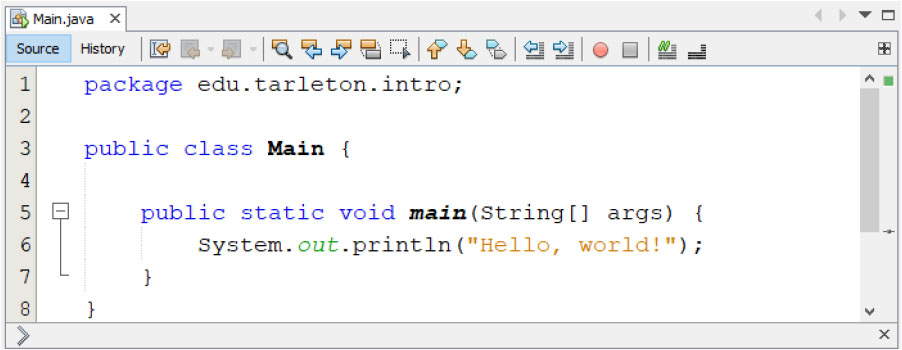
The best IDEs provide features that facilitate writing and maintaining source code. These features can span from simple features such as syntax highlighting to sophisticated ones such as static analysis of source code. Syntax highlighting displays different parts of the source code in different colors, which facilitates reading. Figure 9.22 shows an IDE highlighting Java code.
英語のヒント
優れたIDEは、ソースコードの作成と保守を容易にする機能を備えている。機能の範囲は、構文の強調表示のように簡単なものから、ソースコードの静的解析のように高度なものまで及ぶ。構文の強調表示は、ソースコードの異なる部分を異なる色で表示し、読み取りやすくする。図9.22は、Javaコードを強調表示するIDEを示す。
rendered in NetBeans by Sun Microsystems; attribution: Copyright Rice University, OpenStax, under CC BY 4.0 license · CC BY 4.0 · Source出典
Figure 9.22 Syntax highlighting is a feature of IDEs that helps developers read code. Here, Java source code is being highlighted by the NetBeans IDE. (rendered in NetBeans by Sun Microsystems; attribution: Copyright Rice University, OpenStax, under CC BY 4.0 license)
図9.22 構文の強調表示は、開発者がコードを読むのを助けるIDEの機能である。ここでは、NetBeans IDEがJavaのソースコードを強調表示している。(Sun MicrosystemsのNetBeansで描画。帰属:Rice University、OpenStax著作権、CC BY 4.0ライセンス。)
The cost of IDEs can range from free to thousands of dollars. IDEs such as Eclipse, NetBeans, and Microsoft Visual Studio Code are free. Microsoft Visual Studio and IntelliJ IDEA have a fee associated, although there are free editions of each available. Generally, the cost of an IDE is offset by the increase in productivity that a developer gains from its use.
英語のヒント
IDEの価格は無料から数千ドルまでさまざまである。Eclipse、NetBeans、Microsoft Visual Studio Codeなどは無料である。Microsoft Visual StudioとIntelliJ IDEAには料金がかかるが、どちらにも利用可能な無料版がある。一般に、IDEの費用は、開発者が使用によって得られる生産性の向上で相殺される。