第4章アルゴリズムの言語による実現:低水準プログラミング言語
CONCEPTS IN PRACTICE概念を実践する
APIs in CCのAPI
The C language makes it possible to create a modular API (Application Programming Interface) as a library with publicly visible function prototypes but secret function definitions. This is accomplished by distributing the
.h files with function declarations freely, while keeping the .c files secret and instead distributing only .a or .so compiled object code. A .h file is used in C, C++, where the libraries can be used in the current program instead of writing the code completely.英語のヒント
C言語では、公開された関数プロトタイプと、非公開の関数定義を持つライブラリーとして、モジュール化されたAPI(アプリケーションプログラミングインターフェース)を作れる。そのためには、関数宣言を含む.hファイルを自由に配布し、.cファイルは非公開にして、代わりにコンパイル済みオブジェクトコードの.aまたは.soだけを配布する。.hファイルはCやC++で使われ、コードをすべて自分で書かなくても、現在のプログラムでライブラリーを利用できる。
An example is
math.h. This strategy is used in many industries, such as video games. DirectX is an API created by Microsoft for the platforms that are used on Windows PCs and Xbox. Microsoft provides a C library with many function calls for game-related operations such as drawing graphics, playing sounds, and reading inputs from the keyboard, mouse, or joystick. A game programmer writes their game as a C program that calls those functions. This arrangement is a good compromise—the convenience of the DirectX API makes game programmers’ work easier, and entices them to create games for Windows and Xbox. But keeping the .c files proprietary means that Microsoft does not have to give away the hard work that went into creating DirectX, Windows, or Xbox.英語のヒント
例としてmath.hがある。この方法は、ビデオゲームなど多くの産業で使われる。DirectXは、Windows PCやXboxで使うプラットフォーム向けにMicrosoftが作ったAPIである。Microsoftは、グラフィックスの描画、音の再生、キーボード・マウス・ジョイスティックからの入力読取りといった、ゲーム関連の操作を行う関数呼出しを多数備えたCライブラリーを提供する。ゲームのプログラマーは、それらの関数を呼び出すCプログラムとしてゲームを書く。この仕組みは、よい折合いをつけている。DirectX APIの便利さによってゲームのプログラマーの作業が容易になり、WindowsやXbox向けのゲームを作るよう促される。一方、.cファイルを専有したままにすれば、MicrosoftはDirectX、Windows、Xboxの制作に費やした労力を、無償で他者へ渡さずに済む。
The same arrangement works on other platforms, too. OpenGL is a cross-platform API that works on almost every modern platform, and Sony PlayStation has a similar API. Both of these are distributed as C libraries with public .h files and proprietary implementations.
英語のヒント
同じ仕組みは、ほかのプラットフォームでも使える。OpenGLは、現代のほぼすべてのプラットフォームで動く、複数プラットフォーム対応のAPIであり、Sony PlayStationにも同様のAPIがある。どちらも、公開された.hファイルと専有の実装を持つCライブラリーとして配布される。
Loading Executable Object Files実行可能オブジェクトファイルのロード
An object file is a file that is a combination of metadata from the source or object code along with a combination of bytecode
オブジェクトファイルは、ソースまたはオブジェクトコードに由来するメタデータと、バイトコードの組合せを合わせたファイルである。
Dynamic Load-Time Linking
ロード時の動的リンク
Static libraries have the following disadvantages: duplication in the stored executables (every function needs
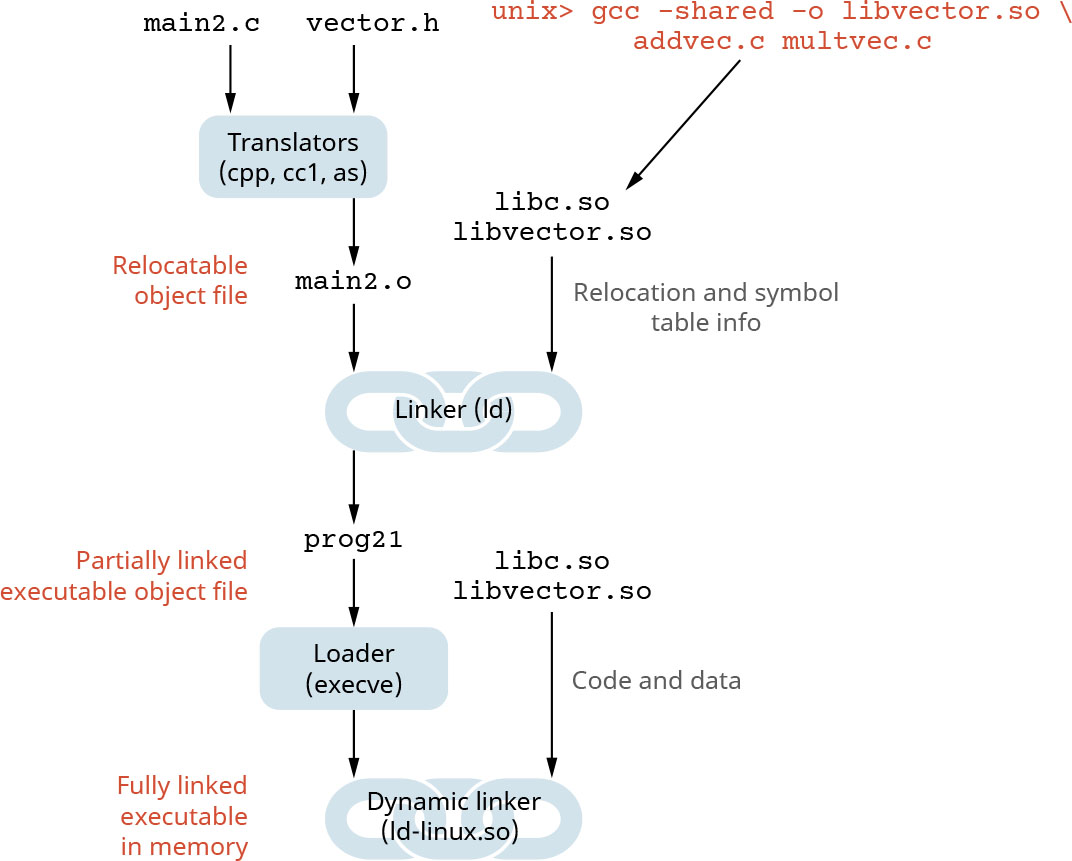
libc), duplication in the running executables, and minor bug fixes of system libraries require each application to explicitly relink. A modern solution to this problem is to use shared libraries (also called dynamic link libraries, DLLs, or .so files). A shared library is a library file that can be shared by multiple programs at the same time (Figure 4.28).英語のヒント
静的ライブラリーには、保存された実行可能ファイルでの重複(すべての関数がlibcを必要とする)、実行中の実行可能ファイルでの重複、そしてシステムライブラリーの小さなバグ修正でも各アプリケーションを明示的に再リンクする必要がある、という欠点がある。この問題に対する現代的な解決策は、共有ライブラリー(ダイナミックリンクライブラリー、DLL、.soファイルとも呼ぶ)を使うことである。共有ライブラリーは、複数のプログラムが同時に共有できるライブラリーファイルである(図4.28)。
attribution: Copyright Rice University, OpenStax, under CC BY 4.0 license · CC BY 4.0 · Source出典
Figure 4.28 A shared library can be used by multiple programs simultaneously. (attribution: Copyright Rice University, OpenStax, under CC BY 4.0 license)
図4.28 共有ライブラリーは、複数のプログラムが同時に利用できる。(出典表記:著作権者 Rice University、OpenStax、CC BY 4.0ライセンス)
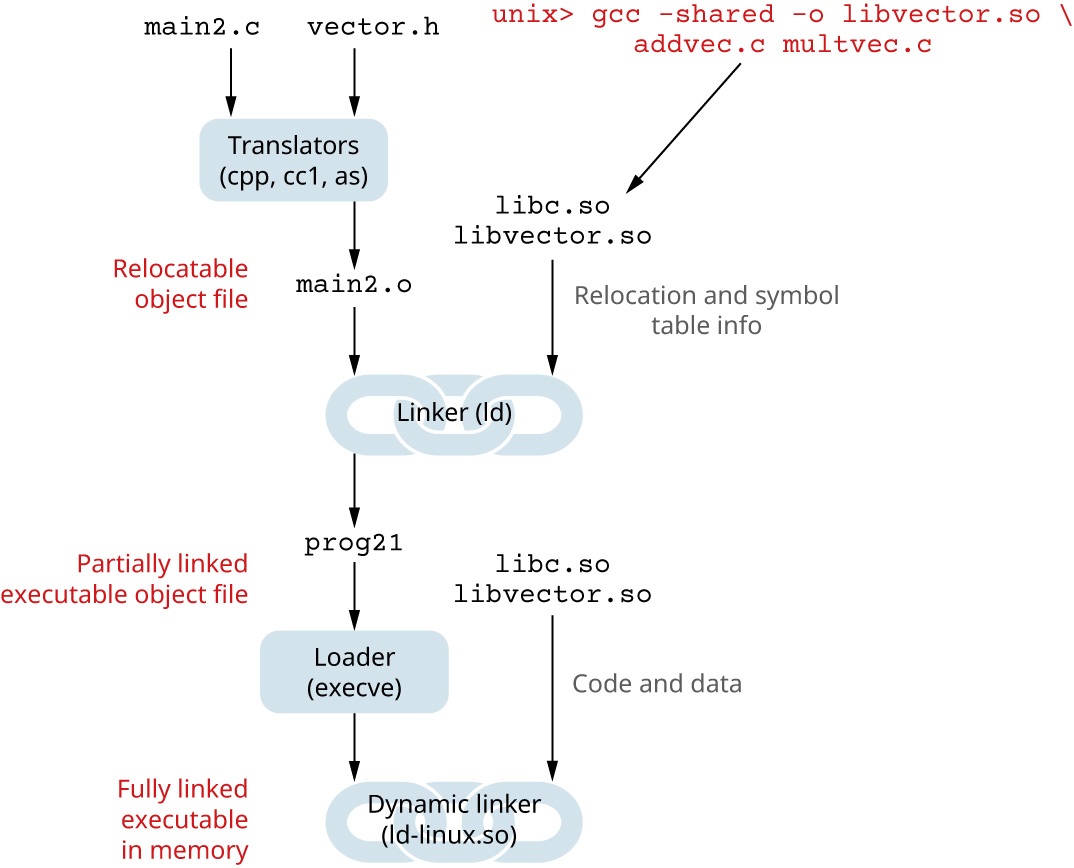
When using shared libraries, object files that contain code and data may be loaded and linked into an application dynamically at load time, as illustrated in Figure 4.29. This load time linking occurs when dynamic linking happens at the same time that a program executable is first run. This is a common case for Linux, which is handled automatically by the dynamic linker (
ld-linux.so). The standard C library (libc.so) is usually dynamically linked. The ldd tool may be used to identify dependencies/libraries needed at load time. In static linking the routines code becomes a part of the executable. In dynamic linking, the routines can be updated during the code execution. To dynamically link a library at load time on Linux, place it in the /lib/ x86_64-linux-gnu/ directory and compile the source files with the -l flag (e.g., gcc main.c -lcso).英語のヒント
共有ライブラリーを使うと、図4.29に示すように、コードとデータを含むオブジェクトファイルを、ロード時に動的にアプリケーションへ読み込み、リンクできる。ロード時リンクは、実行可能なプログラムを初めて実行するのと同時に、動的リンクが起こる場合である。これはLinuxで一般的であり、動的リンカー(ld-linux.so)が自動的に処理する。Cの標準ライブラリー(libc.so)は通常、動的にリンクされる。lddツールを使えば、ロード時に必要な依存関係やライブラリーを調べられる。静的リンクでは、ルーチンのコードが実行可能ファイルの一部になる。動的リンクでは、コードの実行中にルーチンを更新できる。Linuxでロード時にライブラリーを動的リンクするには、/lib/ x86_64-linux-gnu/ディレクトリーに置き、-lフラグを付けてソースファイルをコンパイルする(例:gcc main.c -lcso)。
attribution: Copyright Rice University, OpenStax, under CC BY 4.0 license · CC BY 4.0 · Source出典
Figure 4.29 The diagram illustrates how object files may be loaded and linked into an application dynamically, at load-time; in that case, dynamic linking can occur when the program executable is first loaded and run (i.e., load-time linking), which is a common case for Linux that is handled automatically by the dynamic linker (
ld-linux.so). (attribution: Copyright Rice University, OpenStax, under CC BY 4.0 license)図4.29 オブジェクトファイルを、ロード時に動的にアプリケーションへ読み込んでリンクする方法を示す。この場合、プログラムの実行可能ファイルを初めてロードして実行するときに、動的リンクが起こることがある。つまりロード時リンクである。これはLinuxでは一般的で、動的リンカー(ld-linux.so)が自動的に処理する。(出典表記:著作権者 Rice University、OpenStax、CC BY 4.0ライセンス)
Dynamic Runtime Linking
実行時の動的リンク
An alternative to load-time linking is runtime linking, which means that linking occurs after a program has already started running. As illustrated in the sample code, the program source code needs to explicitly call functions to link additional libraries. In Linux, this is done by calls to the
dlopen() interface and compiling the source with the -l flag (e.g., gcc main.c -ldl). This is a better approach to help distribute software, support high-performance Web servers, or perform runtime library interpositioning.英語のヒント
ロード時リンクに代わる方法が、実行時リンクである。これは、プログラムがすでに実行を始めた後にリンクすることを意味する。コード例に示すように、プログラムのソースコードから、追加のライブラリーをリンクする関数を明示的に呼び出す必要がある。Linuxでは、dlopen()インターフェースを呼び出し、-lフラグを付けてソースをコンパイルすることで行う(例:gcc main.c -ldl)。これは、ソフトウェアの配布、高性能Webサーバーへの対応、実行時のライブラリーの割込み・差替えを行うための、よりよい方法である。
#include <stdio.h>
#include <stdlib.h>
#include <dlfcn.h>
int x[2] = {1, 2};
int y[2] = {3, 4};
int z[2];
int main() {
    void *handle;
    void (*addvec)(int *, int *, int *, int);
    char *error;
    /* Dynamically load the shared library that contains addvec() */
    handle = dlopen("./libvector.so", RTLD_LAZY);
    if (!handle) {
      fprintf(stderr, "%s\n", dlerror());
      exit(1);
    }
    ...
    /* Get a pointer to the addvec() function we just loaded */
    addvec = dlsym(handle, "addvec");
    if ((error = dlerror()) != NULL) {
      fprintf(stderr, "%s\n", error);
      exit(1);
    }
    /* Now we can call addvec() just like any other function */
    addvec(x, y, z, 2);
    printf("z = [%d %d]\n", z[0], z[1]);
    /* Unload the shared library */
    if (dlclose(handle) < 0) {
      fprintf(stderr, "%s\n", dlerror());
      exit(1);
    }
    return 0;
}