第4章アルゴリズムの言語による実現:低水準プログラミング言語
LINK TO LEARNING学習リンク
The C standard library has dozens of header files and hundreds of functions. It is impractical to memorize all this information. Programmers do not memorize the prototypes (i.e., name and parameters) of library functions. Instead, they refer to reference documents, and develop the skill of finding information in these documents quickly. These C library reference documents (https://openstax.org/r/76CLibraryDocs) are available in many places.
英語のヒント
Cの標準ライブラリーには、数十個のヘッダーファイルと数百個の関数がある。この情報をすべて暗記するのは現実的でない。プログラマーはライブラリー関数のプロトタイプ、つまり名前とパラメーターを暗記しない。代わりにリファレンス文書を参照し、その中から情報を素早く見つける技能を磨く。このようなCライブラリーのリファレンス文書(https://openstax.org/r/76CLibraryDocs)は、多くの場所で利用できる。
Developing C ProgramsCプログラムの開発
A programmer spends significant time working in their development environment; indeed, a professional developer might spend most of their workday using it. It pays to invest some up-front time and attention toward learning your environment and customizing it to your needs so that your ongoing experience will be frictionless and ergonomic. Chefs, mechanics, and other tradespeople focus much attention on cultivating safe and productive workspaces, and in the same way, experienced programmers attend to their development environment.
英語のヒント
プログラマーは、開発環境で作業する時間が長い。実際、職業として開発を行う人は、1日の勤務時間の大部分をそこで過ごすこともある。最初にある程度の時間と注意を注いで、環境を使いこなし、自分の必要に合わせて調整しておくことには価値がある。その後の作業を、滞りなく、身体にも使いやすいものにできるからである。料理人、整備士、その他の職人は、安全で生産的な作業場を整えることに十分な注意を払う。同じように、経験豊富なプログラマーは開発環境に気を配る。
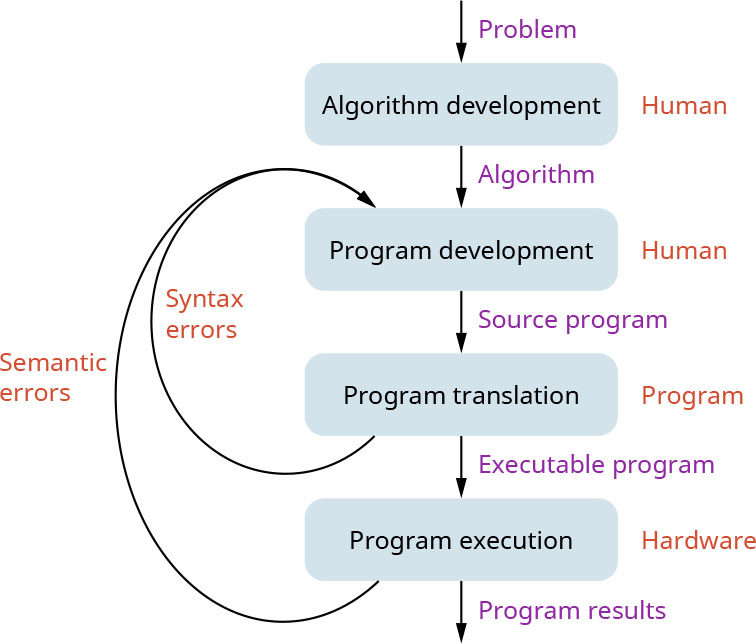
Programmers working with compiled languages, including C, generally work using the cycle shown in Figure 4.17.
Cを含め、コンパイル型言語を使うプログラマーは、一般に図4.17のサイクルに従って作業する。
attribution: Copyright Rice University, OpenStax, under CC BY 4.0 license · CC BY 4.0 · Source出典
Figure 4.17 A typical work cycle includes multiple compilation steps after a program has been written and is ready for compilation. (attribution: Copyright Rice University, OpenStax, under CC BY 4.0 license)
図4.17 一般的な作業サイクルでは、プログラムを書き終えてコンパイルの準備が整った後に、複数のコンパイル手順を行う。(出典表記:著作権者 Rice University、OpenStax、CC BY 4.0ライセンス)
Specifically, these steps are:
具体的な手順は次のとおりである。
1. Algorithm Development: The developer designs a high-level understanding of what the code will do and how it will do it. They may document the algorithm with pseudocode, a block diagram, or a sketch. In the case of extremely simple programs, the algorithm may be trivial enough that the programmer can keep it in their head. In some cases, a programmer is implementing an algorithm that someone else created and described in a reference work or research paper.
英語のヒント
1. アルゴリズムの開発:開発者は、コードが何を行い、どう行うかを、大まかな水準で設計する。アルゴリズムを、擬似コード、ブロック図、略図で記録する場合もある。きわめて単純なプログラムでは、アルゴリズムが簡単なので、プログラマーが頭の中に置いておける場合もある。ほかの人が作り、参考文献や研究論文に記述したアルゴリズムを、プログラマーが実装する場合もある。
2. Program Development: The programmer writes code that implements the steps of the algorithm.
2. プログラムの開発:プログラマーは、アルゴリズムの手順を実装するコードを書く。
3. Program Translation: The programmer runs the compiler on the code. Often, the code has syntax errors, and the compiler provides error messages describing the errors. A syntax error is a violation of the rules for constructing valid statements in the language. For example, the user may have introduced a typo of some sort, like a missing semicolon, or using a keyword as a variable name. In this case, the programmer goes back to Step 2 (Program Development) to resolve the errors one by one.
英語のヒント
3. プログラムの変換:プログラマーは、コードにコンパイラーをかける。多くの場合、コードには構文エラーがあり、コンパイラーはそれを説明するエラーメッセージを出す。構文エラーとは、その言語で有効な文を組み立てる規則への違反である。たとえば、セミコロンを抜かしたり、キーワードを変数名に使ったりする入力ミスがあるかもしれない。この場合、プログラマーは手順2の「プログラムの開発」に戻り、エラーを1つずつ解消する。
4. Program Execution: At this step, the code has no syntax errors, so it successfully compiled into a runnable program. The developer runs the program, and tests that it operates properly. An initial draft of code often has a semantic error, which is when code compiles and runs, but does not behave as it should. When a programmer finds a semantic error, they go back to Step 2 to debug the code and fix the semantic error. Eventually, after thorough testing, which requires a specific approach not described here, no more semantic errors can be found, and the code is considered finished.
英語のヒント
4. プログラムの実行:この段階では、コードに構文エラーがなく、実行可能なプログラムへ無事にコンパイルされている。開発者はプログラムを実行し、正しく動作するか試験する。最初に書いたコードには、しばしば意味上のエラーがある。これは、コードがコンパイルできて実行もできるものの、期待どおりに振る舞わないことである。プログラマーは意味上のエラーを見つけると、手順2に戻ってコードをデバッグし、そのエラーを修正する。やがて徹底的な試験を終え、意味上のエラーがそれ以上見つからなくなると、コードは完成したとみなされる。この試験には、ここでは説明しない特定の進め方が必要である。
Some C compilers include:
Cコンパイラーには、次のようなものがある。
• GCC, an open-source C compiler developed by the GNU Project
• GCC:GNUプロジェクトが開発したオープンソースのCコンパイラー
• Clang, an open-source C compiler developed by the LLVM project
• Clang:LLVMプロジェクトが開発したオープンソースのCコンパイラー
• Visual C++, a C and C++ compiler developed by Microsoft
• Visual C++:Microsoftが開発したCおよびC++コンパイラー
Depending on which operating system you are using, there will be many viable alternative C development environments. An operating system is a complex software program that helps the user control the hardware and help with several other applications. Examples include Windows 10 and 11, and Linux versions such as Ubuntu, Fedora, CentOS. You may choose to use an integrated development environment (IDE), which is a program with a graphical user interface that includes a text editor, compiler, and other tools, all in one application. For example, you can install and use Eclipse for C/C++, an open-source multi-language IDE originally created for Java programming. Eclipse is portable as it is built in Java and can be installed on any operating system.
英語のヒント
使うオペレーティングシステムに応じて、Cの開発環境には多くの実用的な選択肢がある。オペレーティングシステムは、ユーザーがハードウェアを制御するのを助け、ほかのいくつものアプリケーションも支える、複雑なソフトウェアプログラムである。例として、Windows 10と11や、Ubuntu、Fedora、CentOSなどのLinuxの各種版がある。統合開発環境(IDE)を使うこともできる。これはグラフィカルユーザーインターフェースを持ち、テキストエディター、コンパイラー、その他のツールを1つのアプリケーションにまとめたプログラムである。たとえば、Eclipse for C/C++をインストールして使える。EclipseはもともとJavaのプログラミング用に作られた、オープンソースの多言語対応IDEである。Javaで作られていて、どのオペレーティングシステムにもインストールできるため、移植性がある。
Compiling and Running C ProgramsCプログラムのコンパイルと実行
The compilation process involves several steps:
コンパイルの過程には、複数の段階がある。
• compiler: high-level language converts to assembly
• コンパイラー:高水準言語をアセンブリ言語へ変換する。
• assembler: assembly converts to machine code
• アセンブラー:アセンブリ言語を機械語コードへ変換する。
• linker: a program that performs linking, a process of collecting and combining various pieces of object code into a single program file that can be loaded into memory and executed
• リンカー:リンク処理を行うプログラム。リンク処理は、さまざまなオブジェクトコードを集めて結合し、メモリへ読み込んで実行できる1つのプログラムファイルにする過程である。
In practice, compilers such as GCC bundle all these steps into one command. Usually, when you run the GCC command, GCC compiles, assembles, and links a program.
英語のヒント
実際には、GCCなどのコンパイラーは、これらの段階をすべて1つのコマンドにまとめている。通常、GCCコマンドを実行すると、GCCはプログラムのコンパイル、アセンブル、リンクを行う。
To write, compile, and run a simple C program:
単純なCプログラムを書き、コンパイルして実行するには、次のようにする。
1. Write text of program (i.e., source code) using a text editor, and save it as a text file (e.g., “my_program.c”)
1. テキストエディターでプログラムのテキスト、つまりソースコードを書き、テキストファイル(たとえば「my_program.c」)として保存する。
2. Run the compiler, assembler, and linker to convert your program from source to an “executable” or “binary.” Compilation is necessary for every program to run and perform the desired operation.
2. コンパイラー、アセンブラー、リンカーを実行して、プログラムをソースから「実行可能ファイル」、または「バイナリー」に変換する。すべてのプログラムが実行され、望む操作を行うには、コンパイルが必要である。
$ gcc –Wall –g –o my_program my_program.cGCC compiler options:
GCCコンパイラーのオプション:
◦
-Wall tells the compiler to generate all “warnings.” These warnings will often identify mistakes.◦ -Wallは、すべての「警告」を生成するようコンパイラーに指示する。これらの警告によって、誤りが見つかることが多い。
◦
-g tells the compiler to generate debugging information.◦ -gは、デバッグ情報を生成するようコンパイラーに指示する。
◦ If you don’t supply a
–o option to set an output filename, it will create an executable called a.out.◦ 出力ファイル名を設定する–oオプションを指定しないと、a.outという名前の実行可能ファイルを作る。
◦ A
.c file is called a “module.” Often programs are composed of multiple .c files and libraries that are linked together during the compilation process.英語のヒント
◦ .cファイルは「モジュール」と呼ばれる。プログラムは、多くの場合、複数の.cファイルとライブラリーから構成され、コンパイルの過程でそれらをリンクする。
3. If the compiler gives errors and warnings, edit the source file, fix it, and recompile. It is a good practice to work on just one error/warning at a time, namely the first one. This is because a syntax error can cause false-alarm errors later in the source code, so warnings/errors after the first one could be false alarms. We recommend that, when you get compile errors or warnings, you edit to fix just the first one, and recompile; do not try to fix warnings/errors after the first one. Consider the following “Hello World” C program1 :
英語のヒント
3. コンパイラーがエラーや警告を出したら、ソースファイルを編集して修正し、再コンパイルする。一度に1つ、つまり最初のエラーまたは警告だけに取り組むのがよい習慣である。構文エラーがソースコードの後の部分で誤警報のエラーを引き起こすことがあるため、最初のものより後の警告やエラーは誤警報かもしれない。コンパイルエラーや警告が出たときは、最初の1つだけを編集して直し、再コンパイルすることを勧める。それ以降の警告やエラーを直そうとしてはいけない。次の「Hello World」のCプログラムを考えよう1。
#include <stdio.h>      /* include printf prototype */
/* The simplest C Program */
int main(int argc, char **argv)      /* main program entry point */ {
    printf("Hello World\n");
    return 0;      /* return without error */
}
To run a program in the current directory (on Linux) use
./program . ("." means the current directory). In the world of operating systems, everything is defined in terms of directories and files. Even the desktop is a directory, which is a collection of files. A directory can sometimes be empty too, and some directories have hidden files for security reasons. A subdirectory is a directory within a directory.英語のヒント
現在のディレクトリーにあるプログラムをLinuxで実行するには、./programを使う(「.」は現在のディレクトリーを表す)。オペレーティングシステムの世界では、すべてをディレクトリーとファイルによって定義する。デスクトップさえも、ファイルの集まりであるディレクトリーである。ディレクトリーは空のこともあり、セキュリティー上の理由で隠しファイルを含むものもある。サブディレクトリーとは、ディレクトリーの中のディレクトリーである。
> ./my_program
Hello World
>
1 **argv means that the program is accepting a multidimensional array of input arguments. It is a pointer to the pointer of array of arguments.
1 **argvは、プログラムが入力引数の多次元配列を受け取ることを意味する。これは、引数配列へのポインターを指すポインターである。